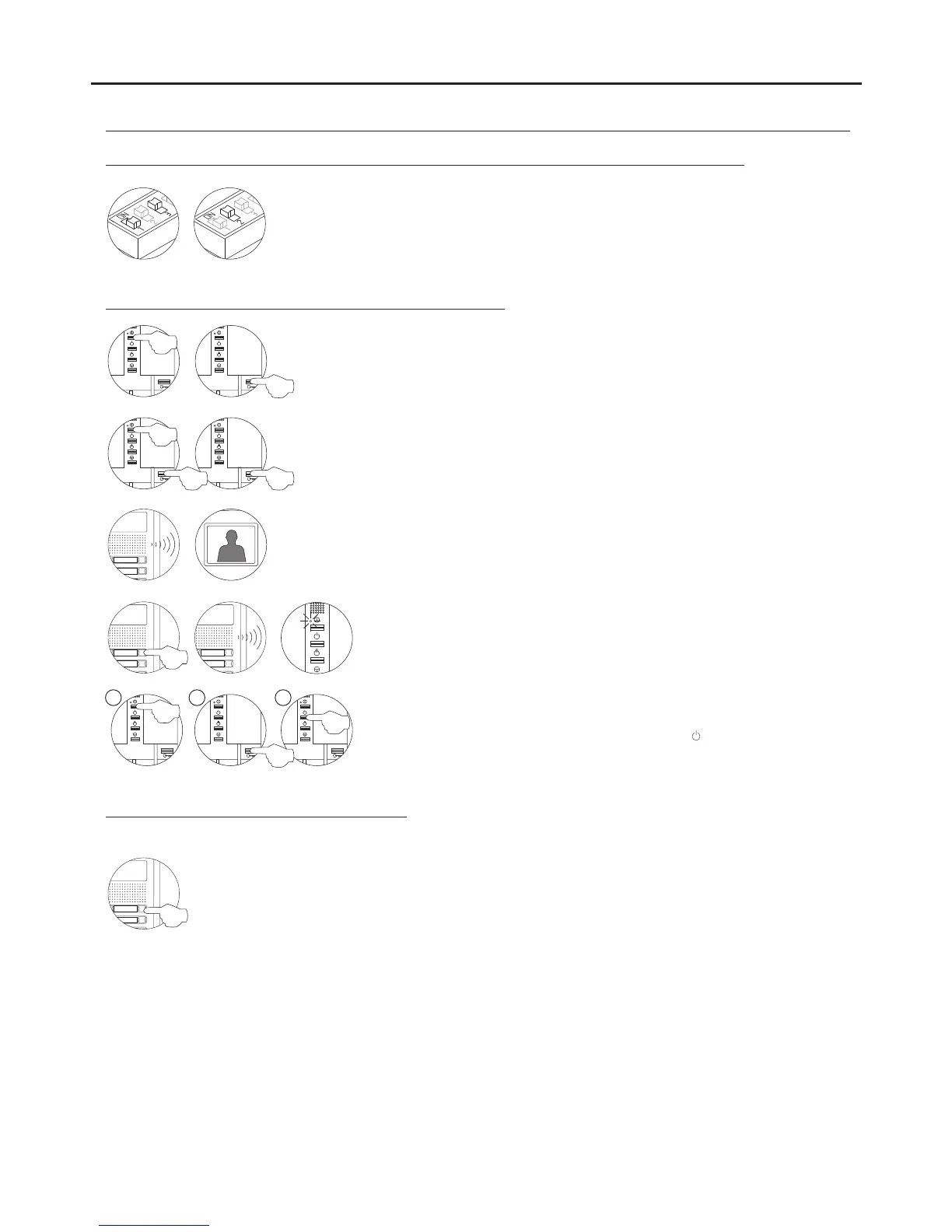
Programming Tekna Plus monitors from a general entrance door panel (SW1-1 ON):
PROGRAMMING THE MONITORS - GENERAL ENTRANCE DOOR PANEL ONLY
Switch off the monitor to be programmed.
Once the telephone is off, press the door release push button.
With the door release push button pressed, switch on the monitor.
To show that the system is ready for programming, the door panel will reproduce a sound
and the picture will appears on the monitor. At this moment, the door release push button
can be released. Lift the handset to establish audio communication with the door panel.
Press the door panel push button that will call this monitor.
At this moment the door panel will reproduce a sound and the monitor led will
blink.
To programme the monitor as the , switch it off and on again.Master
To programme it as a , press the door release button.Slave
To programme it as a , press the buttonSlave with intercom
.
Each apartment must only have one master unit; if there are parallel units, whether monitors or telephones, they must be
configured as slaves.
Make a call to check that the monitor has been successfully programmed. Programme the other
telephones in the same way.
Once the programming has finished, set the programming switch to OFF. If this is not done, the door
panel will emit tones to indicate that the system is still in programming mode.
To programme the monitor from a inner door panel, see p. 49.
M S SI
50
Locate the SW2 DIP switch on the general entrance door panel situated on the top left-hand
side of the back of the sound module. With switch 1 OFF and switch 3 ON, set switch 2 to
ON: the general entrance door panel will emit a tone indicating that it has entered
programming mode.
In systems with more than one door panel, only carry out this procedure on the main door
panel.
AUDIO AND VIDEO DOOR ENTRY SYSTEM - ACCESS CONTROL



 To Next Page