Operating Manual
29
POWER CLAMP
English
Quality Wins.
© 2021/09 Haimer POWER CLAMP
5 Operation
5.1 Switching the devices on
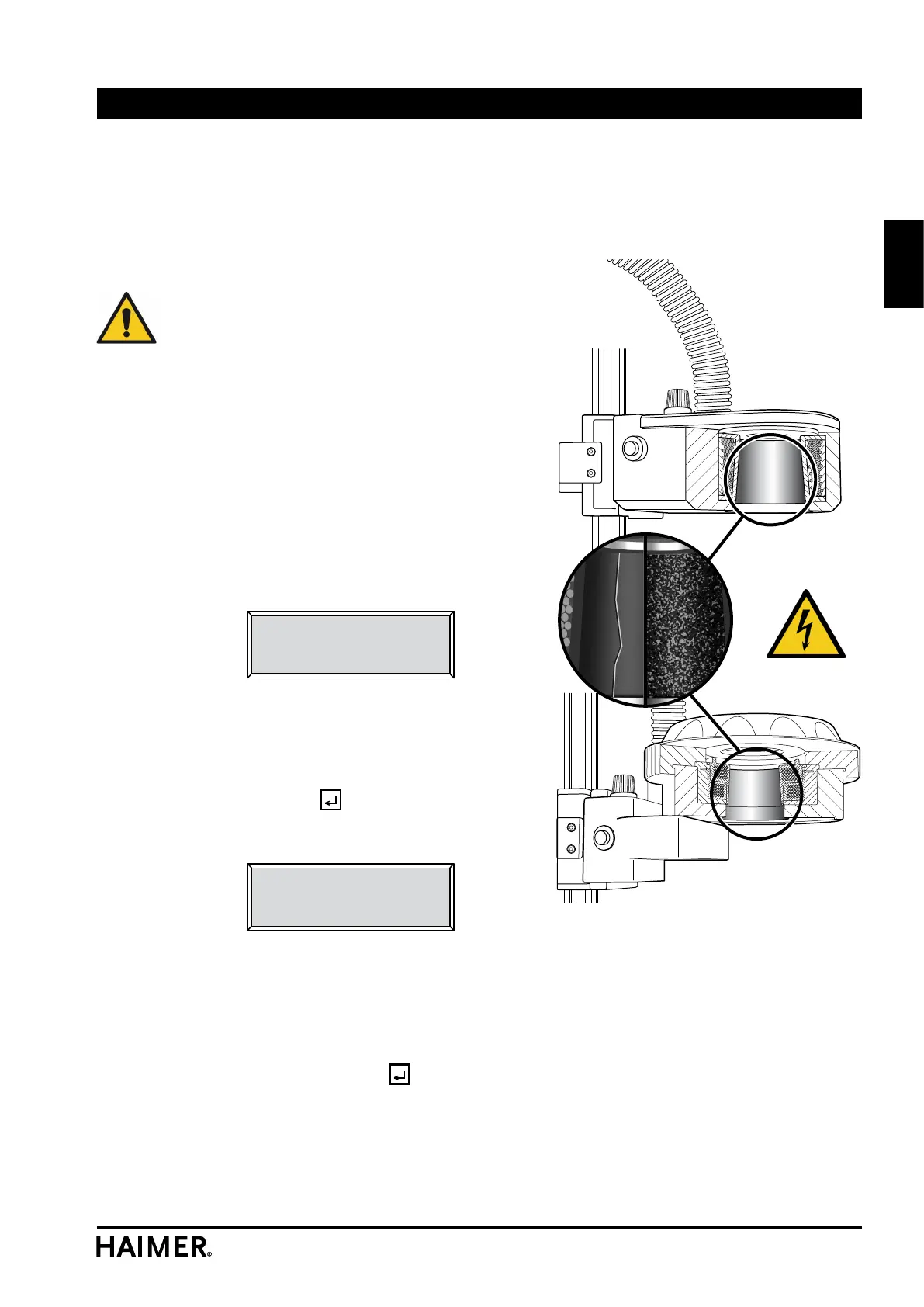
• Before switching on, check that the inner wall of
the inductor has no evident signs of damage (such
as scorched areas or cracks).
Attention! The inductor operates at a high volt-
age. Using the device if the inner wall of the
inductor is damaged carries the risk of electric
shock!
• Check that the mains cable of the SPEED COOLER
has been connected correctly.
• Check that the mains cable of the POWER CLAMP
has been connected correctly.
•
Switch on the POWER CLAMP at the mains switch
(5).
The device now performs a self-diagnosis test. After a
few seconds, the following information is displayed:
Safety check:
Coil damaged inside?
Yes/No: Yes
• If you have not yet checked the inner wall of
the inductor for signs of damage, do so now.
The suggested response is „Yes“. If you acknowledge
this response with the
key, the following message
appears:
Change coil!
Contact the
manufacturer!
This message can be cleared down only when the
device is switched on and off.
• If the inner wall of the inductor is in good condi-
tion, use the + or - key to change the response to
„No“ and confirm with the
key.
The device is now ready to operate.
Operation


 To Next Page