Operating Manual
37
POWER CLAMP
English
Quality Wins.
© 2021/09 Haimer POWER CLAMP
Operation
5.2.8 I-button
The induction process can be started by means of the I-button.
Depending on the setting in the menu, the I-button can function in various ways.
• Setting 0: The I-button functions just like the Start key at the coil.
Heating is applied for as long as the button is pressed and held down,
until the maximum heating time is reached.
• Setting 1 – 100: With this setting the heating is only started when the I-button is pressed
and is switched off automatically after a certain time. The key does
not need to be held down.
The heating time is calculated as a percentage of the maximum heating time.
Example:
Max. heating time: 12 seconds
Setting I-button: 80 (= 80 %)
Actual heating time: 80 % of 12 s = 9.6 s
For example, this function is very helpful with the POWER CLAMP Preset
because the chuck is always heated by the same amount.
The function of the Start key is not affected by this setting.
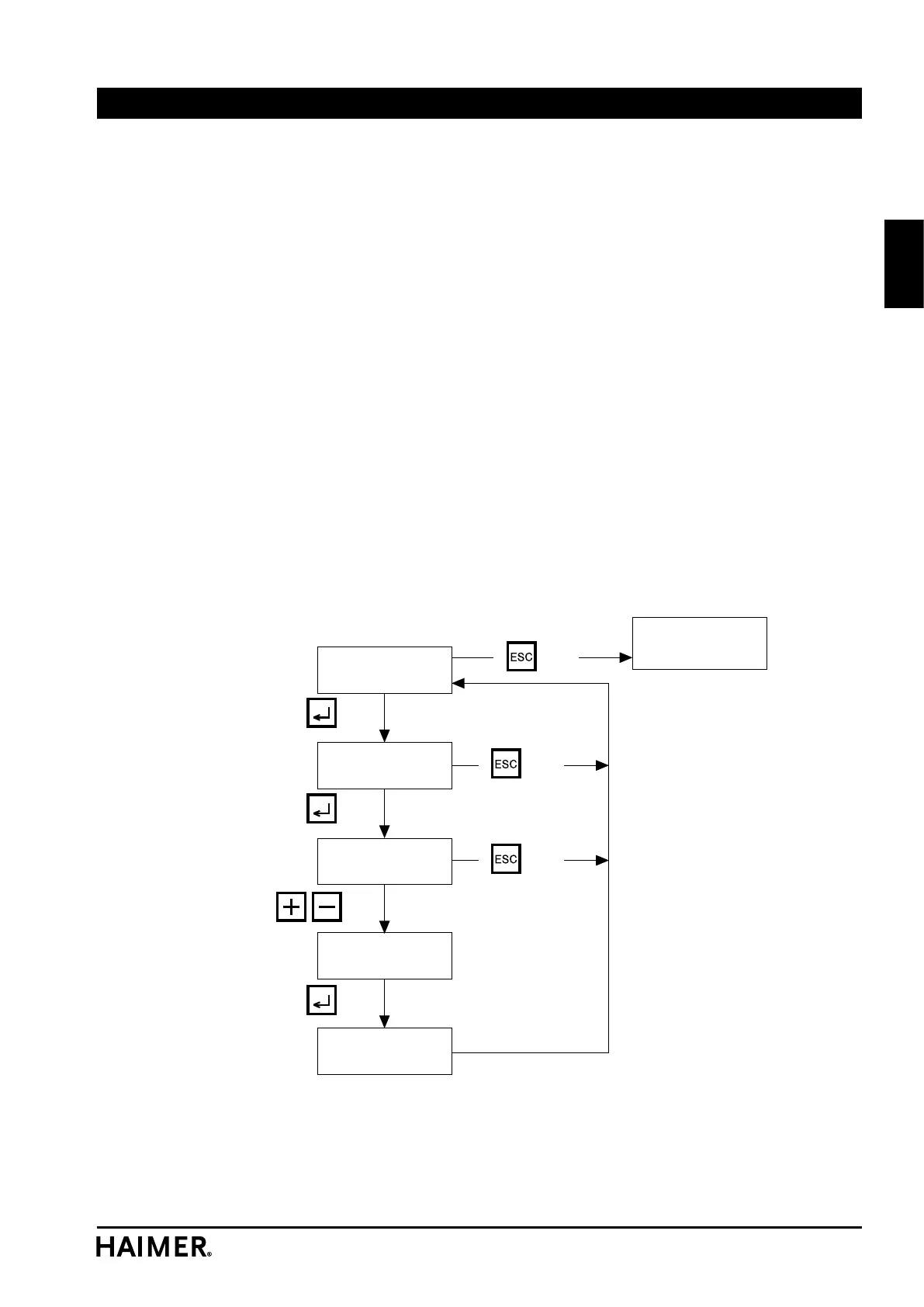
I button
I button
0 - 100 : 0
Back to
Shrink Fit menu
*flashes
I button
0 - 100 : 0 *
Change number
value
Save and
return
key
key
key
key
key
key
key


 To Next Page