4 2 | www.HandiQuilter.com
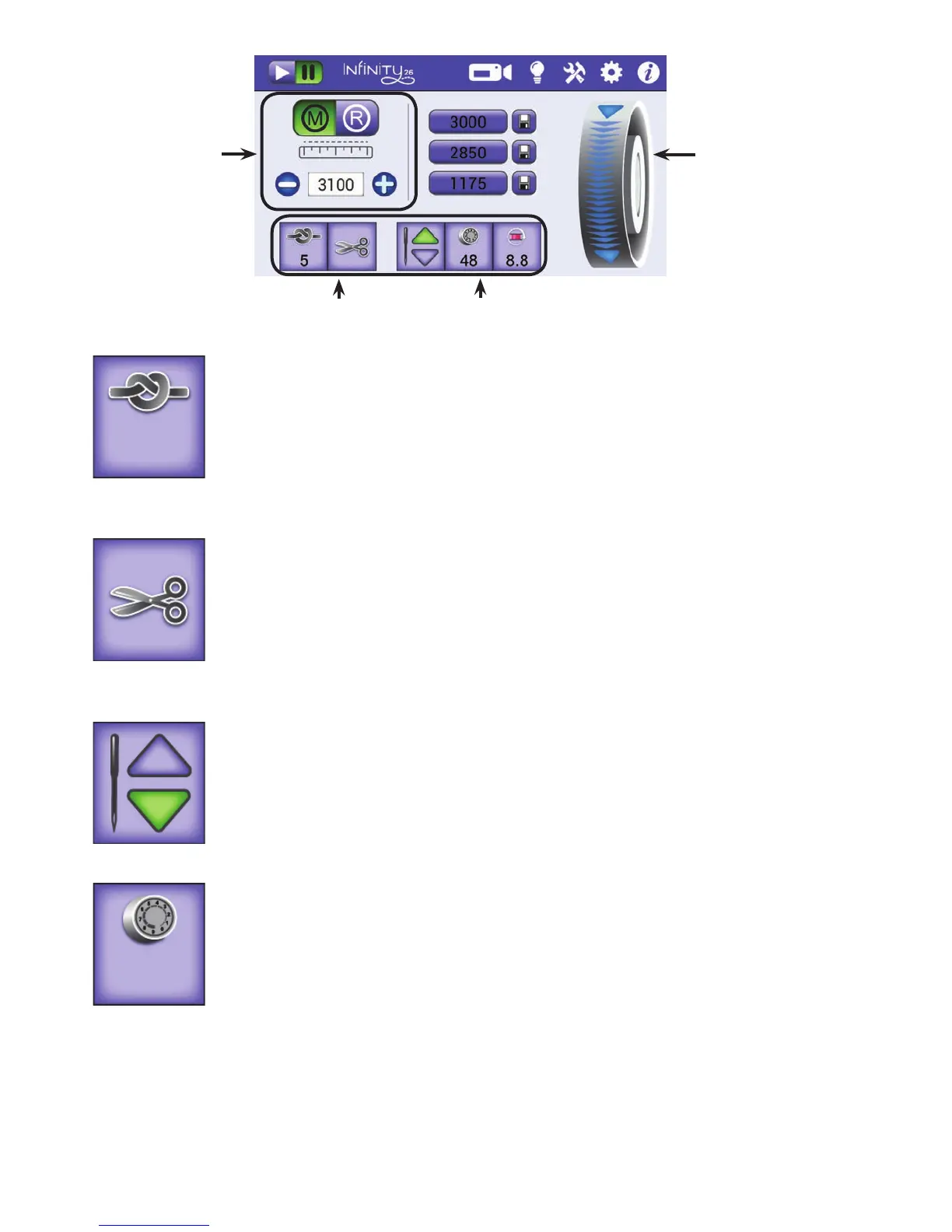
Tie-o buon: Use this buon to perform a eo at the start or nish of your
stching. Touch the buon and gently move the machine to perform the micro
stches. The number below the image indicates how many micro stches will
be performed.
For more informaon about how to congure the number of micro stches in a
eo, see To congure eos i n t h e Toolbar Opons secon of this manual.
Bobbin-thread cuer buon: Touch this buon to perform a bobbin thread cut.
The Innity cuts the thread at the needle opening in the needle plate, leaving
enough bobbin thread for your next pullup.
ONLINE: For informaon about using the Bobbin-thread cut buon,
watch the video Using the Bobbin-Thread Cuer at:
hp://www.handiquilter.com/videos/hq-innity/232/.
Needle-stop buon: Touch the buon to alternate between having the needle
stop in the up or down posion when you stop stching. Your choice displays in
green (as shown at the le).
This buon does not move the needle, but rather indicates your preference for
the nal needle posion when quilng is stopped.
Easy-Touch Tension™ buon: Touch this buon and then use the plus (+)
and minus (–) buons on the screen or on the handlebars to increase or
decrease the upper tension. The number on the buon indicates the current
tension seng.
For more informaon about electronic tension, see Top Thread Tension i n t h e
Machine Sengs secon of this manual.
ONLINE: For informaon about seng the top-thread tension,
watch the video Adjusng the top-thread tension at:
hp://www.handiquilter.com/videos/hq-innity/233/.
This area of the Main
screen controls the
stching modes. It
is currently set to
manual mode and
shows the current
stches per minute
seng and three
stches-per-minute
presets. This area
changes according
to the stching mode
you’ve selected.
The on-screen hand
wheel enables you to
rotate the machine’s
hand wheel from the
Main screen rather
than reaching around
the machine to do
it manually.
These buons remain the same regardless of
the stching mode you choose.
5
4 8











 To Next Page