32 | www.HandiQuilter.com
To adjust the bobbin tension
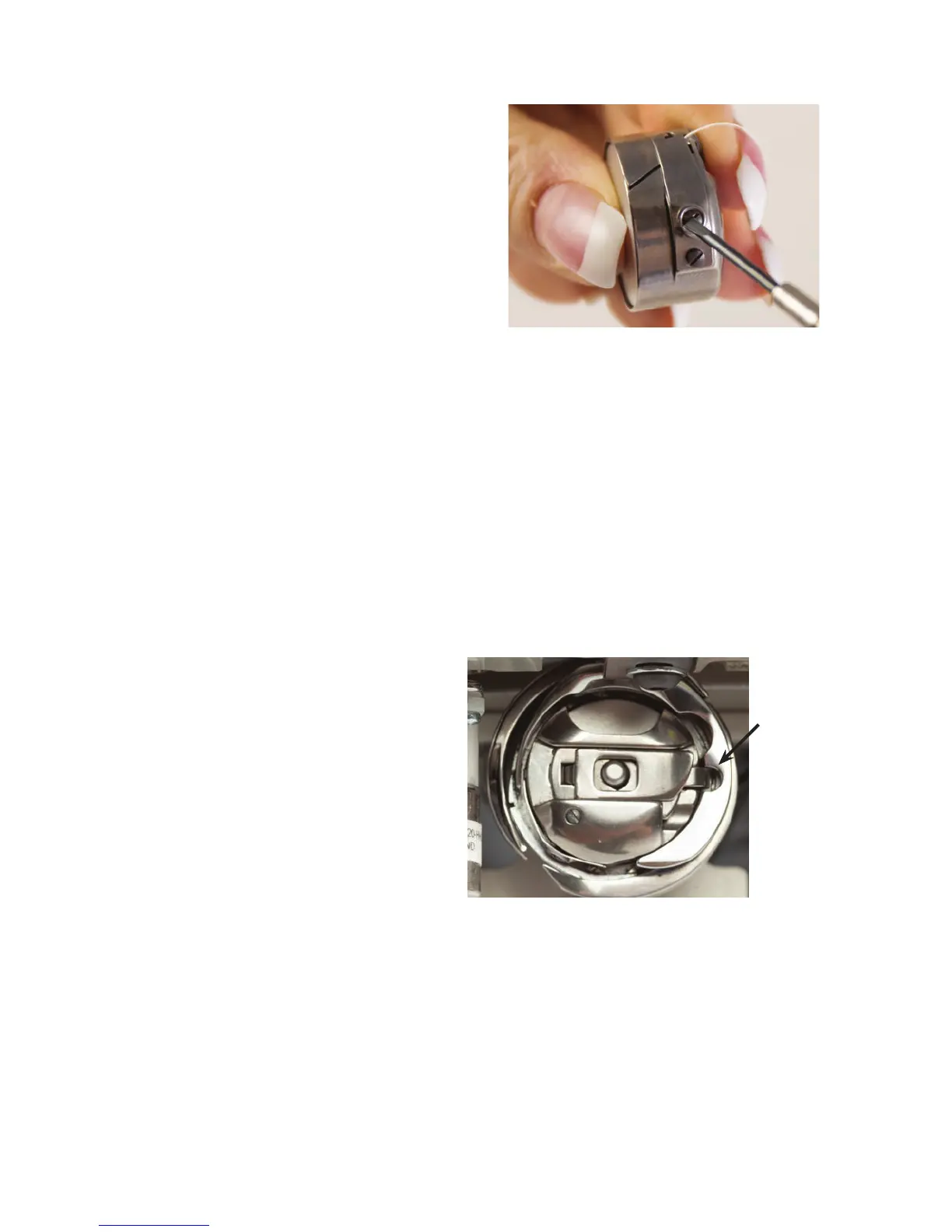
• Make the adjustment using the screw in the
center of the tension spring. Turn clockwise
to ghten and counterclockwise to loosen the
bobbin case tension. Make ny adjustments to
the bobbin tension and test again.
To insert the bobbin case into the machine
ONLINE: For more informaon about inserng the bobbin case into the machine, watch the video
Inserng the Bobbin Case at: hp://www.handiquilter.com/videos/hq-innity/227/.
1 . Move the needle to the up posion. Turn o the front power to the machine.
2 . Place the bobbin in the bobbin case so that the thread pulls o clockwise when viewing the
open side.
3. Slide the thread through the slot and under the tension spring, leaving 5 to 6 inches of thread
h an g i n g l o o s e .
4 . To t the bobbin case onto the hook spindle
in the machine, orient the bobbin case as
shown in the photo with alignment notch to
the right. Push the bobbin case inward unl it
clicks into place.
NOTE: Do not insert the bobbin case into the machine by liing the lever on bobbin case. Use the
lever only for removing the bobbin case.
Easy-Touch Tension™
One of the joys of quilng with the Innity is its ability to handle many dierent types of thread. You can
quilt with almost any high-quality thread as long as you rst adjust the bobbin tension and then adjust the
top tension to suit the thread you’ve chosen.
Alignment
notch











 To Next Page