34 | www.HandiQuilter.com
2 . Adjust the tension by pressing the plus ( +) and minus (–) buons on the
Main screen. The tension value appears on the Electronic Tension Buon
on the Main screen. This value changes as you press the plus (+) and
minus (–) buons.
3. Connue to test the stching on the fabric scrap unl you are happy with the tension. If you want
to save that seng as one of the tension presets, see To customize the top tension presets i n t h e
Machine Sengs secon of this manual.
Tension Quick Start Guide
Bobbin adjustments are minute, like cks of
the clock.
1 . Always adjust bobbin thread tension rst.
2. Stch out to check top tension.
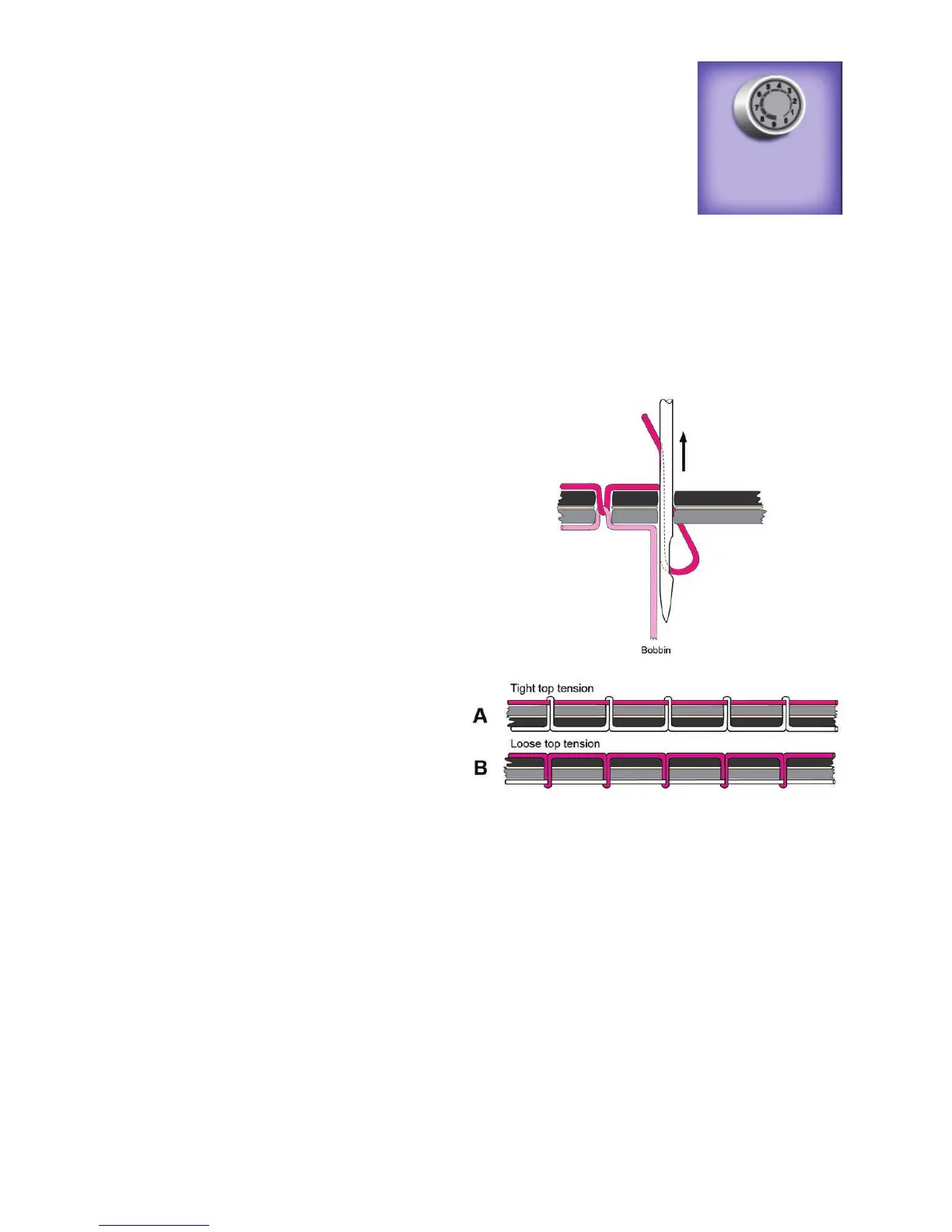
3. If top thread looks like Diagram A
Problem: The top thread is too ght.
Soluon: Press the Easty-Touch Tension
buon on the Main screen and loosen
the top thread tension by pressing the
minus buon.
4. If top thread looks like Diagram B
Problem: The top thread is too loose.
Soluon: Touch the Easy-Touch Tension
buon on the Main screen and ghten
the top thread tension by pressing the
plus buon.
Threading the Machine
Handi Quilter recommends that you select and use only high-quality threads for your quilts.
To thread the machine
ONLINE: For more informaon about threading the machine, watch the video Threading the
Machine at: hp://www.handiquilter.com/dash/videos/video/228/.
5 7











 To Next Page