HQ Innity User Manual | 63
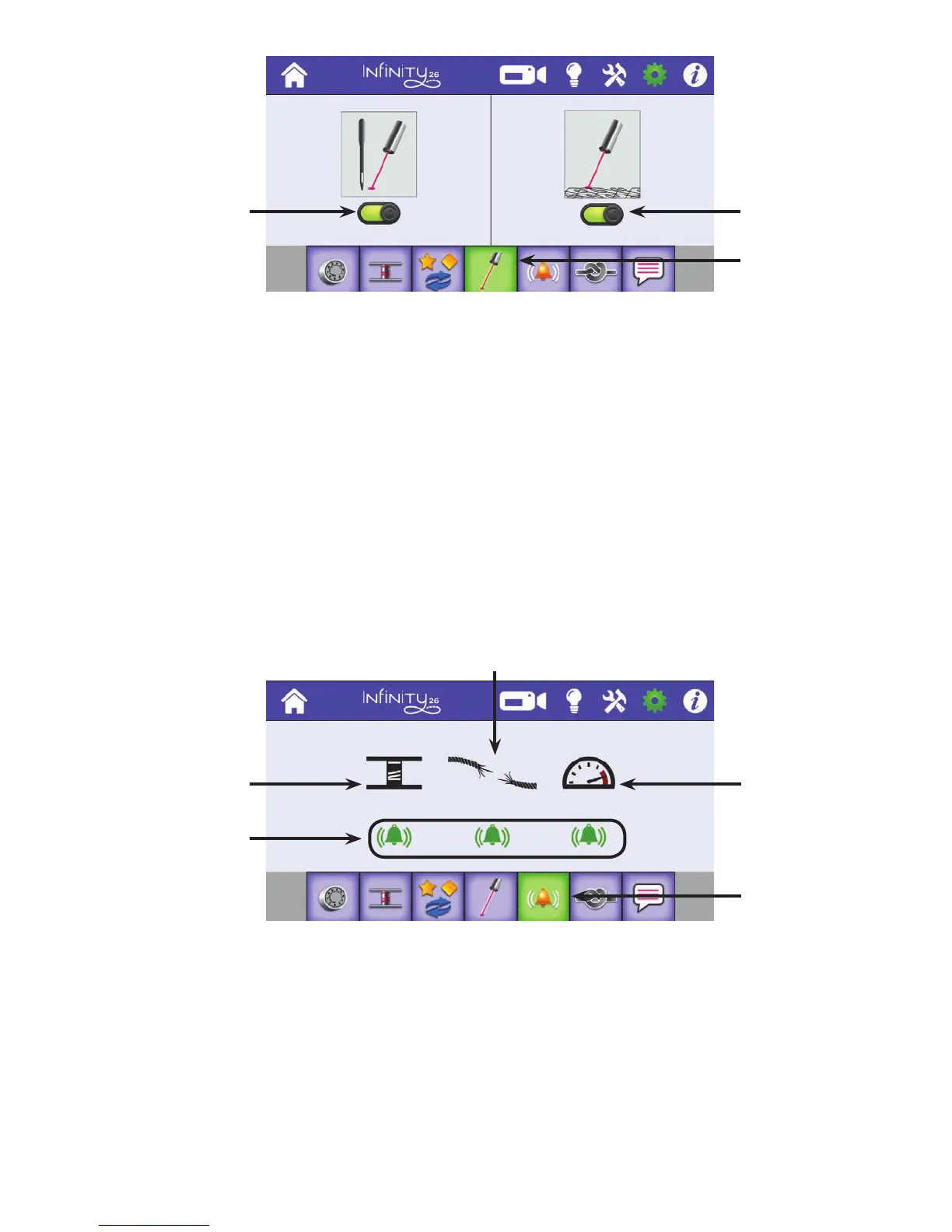
A l ar m s
The alarm sengs enable you to quickly turn on or o the alarms for the low bobbin, thread breaks, and
when you are quilng faster than the stch regulaon can accommodate.
Low-bobbin alarm: Alerts you when the low-bobbin threshold has been reached, indicang you will soon
run out of bobbin thread. For more informaon about the low-bobbin alarm, see Low-Bobbin Alarm above.
Thread-break alarm: Alerts you if the top thread breaks while quilng.
Overspeed alarm: Alerts you if you are moving the machine faster than 100% of motor capacity and
therefore are quilng too fast for stch regulaon to work properly. Because of the high speeds of the
Innity can handle, you will most likely never encounter this alarm.
To turn on or o alarms
• Touch the alarm buon below the alarm to turn it on or o. It is on when it appears green with the
sound-wave symbols. It is o when it appears purple.
Control the needle
laser. Light is
currently on.
Control the laser
stylus. Light is
currently on.
Turn on or o laser
lights.
Low-bobbin alarm
Indicates the
alarm is on. Touch
to turn o.
Overspeed alarm
Congure alarms
Thread-break alarm











 To Next Page