HQ In nity User Manual | 4 9
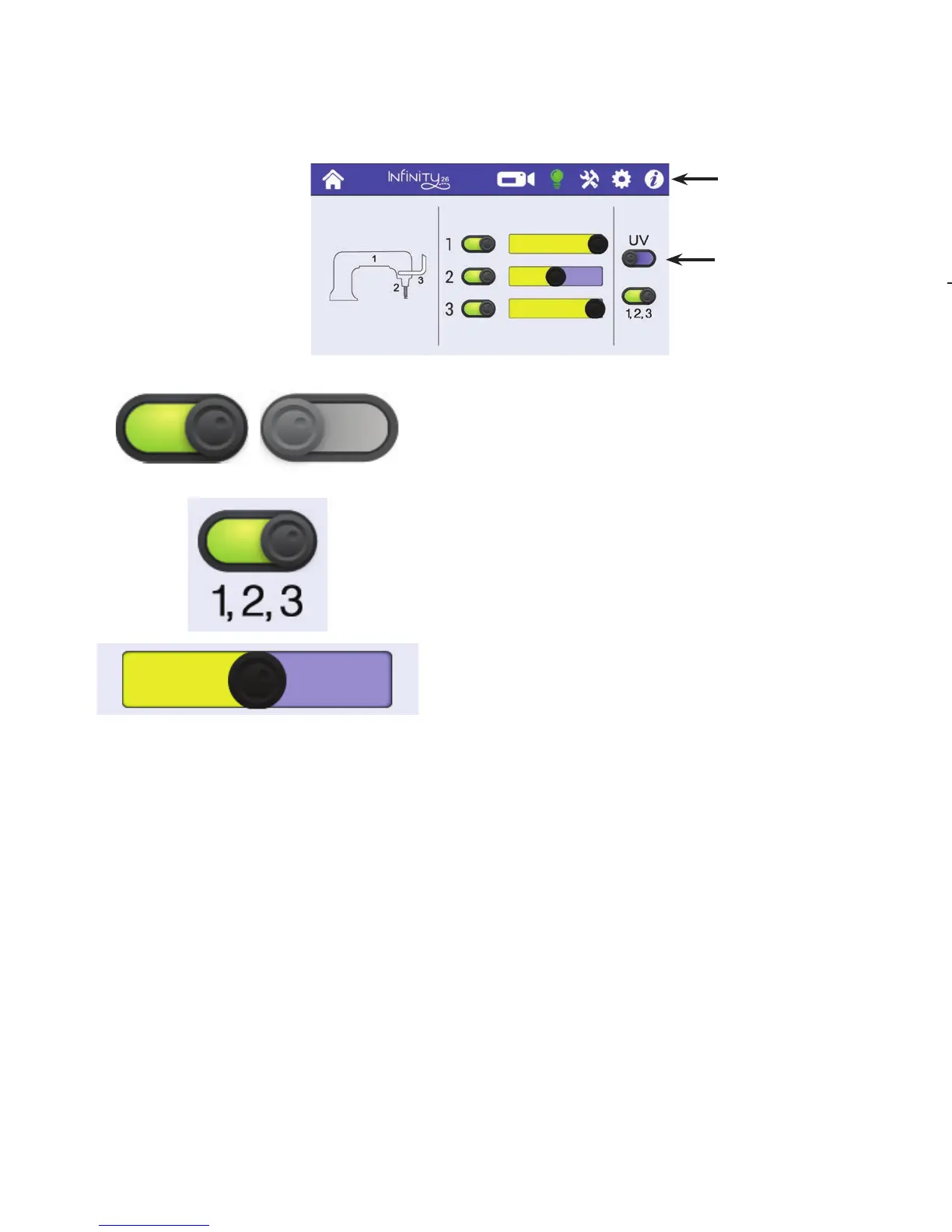
To control the lights on the machine
• To open the Lights screen, touch the Lights icon in the toolbar. A er selec ng the icon, it turns
green and Lights screen opens.
When lights are on, the on/o bu on displays in color.
Touch the on/o bu on to quickly turn o the light.
Touch the All Lights (1,2,3) bu on to turn on all of the lights
at once. If they are already on, touch the bu on to turn o
al l l i g h t s a t o n c e .
Otherwise, use the slider to vary the intensity of the light.
Touch the black dot and drag to the right to increase
the intensity or to the le to decrease the intensity. The
intensity se ngs are saved when lights are turned o and
will be the same when you turn them on again.
To use UV ligh ng
UV ligh ng can be very useful when viewing white thread or white chalk on white fabric. The best contrast
is achieved when viewed in a dark or dimly lit room. Although Handi Quilter has chosen to use UV lights
which emit a light wavelength at the lowest end of the UV spectrum to minimize eye strain and damage,
constant or direct exposure to any UV ligh ng can cause eye strain and may lead to permanent eye
damage. Be careful and avoid looking directly at the UV lights (which emit a violet colored light). The UV
lights should only be used when other ligh ng sources cannot produce the visual contrast necessary to
achieve accurate quil ng.
Touch the UV
light bu on to
turn it on or o .
When you turn
the UV lights on,
all other lights
are turned o .
Light 1 is under
the arm of the
machine. Light 2 is
the light ring that
illuminates the
needle and s tching
area. Light 3 is on
the handlebars and
adds light to the
s tching area.
The Lights
bu on is selected
(green).











 To Next Page