HQ Innity User Manual | 5 1
ONLINE: For more informaon about the quilng mer, quilng alarm, and stch counter, watch
t h e v i d e o Seng and Using the Quilng Alarms and Stch Counter at:
hp://www.handiquilter.com/videos/hq-innity/241/.
• T o u c h t h e Tools icon in the toolbar. Then touch the Timers buon. Press the Home buon to
return to the Main screen.
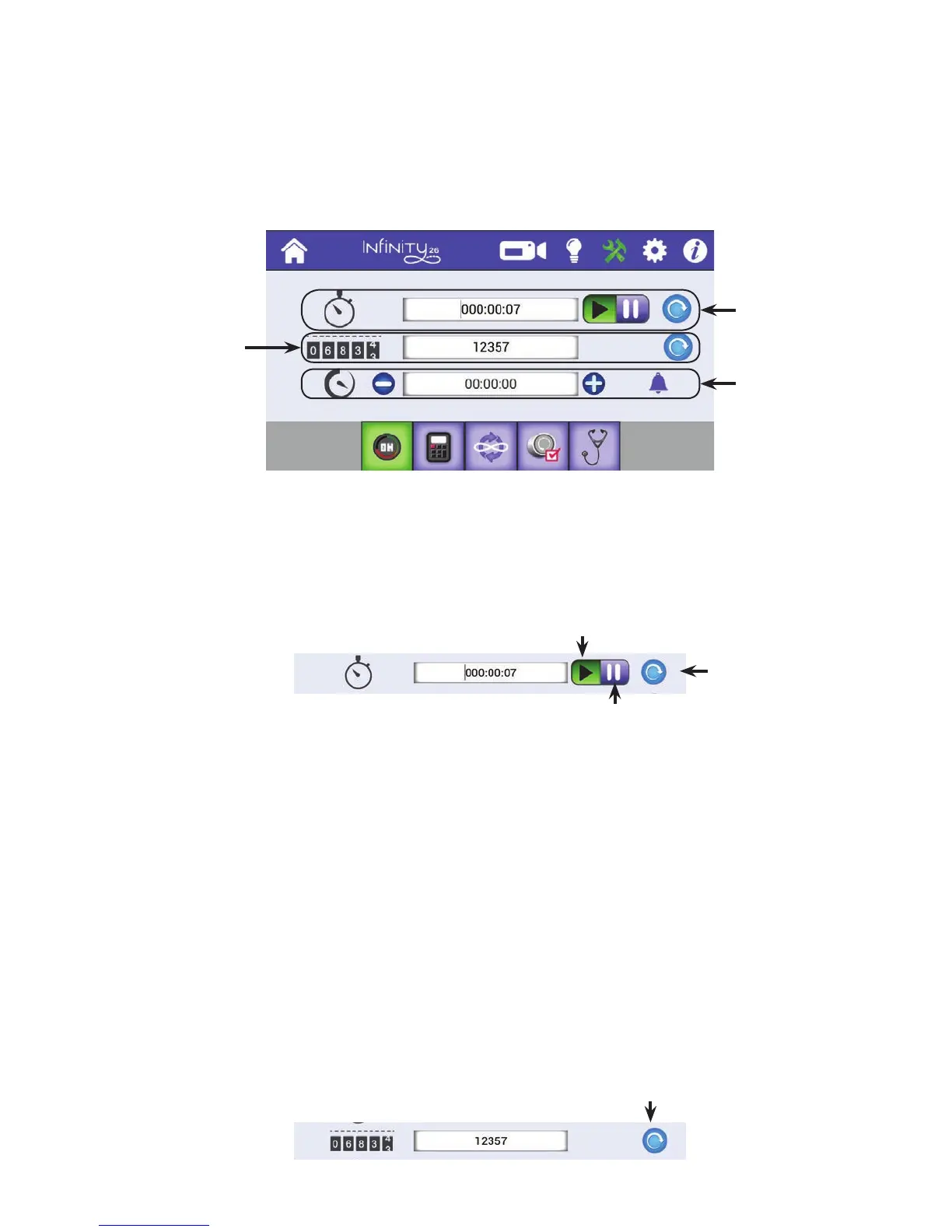
To track how much me you spend on a quilt
Use the quilng mer to keep track of how much me you spend on a quilt. The quilng mer measures
me the machine is actually quilng, not the me the machine is on but idle.
1 . When you begin a new quilt, press Reset.
2 . When you are ready to begin tracking the me spent on a quilt, press Play. Proceed with your quilng.
When you are through quilng for a me, press Pause.
3. When you resume quilng, press Play again. The quilng mer will connue tracking your me and add
it to the previously recorded me.
To track the number of stches in a quilt
Use the stch counter to count the number of stches in a quilt.
• Press the Reset buon to zero-out the counter when you begin a new quilt. To see the lifeme
stch counter for your machine, see the Informaon screen.
Quilt mer tracks
how much me
you spend on a
quilt.
Sets a quilng
alarm.
Stch counter
tracks how many
stches you have
quilted.
Reset buon: Press
to clear the quilng
mer, usually when
you begin a new
quilt.
Play/Resume buon: Press to begin
tracking the me spent on a quilt.
Pause buon: Press to turn o the mer unl
the next me you press Play/Resume.
Reset buon: Press to clear the
quilng stch counter.











 To Next Page