MARK IV HD J2 TAMPER OPERATION PAGE 2.2 - 15
BULLETIN 5082505 JUPITER II REVISED 10 - 2020
2.2
2.2.2 Main Screens
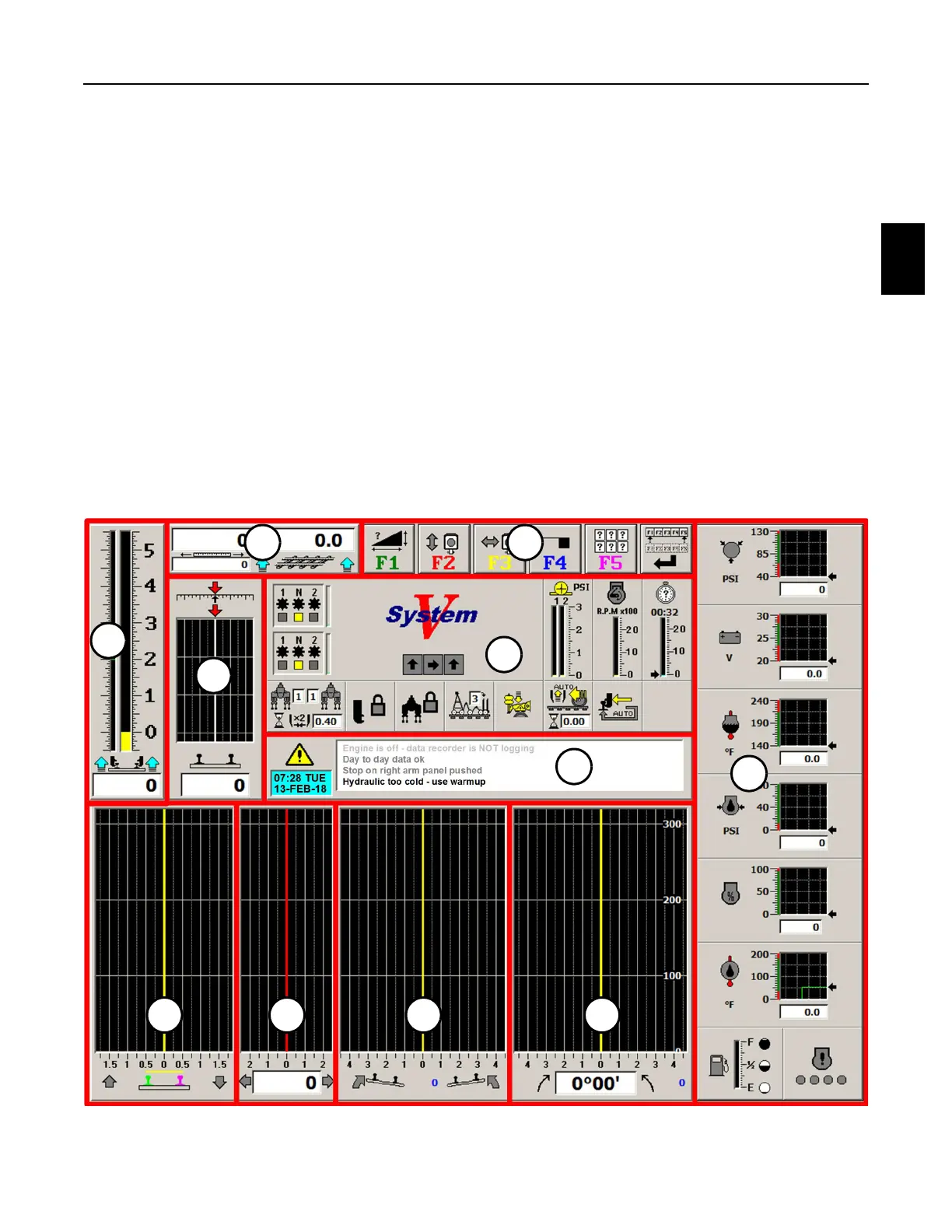
2.2.2.2 Work Screen - See Figure 2.2-6
1. The Work Screen is the screen that is displayed on the monitor when operating in the
Work Mode. The screen displays the following:
(1) Alarm Panel (7) Superelevation / Crosslevel Panel
(2) Engine Status Panel (8) Surface Graph Panel
(3) Machine Status Panel (9) Throws Graph Panel
(4) Tool Bar Buttons Panel (10) Superelevation Graph Panel
(5) Distance Panel (11) Line Graph Panel
(6) Lift Panel
Note: The panels are shown outlined in red on the Work Screen for identification only. The
panels will be described in detail later in this manual.
FIGURE 2.2-6
WORK SCREEN
6
1
3
5 4
2
7
8 9 10 11



 To Next Page