MARK IV HD J2 TAMPER OPERATION PAGE 2.1 - 31
BULLETIN 5082505 CONTROLS REVISED 10 - 2020
2.1
2.1.4 Control Panel - Left - See Figures 2.1-26 and 2.1-27
(14) Switch Plugs
When a switch position is not used, a switch plug is inserted into the empty position.
(15) Video Monitor Option
The Video Monitor is located on the top of the Left Control Panel. The monitor displays the
video from the video camera on the front of the machine.
(16) Panel Latch
Rotate the latch to open the panel to gain access to the inside of the Left Control Panel. The
inside of the compartment houses the Jupiter JAM and J42 Board, and other various electrical
components. It also houses the optional Drone Tamper JAM and Wireless Transmitter electrical
components, if the machine is so equipped.
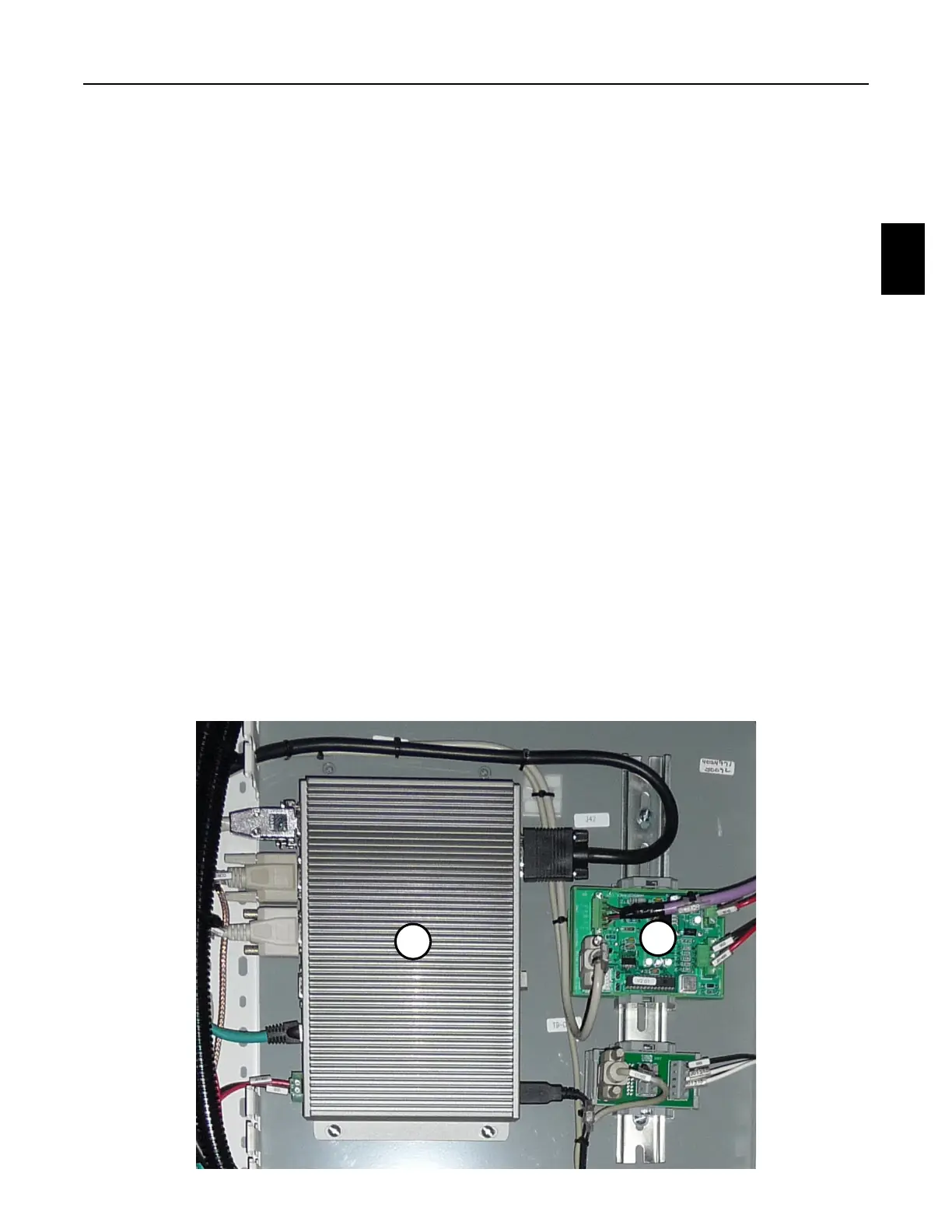
(17) Jupiter JAM (Jupiter Applicable Master)
(18) Jupiter J42 Board
The inside of the compartment houses the Jupiter JAM and J42 Board, and other various
electrical components. See Jupiter II Troubleshooting for a detailed explanation of the Jupiter
Control System components.
FIGURE 2.1-27
INSIDE OF CONTROL PANEL - LEFT
JUPITER JAM AND J42 BOARD
17
18



 To Next Page