PAGE 2.2 - 42 OPERATION MARK IV HD J2 TAMPER
REVISED 10 -2020 JUPITER II BULLETIN 5082505
2.2
2.2.11 Gearbox Shift Indicators
1. The Gearbox Shift Indicators are located on the left side of the Machine Status Panel.The
upper indicator is for the front axle and the lower indicator is for the rear axle.
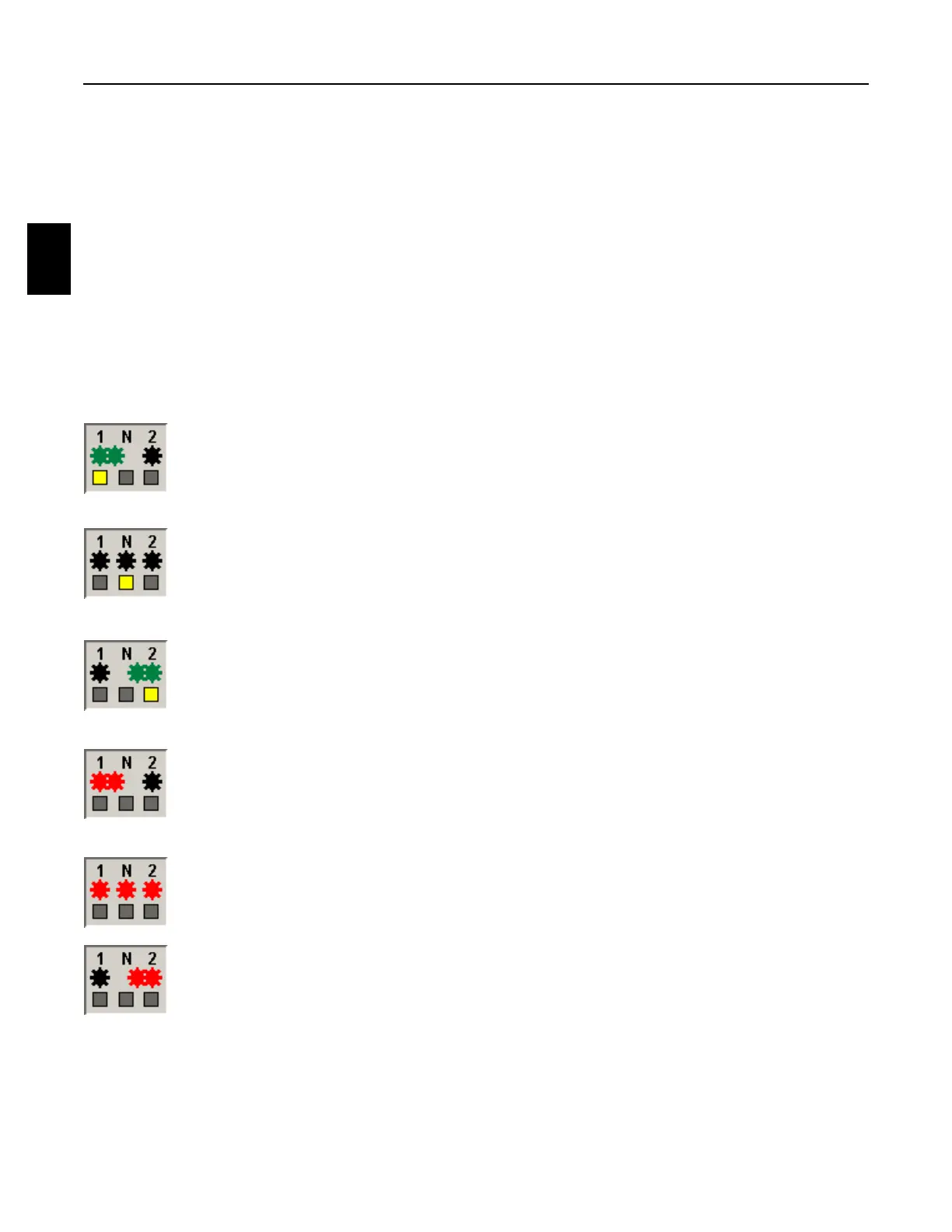
2. The applicable gearbox indicator displays the proximity switches input signal status and
the gears engagement status of the applicable front and rear axle gearboxes as follows:
a. When the proximity switch is made, the switch indicator will highlight yellow and the
gear icons will be black and apart in Neutral, or green and together in 1st Gear (Low)
or 2nd Gear (High).
b. When the proximity switch is not made, the switch indicator will un-highlight gray and
the gear icons will be red and apart in Neutral, or red and together in 1st Gear (Low)
or 2nd Gear (High).
1st Gear (Low) successfully engaged.
Neutral Position successfully engaged.
2nd Gear (High) successfully engaged.
Attempting to engage 1st Gear (Low).
Attempting to engage Neutral Position.
Attempting to engage 2nd Gear (High).



 To Next Page