MARK IV HD J2 TAMPER OPERATION PAGE 2.2 - 43
BULLETIN 5082505 JUPITER II REVISED 10 - 2020
2.2
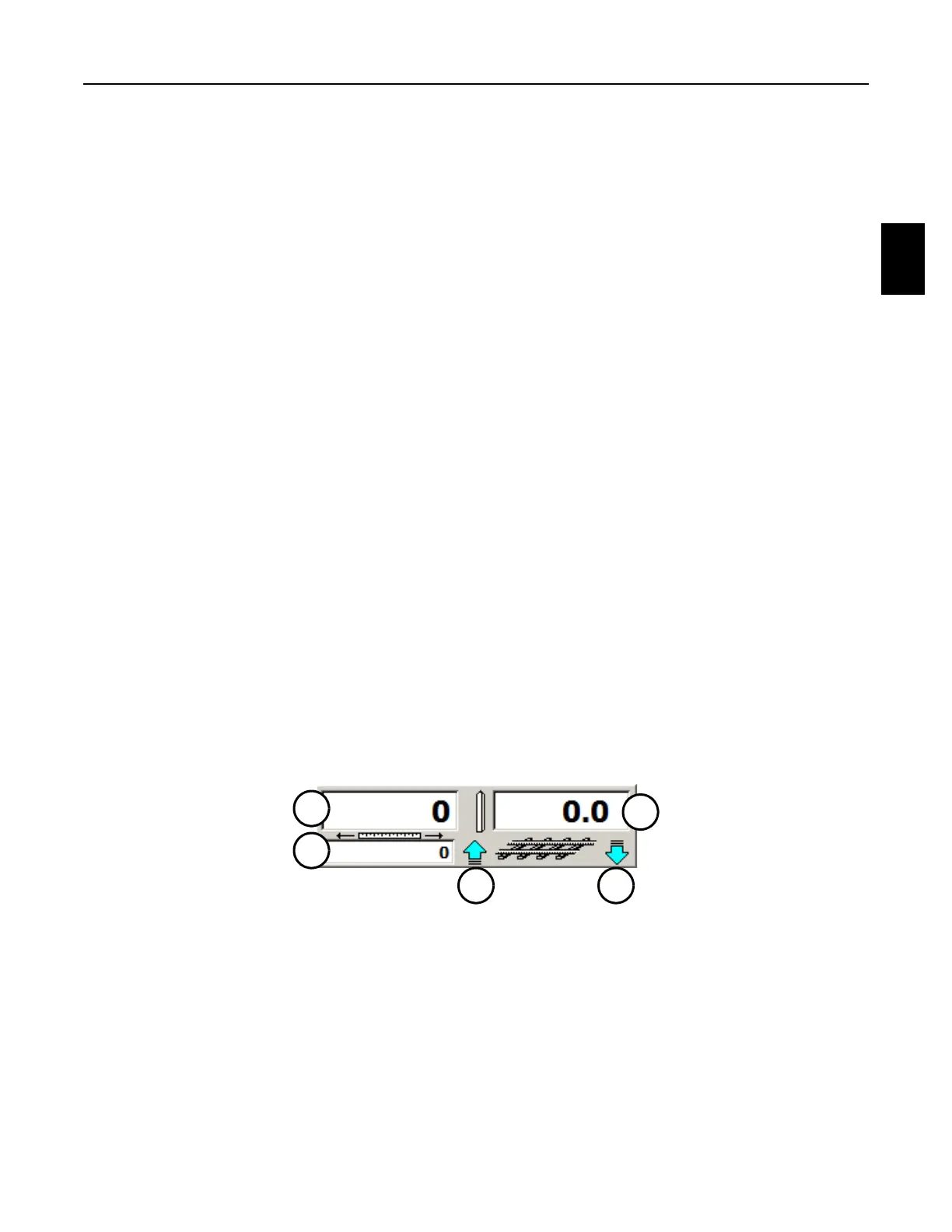
2.2.12 Distance Panel - See Figure 2.2-26
1. The Distance Panel on the Travel or Work Screens displays the following: See 2nd Toolbar
Set - Work Mode - F1 Distance Menu Panel to set the distance and milepost values, and
for operation information.
(1) Distance Info Box
(2) Auxiliary Distance Info Box
(3) Direction Indicator
(4) Milepost Info Box
(5) Direction Indicator
2. The Distance Info Box (1) displays the current accumulative distance value in feet that the
machine has traveled from when the value was reset to zero (0), such as at the start of a
new recording.
3. The Auxiliary Distance Info Box (2) displays the current accumulative distance value in feet
that the machine has traveled from when the value was reset to zero (0), such as at the
start of the day.
a. The cyan arrow Direction Indicator (3) displays whether the distance value will
increase (up arrow) or decrease (down arrow) as the machine moves forward.
4. The Milepost Info Box (4) displays the current mile post marker from where the value was
originally set.
a. The cyan arrow Direction Indicator (5) displays whether the milepost value will
increase (up arrow) or decrease (down arrow) as the machine moves forward.
FIGURE 2.2-26
DISTANCE PANEL
2
1
4
53



 To Next Page