MARK IV HD J2 TAMPER OPERATION PAGE 2.2 - 21
BULLETIN 5082505 JUPITER II REVISED 10 - 2020
2.2
2.2.5 Alarm Panel
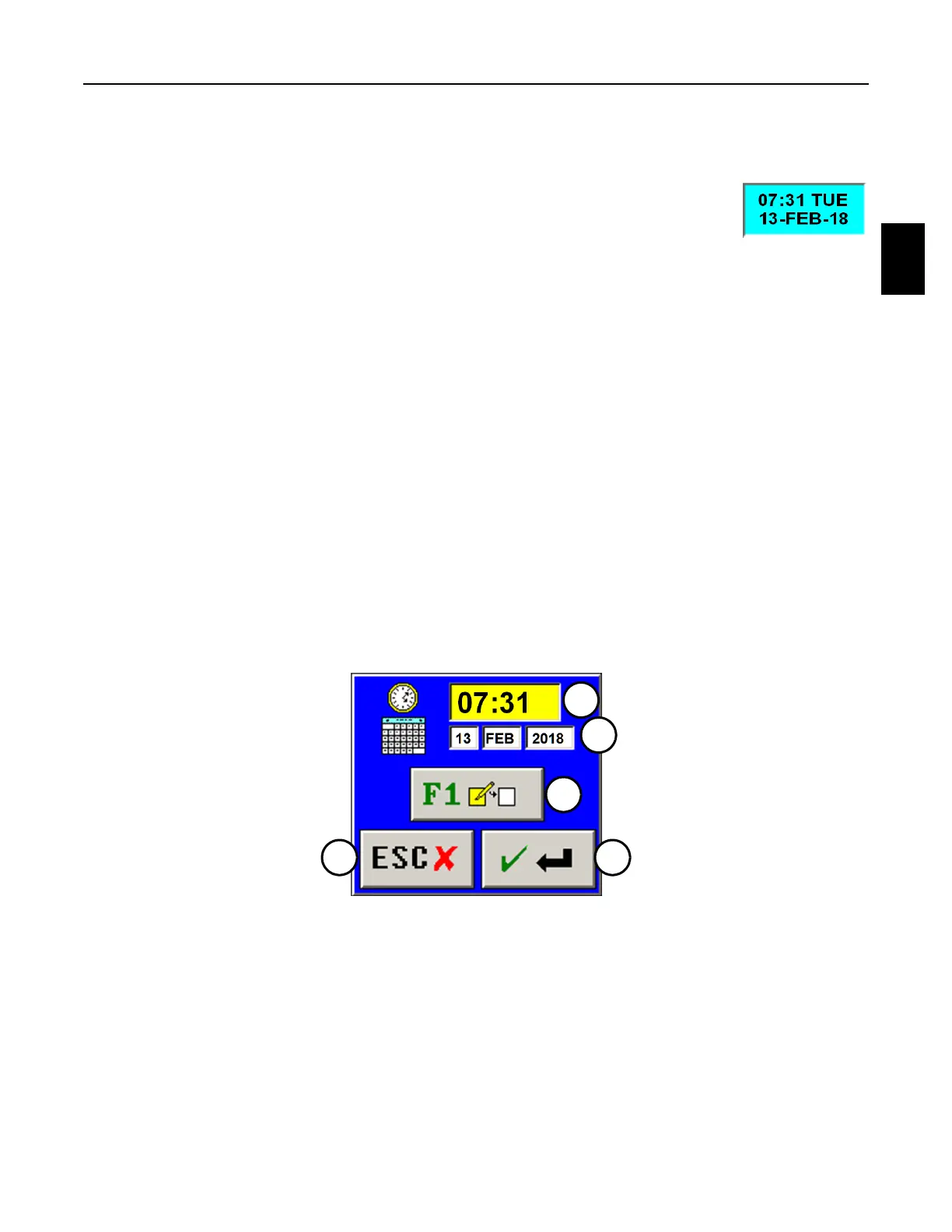
2.2.5.1.1 Set Clock Panel - See Figure 2.2-12
1. Press the Date and Time Panel on the Expanded Alarm Panel to display
the Set Clock Panel on the screen. This panel is used to set the
computer’s current date and/or time. The panel displays the following:
(1) F1 Button: Press the button or the F1 Key on the Right Operator Keypad or computer
keyboard to highlight yellow the value in the desired info box that is to be changed.
Then use the Plus (+) or Minus (-) Keys on the Right Operator Keypad or computer
keyboard to change the highlighted value.
(2) Time Info Box: The info box displays the computer's current time value.
(3) Date Info Boxes: The info boxes display the computer's current day / month / year
value.
(4) Enter Button: Press the button or the Enter Key on the Right Operator Keypad or
computer keyboard to save any changes and remove this panel from the screen.
(5) Escape Button: Press the button or the Escape Key on the Right Operator Keypad or
computer keyboard to discard any changes and remove this panel from the screen.
FIGURE 2.2-12
SET CLOCK PANEL
3
2
5 4
1



 To Next Page