EasyBalancer EB 3500 Operation - General information
5 - 1
5 Operation
5.1 General information
5.1.1 How do you want to measure / balance?
All measuring / balancing tasks have in common that
the following question appears after selection.
Basic menu \ Measurement task (Balancing /
Overall vibration / Cumulative vibration /
Roller bearing (optional).
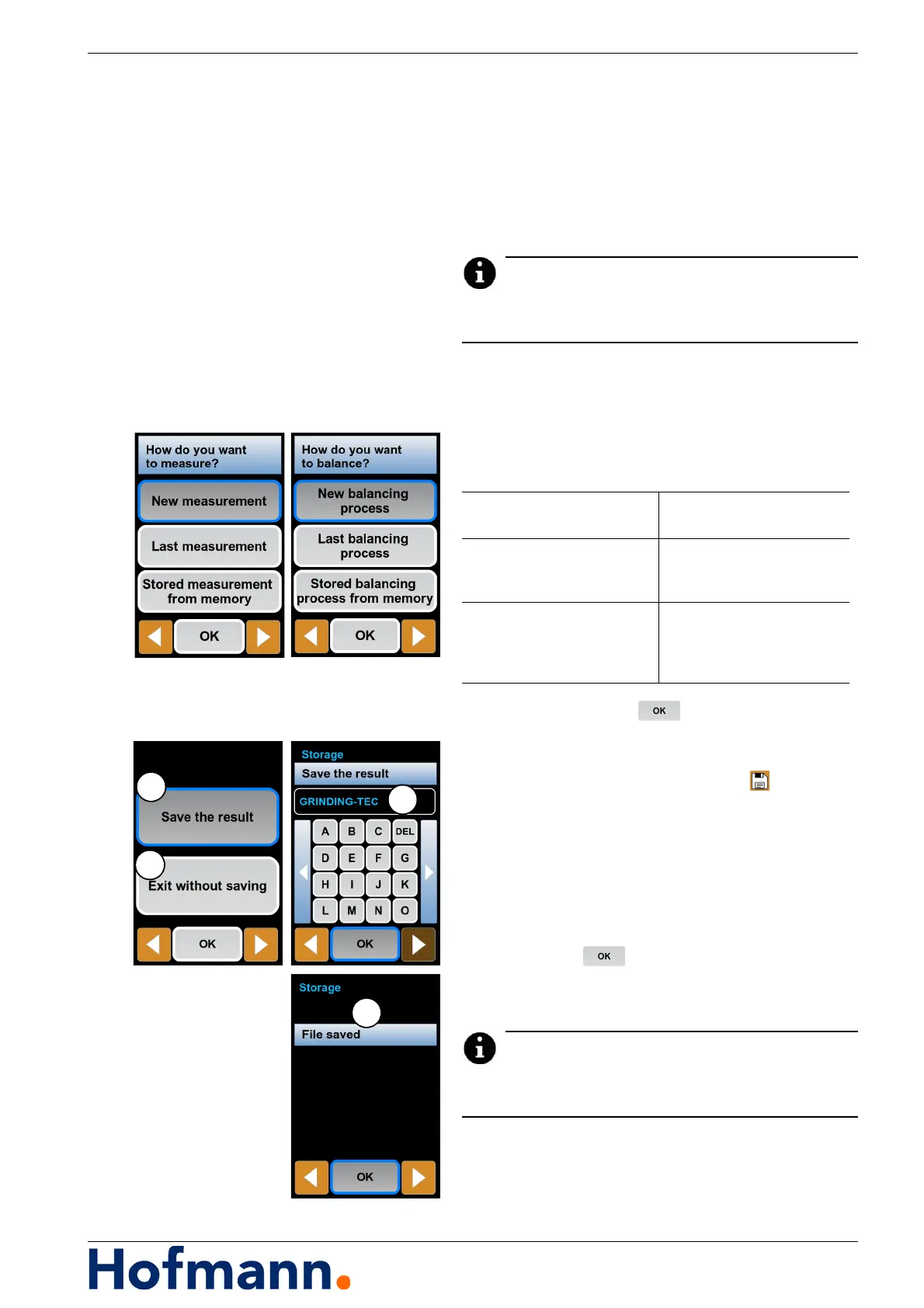
The window “How do you want to measure?”
or “How do you want to balance?” appears.
Select and press .
5.1.2 Saving the measurement result
After a measurement, press the button.
A new window appears.
Press “Save the result” (1) or “Exit without saving”
(2).
After pressing “Save the result”, a new window
appears.
Enter the file name (3) with the virtual keyboard.
Press the button.
The measurement is saved in the file manager
and a message (4) appears.
A new measurement or balancing operation can be
saved for each machine.
New measurement /
New balancing process
Perform new measurement
/ new balancing operation
Last measurement /
Last balancing process
Display last measurement /
last balancing operation
from memory
Stored measurement from
memory /
Stored balancing process
from memory
Call up measurement /
balancing operation from
memory



 To Next Page