Operation - Balancing EasyBalancer EB 3500
5 - 14
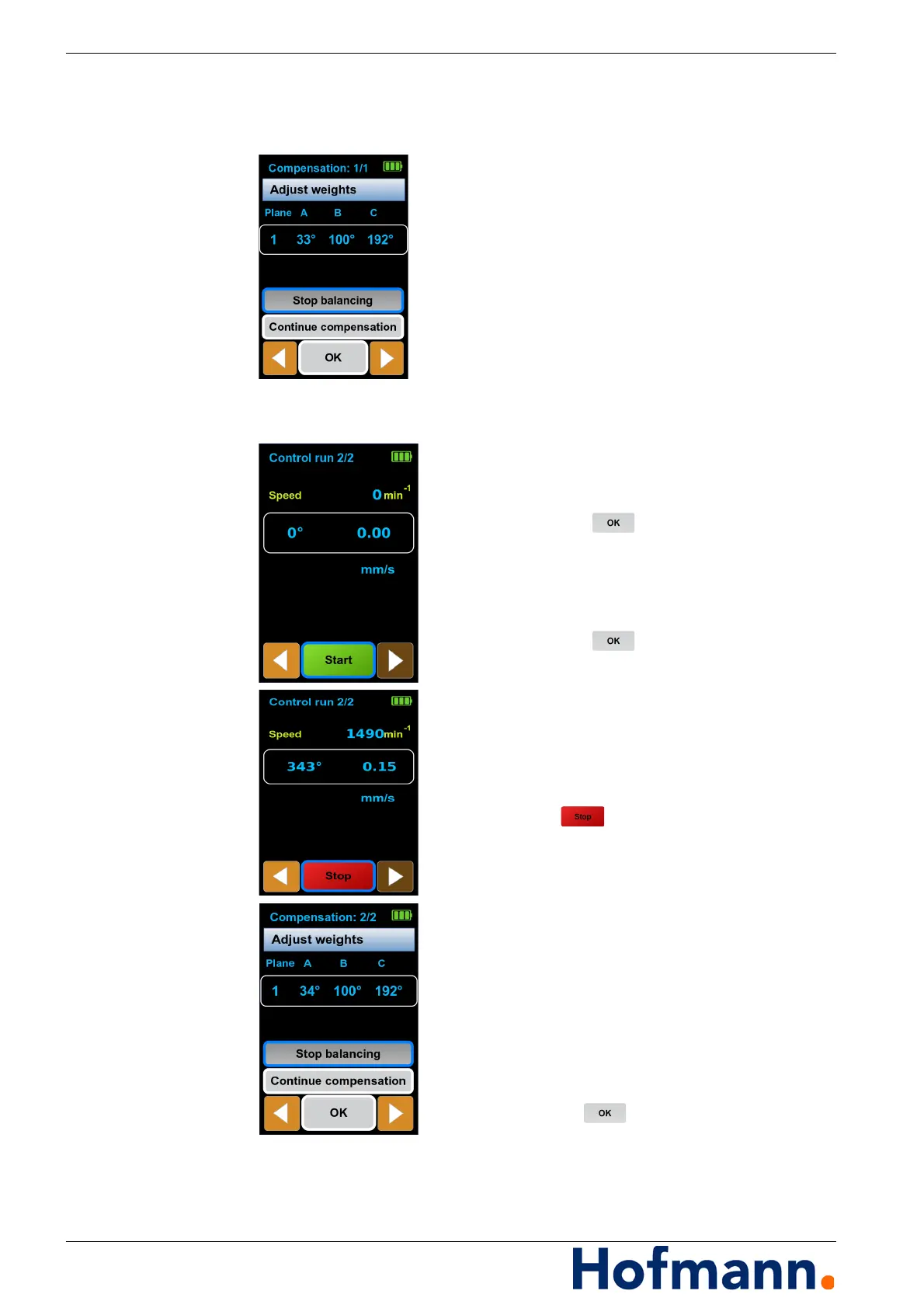
Compensation Align the angle template to 0 degrees.
Set weights A, B and C to the angle positions
shown in the display according to the angle
template.
Control run Starting a check run
Switch on the machine and wait until
the final speed is reached.
Select “Accept compensation”
and press the button.
A check run is carried out.
Ending balancing
Select “Stop balancing”
and press the button.
The balancing process is completed.
The current speed appears on the display,
e.g. “n=1490” in rpm, the relative angular posi-
tion, e.g. “343°” and the vibration amplitude,
e.g. “0.15” in the selected physical unit: mm/s.
Wait until the measured value display is stable.
Press the button.
The measured values are accepted.
Results of check run
The new angular positions of weights A, B
and C are displayed.
If necessary, correct weights A and C to
the angular positions shown in the display.
Press “Continue compensation” to carry out
check runs again until the results correspond to
the permissible tolerances.
Select “Stop balancing”.
Confirm with .
Exit without saving or select “Accept compen-
sation” to continue balancing.



 To Next Page