Serial essernet
®
interface (SEI1)
56 FB 798819 / 05.18
Two essernet
®
micro modules are available for selection:
• essernet
micro module 62,5 kBd (Part No. 784840.10)
• essernet
micro module 500 kBd (Part No. 784841.10)
S1
LED
essernet
®
module
red
yellow
green
0
1
2
3
4
5
6
7
8
9
0
1
2
3
4
5
6
7
8
9
X1
S2
X4 X5
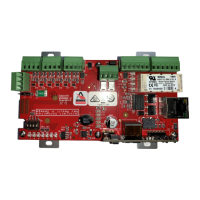
Fig. 10: essernet
®
micro module (Part No. 784840.10 / 784841.10)
S1 Rotary address switch to select panel address factor x1
S2 Rotary address switch to select panel address factor x10
X1 64 pin connector for the micro module slot inside SEI1
X4 / X5 jumpers for configuration of the terminals IN/OUT (terminal 1+2 and 3+4)
conventional
fibre optics converter
conventional
fibre optics converter
If data is transferred via fibre optic converter (FOC), two fibre optic fibre converters
are always required for a data path between the devices.
For further information refer to documentation of the fibre optic converter.
LED Status and error indication
red on communication error between essernet
®
micro module and FACP
green flashing communication with other network devices
yellow on communication error (A/B mode)
unidirectional communication
• All other LED display combinations mean that there is a fault in the essernet
®
module or that measuring operation is active.
• Connect cable shielding to the appropriate terminals!
• The data signalling rate and connection cable to be used is governed by
the module type installed. In a network you may only use essernet
®
modules with the same data signalling rate.



 To Next Page