Serial essernet
®
interface (SEI1)
FB 798819 / 05.18 71
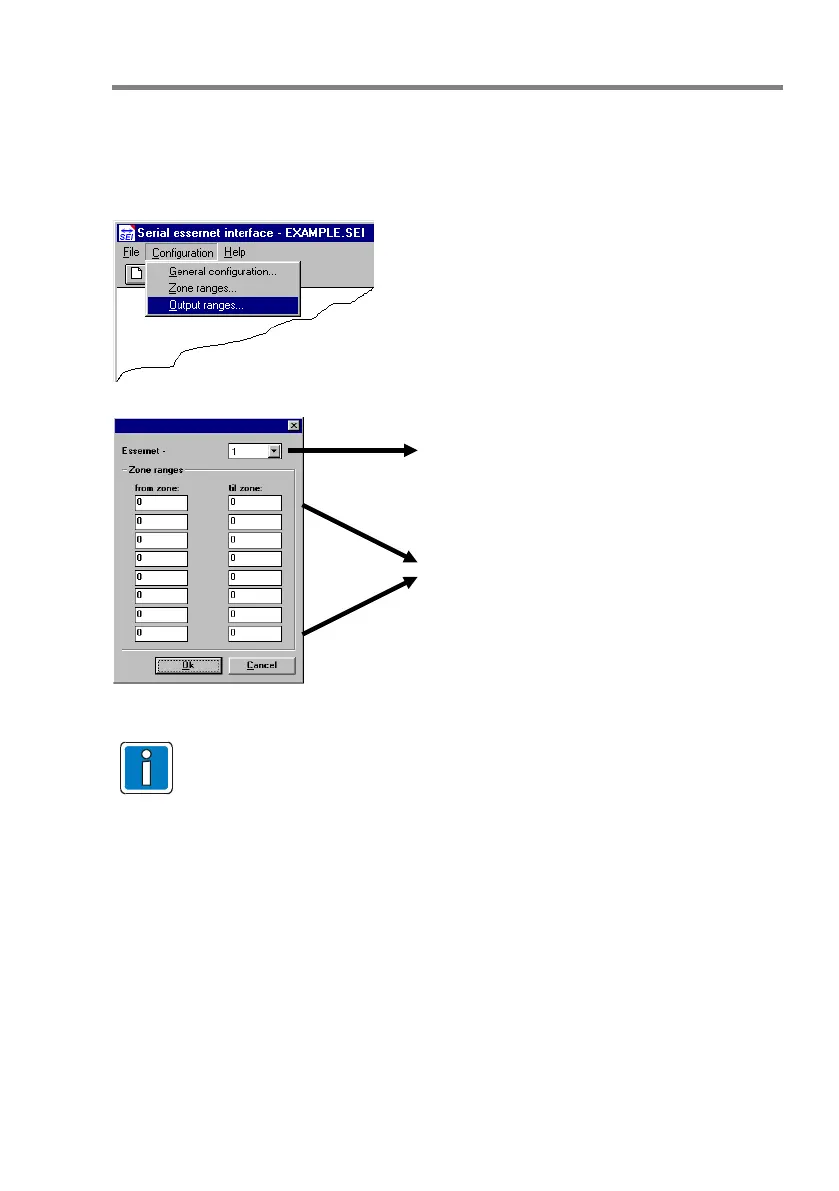
Output ranges
This menu is used to enter the output ranges of the FACPs which are connected via the
essernet
. These intervals are identical to the control zone intervals in all other FACPs
connected to the essernet
.
Fig. 27: Output ranges
The zone and control zone numbers must be unique and must not be used twice
in the essernet
and the sub nets.
EI data programming is complete with these entries.
12.1 Data transfer SEI1 with VAS connection (Part No. 784856)
For the connection of the SEI1 to a VARIODYN
®
D1 voice alarm system, use the service and
programming software tools 8000 to export the txt file
(File Export 'Winmag' customer data).
Set the device/control panel number On the SEI1 as well as:
DIP switch S2/1 – Programming mode OFF / Programming not active
DIP switch S2/2 – load factory setting ON
Detailed information on further connection with the Designer D1 programming software can be
found in the documentation 798664.GB0.
Selection of the FACP number.
This number must be identical with the
address set at the essernet
- micro modules
of the panel (max. range 1 to 31).



 To Next Page