EasyManua.ls Logo

HP 10504 - Page 21

HP 10504
121 pages
Print Icon
To Next Page IconTo Next Page
To Previous Page IconTo Previous Page
Loading...
15
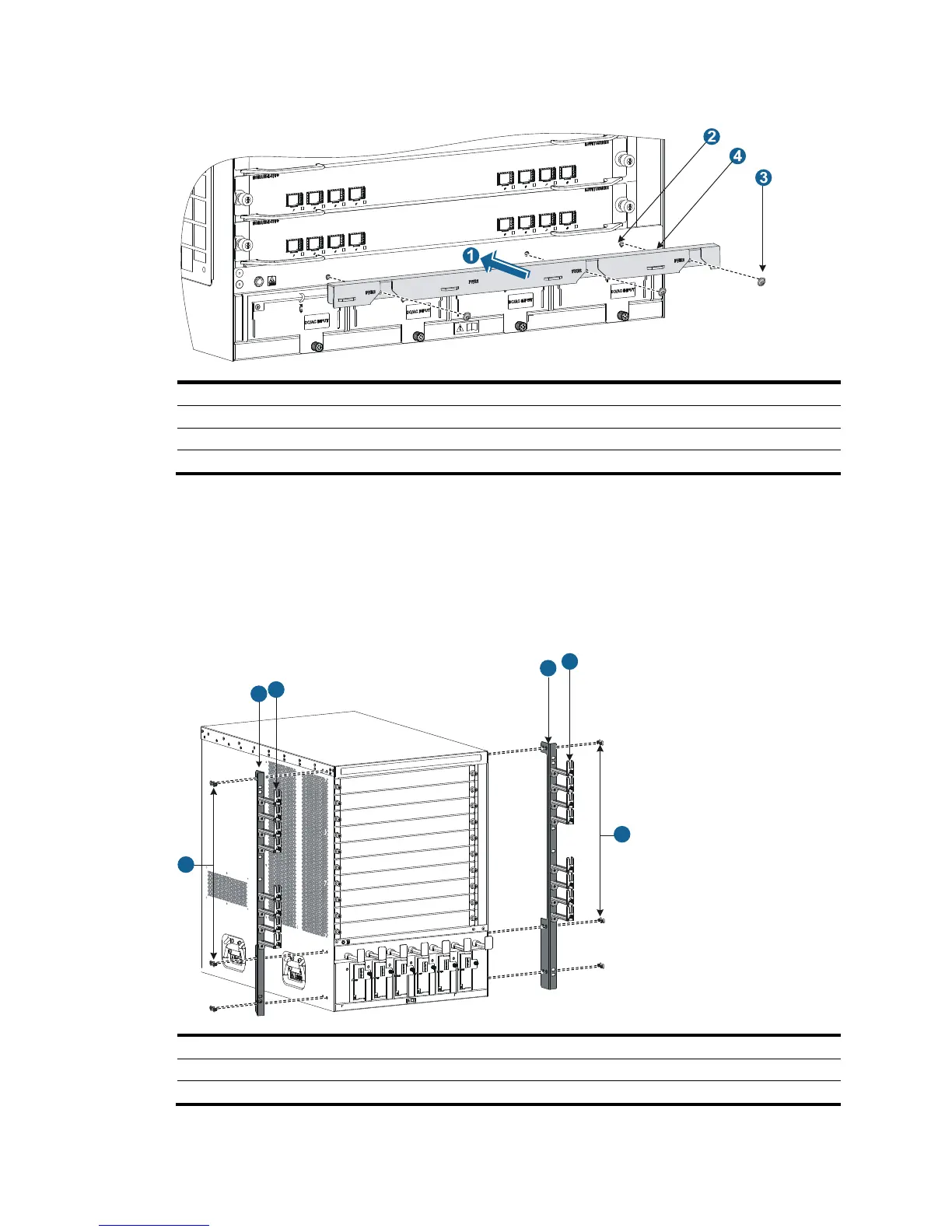
Figure 10 Attaching cable management brackets to a 10504
(1) Attach the cable mana
g
ement bracket to
the chassis.
(2) Mounting holes for installing the cable management bracket.
(3) Screws for attachin
g
the cable mana
g
ement bracket to the chassis.
(4) Power cord mana
g
ement bracket (installed at the lower
part of the chassis).
Attaching mounting brackets to the chassis
1. Identify the left mounting bracket (marked L) and the right mounting bracket (marked R) on the inner
surface of the mounting brackets.
2. Facing the chassis front, mount the left and right mounting brackets to the two sides of the chassis,
as shown in Figure 11.
Figure 11 Installing the
mounting brackets (10508)
(1) Screws for attachin

g
the mountin
g
brackets to the chassis
(2) Mountin
g
brackets
(3) Signal cable management brackets
1
1
2
2
3
3

Table of Contents

Related product manuals