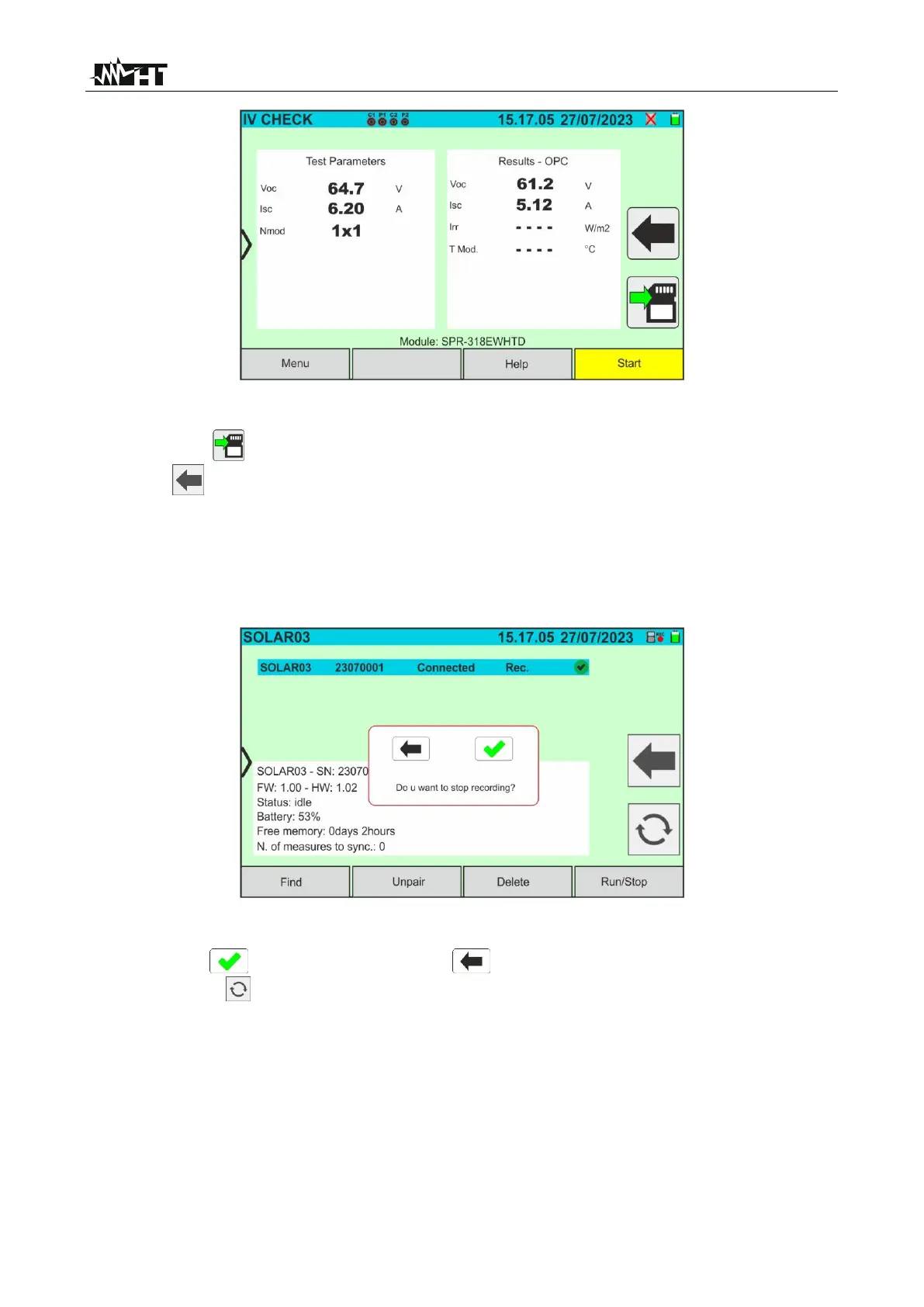
Fig. 60: IVCK test result @OPC with synchronous recording
15. Tap on the icon to save the measurements to the internal memory (see § 7.1), or
on the icon to exit without saving
16. At the end of the test session, disconnect the SOLAR03 remote unit, place it close to
the instrument and check that it automatically reconnects to the instrument
17. Tap on the "SOLAR03” button to access the control and management section of the
SOLAR03 remote unit (see § 6.2) connected to the instrument
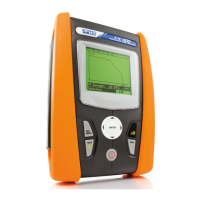
18. Tap on the "Start/Stop” key to end the recording. The following screen will appear:
Fig. 61: Ending recording on the remote unit
19. Tap on the key to confirm or on the key to exit without proceeding
20. Tap on the icon to download (synchronise) the irradiance/temperature values
recorded by the SOLAR03 remote unit to the instrument. The “N. of measures to
sync” parameter must take the value '0'
21. The instrument will automatically update the previously saved @OPC values and, if
calculated correctly, will perform the translation to the @STC values without the need
for further saving.
22. Access the memory area (see § 7.2) to retrieve the saved measurements



 To Next Page