EasyManua.ls Logo

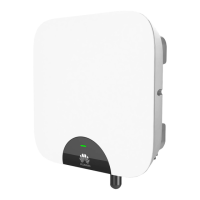
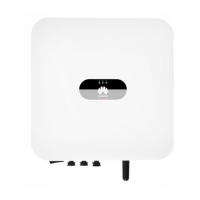
Huawei SUN2000L Series - User Manual

Huawei SUN2000L Series
135 pages
Print Icon
To Next Page IconTo Next Page
Loading...
SUN2000L-(4.125KTL, 4.95KTL)-JP
User Manual
Issue
03
Date
2018-04-11
HUAWEI TECHNOLOGIES CO., LTD.

Table of Contents

Questions and Answers

  • A
    Alfred AndersonJul 27, 2025
    How to fix Huawei Inverter SUN2000L list failing to be obtained?
    • B
      bradfordjoanJul 27, 2025
      If you're unable to obtain the SUN2000L list on your Huawei Inverter app, there might be an issue with the WiFi connection. If the list cannot be obtained after several attempts, log out and then log in again. Also, verify that the WiFi connection is correct.
  • H
    Haley JacksonJul 30, 2025
    What to do if data fails to be obtained during Huawei Inverter operations?
    • D
      djohnsonJul 30, 2025
      If data cannot be obtained during operations with the Huawei Inverter, it indicates that the connection to the SUN2000L is disconnected. To solve this, reconnect to the SUN2000L.
  • T
    Tracey PerryAug 4, 2025
    Why Available WiFi networks list is blank on Huawei Inverter app?
    • P
      Pamela WhiteAug 4, 2025
      If the 'Available WiFi networks nearby' list is blank in the WiFi area on the home screen of the Huawei Inverter app, it's likely that the app was not granted the necessary permissions during installation. To fix this, reinstall the app and make sure to grant it access permission.
  • J
    James CarrilloAug 8, 2025
    How to fix no upgrade package available for Huawei SUN2000L?
    • T
      Troy ReillyAug 8, 2025
      If no upgrade package is available for upgrading your Huawei Inverter, it could be that the upgrade package is not saved on your mobile phone. Ensure you save the upgrade package to your mobile phone.
  • S
    Sharon GarciaAug 13, 2025
    What to do if Huawei SUN2000L Inverter displays 'Failed to connect' message?
    • D
      Danielle TannerAug 13, 2025
      If you see a 'Failed to connect to the inverter. Reconnecting...' message on your Huawei Inverter, it might be due to a weak WiFi signal or the mobile phone/router being more than 5 meters away from the SUN2000L. To resolve this, make sure the WiFi network is connected and try logging out of the app and then logging back in.
  • P
    Phillip DayAug 17, 2025
    Why Huawei SUN2000L Inverter app fails to install on Android?
    • W
      wlawrenceAug 17, 2025
      If the app fails to install on your Android phone for Huawei Inverter, it could be due to several reasons: your phone's operating system might be older than required (upgrade it), the installation of apps from unknown sources might not be allowed (enable it in Settings > Security), or a previous version of the app wasn't properly deleted.
  • J
    Jeffrey CampbellAug 22, 2025
    Why communication fails with Huawei SUN2000L Inverter?
    • J
      Jordan BennettAug 22, 2025
      If communication fails with your Huawei Inverter SUN2000L, it might be because your mobile phone or router is more than 5 meters away, causing the WiFi connection to drop. Try keeping your mobile phone or router within 5 meters of the SUN2000L and reconnect the WiFi connection.

Summary

Safety Precautions

General Safety

Provides overall safety guidelines and warnings for operating the equipment.

System Installation

4.3 Determining the Installation Position

Provides basic requirements and considerations for choosing an installation location.

4.4 Installing the Mounting Bracket

Details the procedure for mounting bracket installation, including wall and support options.

4.5 Installing the SUN2000 L

Guides on how to physically install the SUN2000L unit onto the mounting bracket.

Electrical Connections

5.2 Connecting the Ground Cable

Provides instructions for properly connecting the ground cable for safety.

5.3 Connecting AC Output Power Cables

Details the procedure for connecting AC power output cables to the SUN2000L.

5.4 Installing the DC Input Power Cable

Guides on how to connect DC input power cables to the SUN2000L.

System Commissioning

Operations on the Local FusionHome App

7.4.5 Setting Grid-Connection Parameters

Details how to configure parameters related to grid connection.

7.4.5.1 Setting Grid Parameters

Guides on setting specific grid parameters for the SUN2000L.

7.4.5.2 Setting Protection Parameters

Explains how to configure protection parameters for the device.

7.4.5.3 Feature parameters

Covers the configuration of various feature parameters for the SUN2000L.

7.4.5.4 Adjusting Power

Details how to adjust power-related parameters for the SUN2000L.

7.4.6 Comm config

Details how to configure communication settings, including WiFi and RS485.

Setting Inverter WiFi Parameters

Explains how to configure the WiFi settings for the inverter.

Setting RS485 Communications Parameters

Details how to configure RS485 communication parameters.

7.7 Troubleshooting

Lists common faults and their troubleshooting measures.

System Maintenance

8.2 Troubleshooting

Provides information on alarm severities and common faults.

Technical Specifications

Huawei SUN2000L Series Specifications

General IconGeneral
Max. DC Voltage600 V
Max. Efficiency98.6%
CoolingNatural Convection
Protection DegreeIP65
Power Output Range2kW - 5kW
Max. AC Power5, 500 VA
Rated AC Voltage220 V / 230 V
European Efficiency98.2%
Operating Temperature Range-25°C to +60°C
Weight10.6 kg
CommunicationRS485

Related product manuals