C-7
Setup of Alternative Network Configurations
032-0330-EN Rev K
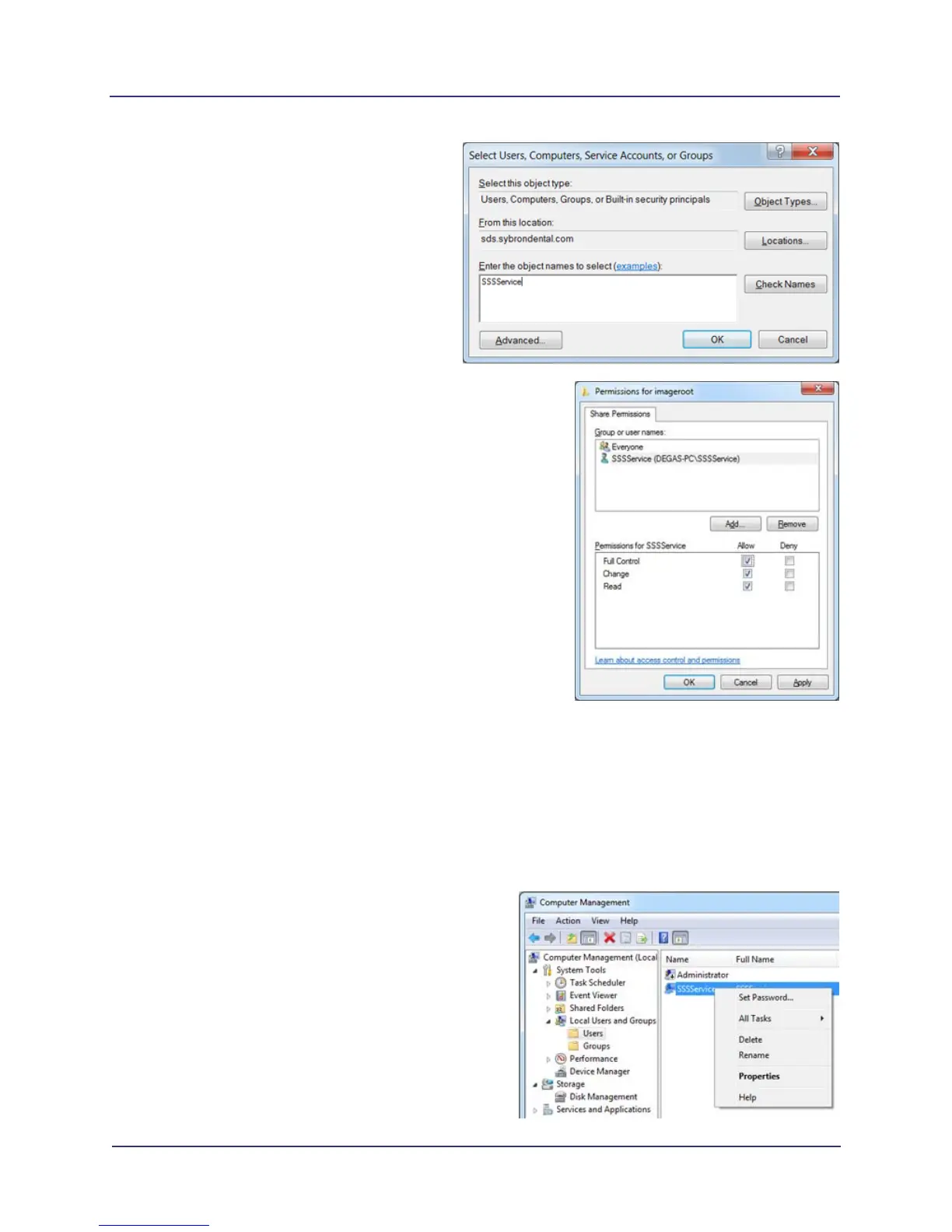
e. Enter SSSService in object name field
and click OK.
f. Grant full access to SSSService
account. Select Allow check box for Full
Control, Change, and Read options.
Click OK to close any open windows.
The network share should now be
accessible to other computers on the
network.
2. SmartScan STUDIO Integration Server
Create an identical user account on the SmartScan STUDIO Integration server to enable access to the
network share created in the above steps.
The following steps are performed on the SmartScan STUDIO Integration server.
1. Follow steps 1a - d from procedure above to create an identical user on the SSS STUDIO Integration
server.
2. Add the user to the administrators group.
NOTE: If the site’s IT policy does not
allow the use of the administrators group,
follow the permissions steps from the
Remote Image Root Setup for Domain
Environment procedure, replacing
Network Service with the SSSService
account.
a. Right-click on the user and select
Properties.



 To Next Page