4-12
i-CAT FLX Installation Manual
032-0330-EN Rev K
QA PAN Test
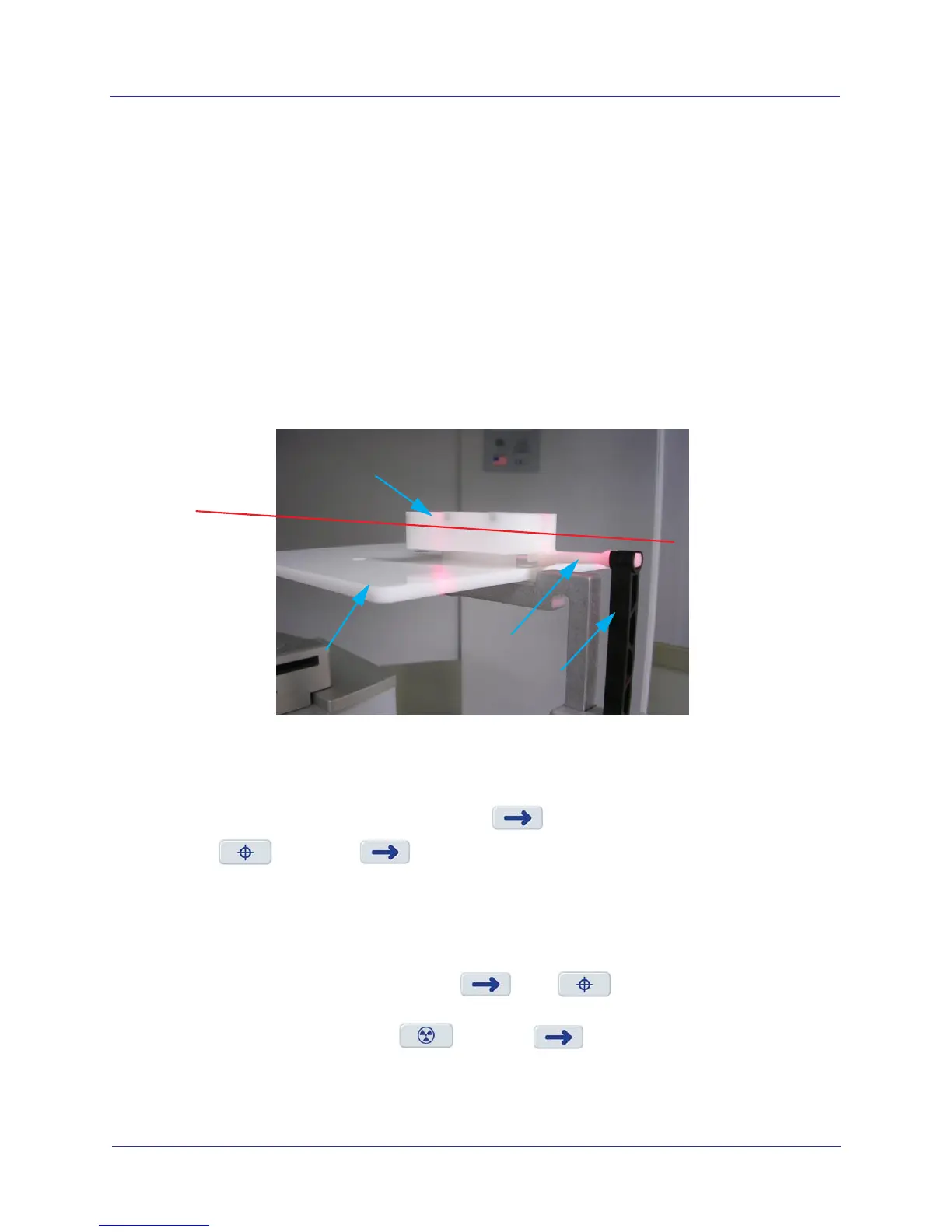
Install PAN Phantom
1. Prepare the bite tip by inserting the narrow edges of the bite tip down into the bite tip holder uprights.
Then turn the bite tip a ¼ turn to lock into place.
2. Insert the phantom platform and bite tip holder into the positioning block. The bite tip should rest on
top of the platform.
3. Place PAN phantom on platform with balls facing up and top of arch resting on bite tip.
4. Use the Alignment Lasers to position the phantom. Use the horizontal laser to adjust the height of
the phantom as shown below. Use the vertical laser to center the phantom on the platform.
Run QA PAN Test
1. From Utilities menu, select QA PAN.
2. Ensure phantom is set up properly, then press .
3. Select , then press . The scanner initializes.
4. When prompted, press the Scan button on the operator control box. An audible alarm is sounded
and the X-ray ON light is illuminated during radiation exposure.
5. Review the scout image. Ensure the phantom is centered. Adjust the phantom platform as needed
to achieve the proper height.
If required, make adjustments, then press . Run again until phantom is properly
aligned.
6. When phantom is aligned, select and press . The scanner initializes and moves
approximately 1/8 rotation to the Home Position.
PAN
PHANTOM
PHANTOM
BITE TIP HOLDER
BITE TIP
LASER
LINE
PLATFORM



 To Next Page