4-11
QA Tests
032-0330-EN Rev K
Uniformity Evaluation
The Uniformity test is used to check that image density measurements are consistent in all areas
within the field of view.
13. In the upper right corner view, click where the vertical and horizontal cursor lines cross and drag to
the center of the water height and width.
NOTE: To better view measurements, select to turn off display information.
14. Select to activate HU tool.
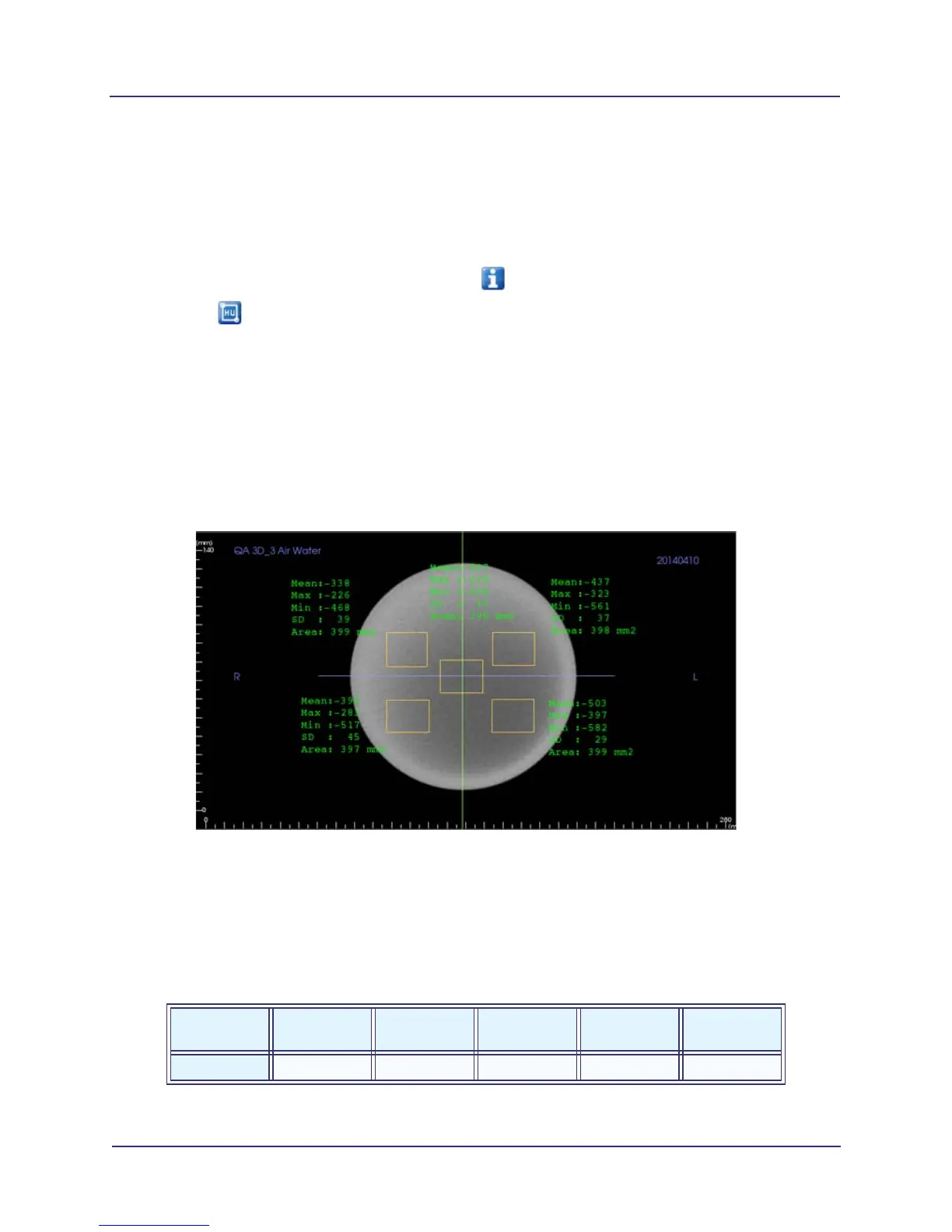
15. Draw a box with an area of approximately 400 mm
2
in the upper left quadrant of the phantom image,
as shown below.
a. Click and release at starting point. A red circle displays.
b. Move cursor to draw box.
c. When correct area is displayed (approximately 400 mm
2
), click to set box and display HU
information.
d. Click on measurements and drag as needed to move them out of the way so that additional
boxes can be drawn.
16. Repeat steps 14-15 for the lower left, upper right and lower right quadrants, and at the center.
17. Record the Mean values in the chart below.
18. Remove measurements by clicking each one, then press the Delete key on the keyboard.
19. Subtract each Mean Value from the Mean Value of the center measurement. If the difference is
greater than 90, make sure phantom is correctly centered in the field of view and re-measure.
20. When finished, save the file and close TxSTUDIO.
Measured
Values
Upper
Left
Upper
Right
Lower
Left
Lower
Right
Center
Mean



 To Next Page