10
2
BATTERY INSTALLATION/CHARGING
2
DD
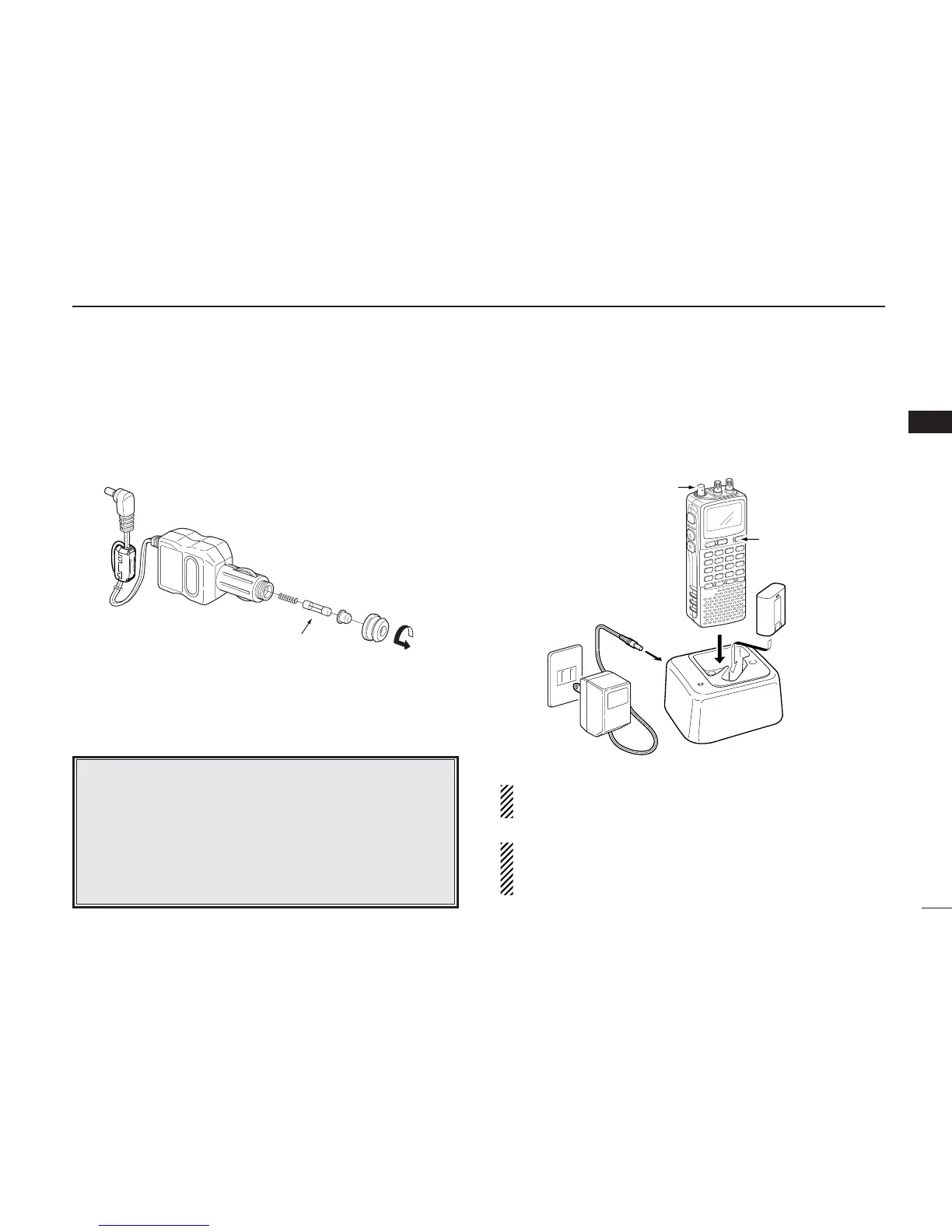
CP-18A/E fuse replacement
If the fuse blows or the receiver stops functioning while oper-
ating with the optional CP-18A/E, find the source of the prob-
lem if possible, and replace the damaged fuse with a new
rated one (FGB 5 A) as shown below.
DD
Rapid charging with the BC-156
The optional BC-156 provides rapid charging of battery pack
(BP-206).
• Charging periods: 2.5 hours (w/BP-206)
CAUTION: Shorten or remove the telescoping antenna be-
fore charging to prevent the receiver from overturning.
If the charge indicator flashes orange, there may be a
problem with the battery pack (or charger). Reinsert the
battery pack or contact your dealer.
Recommendation:
Charge the supplied battery pack for a maximum of
8 hours. Li-Ion batteries are different from Ni-Cd bat-
teries in that it is not necessary to completely charge
and discharge them to prolong the battery life. There-
fore, charging the battery in intervals, and not for ex-
tended periods is recommended.



 To Next Page