32
6
MEMORY CHANNELS
■ Memory clearing
Contents of programmed memories can be cleared (blanked),
if desired.
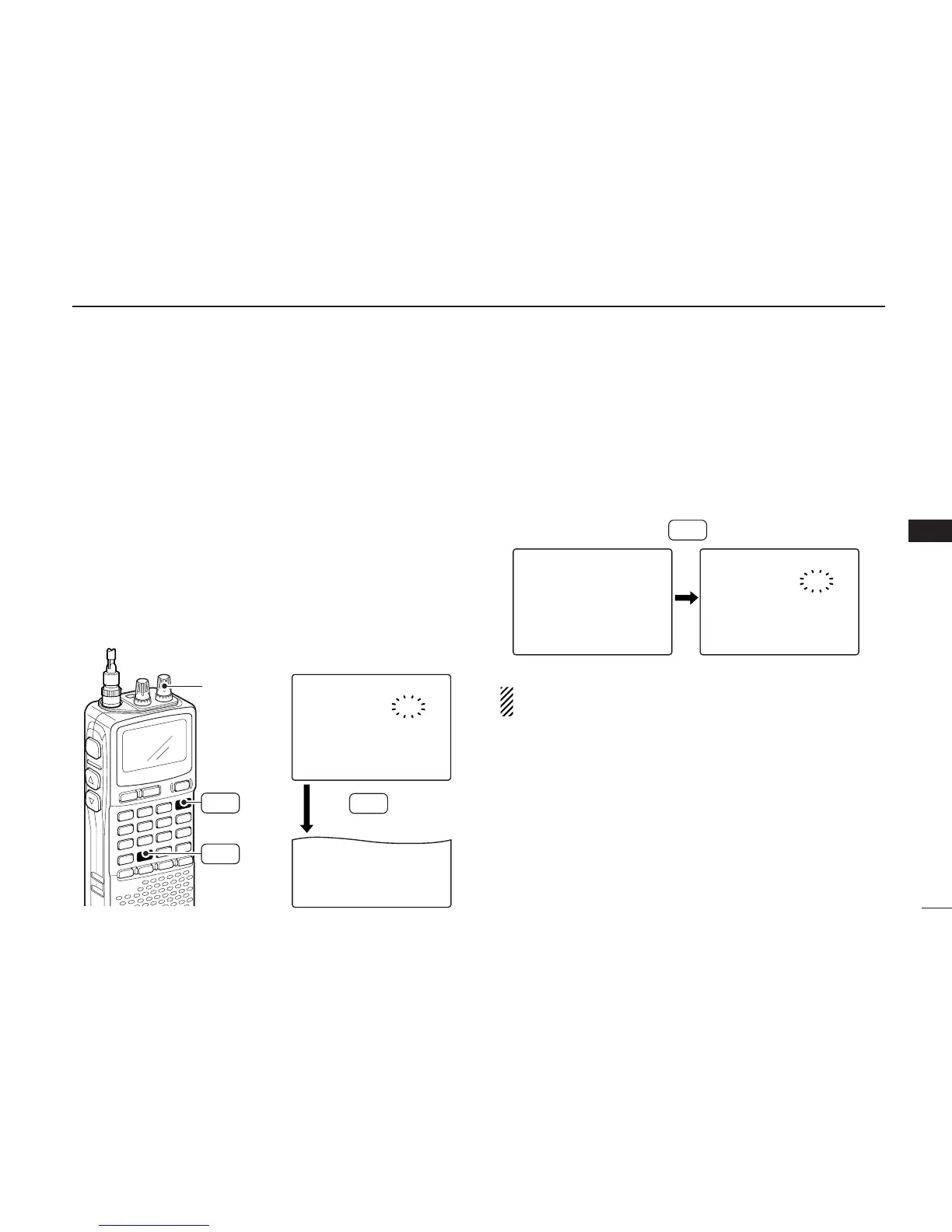
qPush [MR S.MW] for 1 sec. to select the select memory
write condition.
•1 short and 1 long beeps sound.
•“
µµ
” indicator blinks.
• Do not hold [MR S.MW] for more than 2 sec. otherwise the
memory contents will be copied to VFO.
wRotate [R-DIAL] to select the desired memory channel to
be cleared.
eWhile pushing [8 SET], rotate [R-DIAL] to select “CLEAR.”
•“CLEAR” item can also be selected by pushing [8 SET] several
times.
rPush [MR S.MW] for 1 sec. to clear the contents.
•3 beeps sound.
• The cleared channel changes to blank channel
• Return to the select memory write condition.— “
µµ
” indicator
blinks. Push [DUALWATCH] to exit the select memory write con-
dition, then push [VFO MHz] to return to VFO mode.
NOTE: Be careful!— the contents of cleared memories
CANNOT be recalled even in bank channel operation.



 To Next Page