37
7
SCAN OPERATION
■ Memory/bank/all bank scan
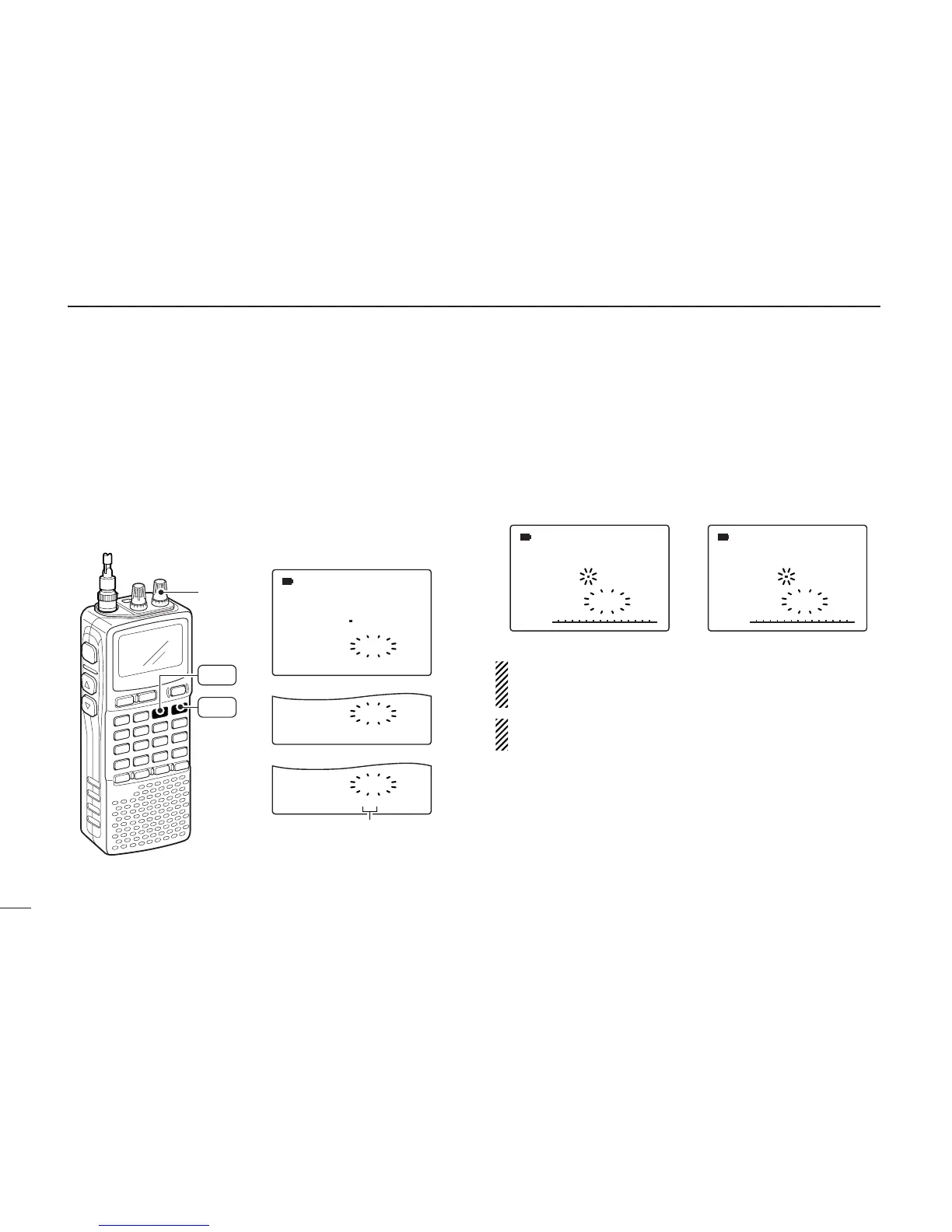
qSelect memory mode with [MR S.MW].
•Select the desired bank with [BAND] for bank scan.
wSet the squelch level.
eWhile pushing and holding [MODE SCAN], rotate [R-DIAL]
to select the desired scanning type.
• “ALL” for all bank scan; “BANK-LINK” for bank link scan or
“BANK-x” for bank scan. (x= A to Z; programmed bank groups
only displayed.)
rRelease [MODE SCAN] to start the selected scan.
• Scan pauses when a signal is received.
• Rotate [R-DIAL] to change the scanning direction, or resumes
manually.
tTo stop the scan, push [DUALWATCH].
IMPORTANT!: To perform memory or bank scan, 2 or
more memory/bank channels MUST be programmed, oth-
erwise the scan will not start.
The bank-link setting can be changed in expanded set
mode. See page 58 for details.
SCAN:ALL
√
µ
MODE
ANL
AFCTSQL
FM
146 010
PSKIP
-DUP
088
SCAN:BANK-LINK
√
µ
PSKIP
121
SCAN:BANK-A
√
µ
PSKIP
A01
• Full memory scan selection
• Band link scan selection
• Bank scan selection
Selectable between “A” to “Z”
if programmed
[R-DIAL]
MODE
SCAN
MR
S.MW



 To Next Page