23
4
BASIC OPERATION
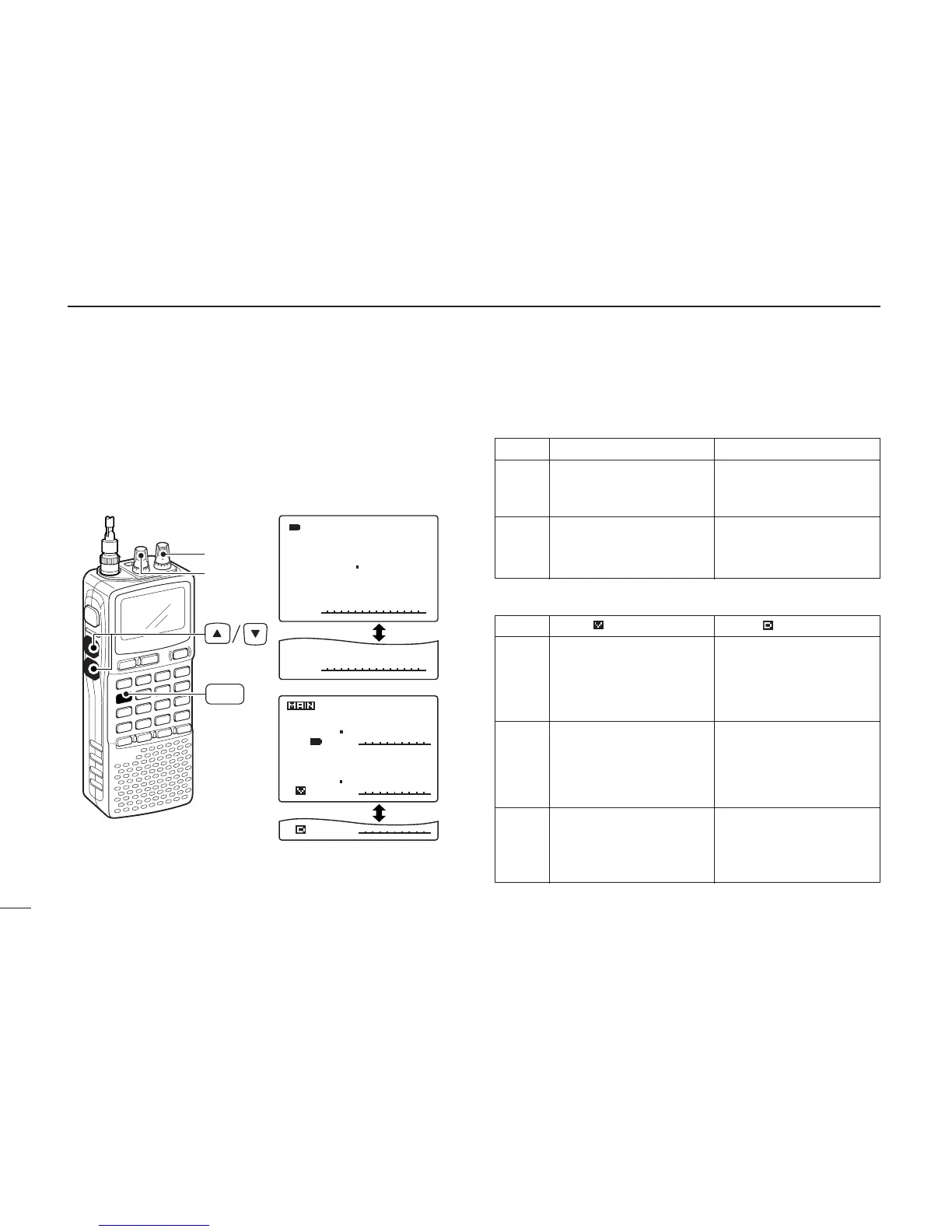
■ [DIAL] function assignment
The frequency control dial can be traded with an audio volume
control dial or [
YY
]/[
ZZ
] keys to suit your preference.
➥
Push [1 DIAL.SEL] for 1 sec. to toggle the dial function
from tuning dial and audio volume.
• Single band operation
• Dualwatch operation
“ ” indication “ ” indication
• Frequency, Memory chan-
nel, Squelch level, Scan-
ning direction for upper
band
• Set mode item and condi-
tion set for MAIN band
• Frequency, Memory chan-
nel, Squelch level, Scan-
ning direction for lower
band
• Set mode item and condi-
tion set for MAIN band
Audio volume set for MAIN
band
[L-DIAL]
[R-DIAL]
[Y]/[Z]
Audio volume set for upper
band
Audio volume set for lower
band
Frequency, Memory chan-
nel, Squelch level, Scanning
direction, Set mode item
and condition set for MAIN
band
“
√√
” indication “
∂∂
” indication
Frequency, Memory chan-
nel, Squelch level, Scanning
direction, Set mode item
and condition set
Audio volume set
[R-DIAL]
[L-DIAL]
[Y]/[Z]
Audio volume set
Frequency, Memory chan-
nel, Squelch level, Scanning
direction, Set mode item
and condition set



 To Next Page