32
7
DTMF MEMORY
1
2
3
4
5
6
7
8
9
10
11
12
13
14
15
16
17
18
19
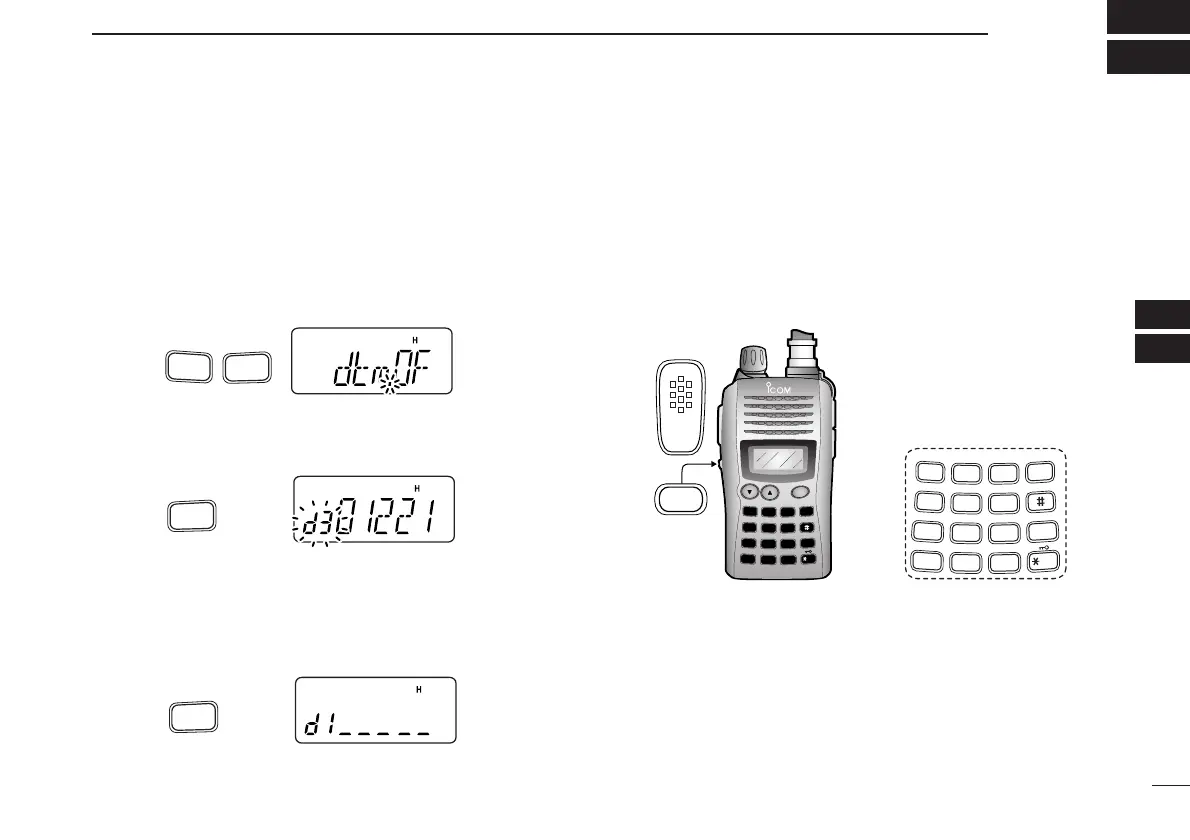
■ Programming a DTMF code sequence
The transceiver has 16 DTMF memory channels (d0 to dF)
for storage of often-used DTMF code sequence of up to 24
digits. DTMF memories are used to store phone numbers or
control codes.
qPush [FUNC], then push
[
OPT
](0)
to enter
OPTION SET MODE
.
• Rotate [VOL] to select “dtm.OF,” if necessary.
w Push and hold
[
OPT
](0)
for 1 sec. to select the DTMF mem-
ory.
• One of “d0” to “dF” appears.
e
Rotate [VOL] to select the desired DTMF memory.
rPush and hold [
OPT
](0) for 1 sec. to enter the DTMF pro-
gramming mode.
•“_____” appears.
• Programmed memories can be cleared in this way.
tEnter the desired DTMF code sequence by pushing the
digit keys, [A], [B], [C], [D], [#] and [✱], in the desired
sequence.
•Amaximum of 24 digits can be input.
• [✱] enters tone “E”, [#] enters tone “F.”
• If a digit is mistakenly input, push [MONI] or [PTT] momentarily
then repeat from step q.
yPush [MONI] or [PTT] to save the digits and exit the DTMF
programming mode.
• Programmed DTMF code sequence sounds when [MONI] is
pushed.
• Or after 24th digit is input, the transceiver automatically saves
the digits and returns to step w.
for 1 sec.
for 1 sec.



 To Next Page