30
6
MEMORY/CALL OPERATION
1
2
3
4
5
6
7
8
9
10
11
12
13
14
15
16
17
18
19
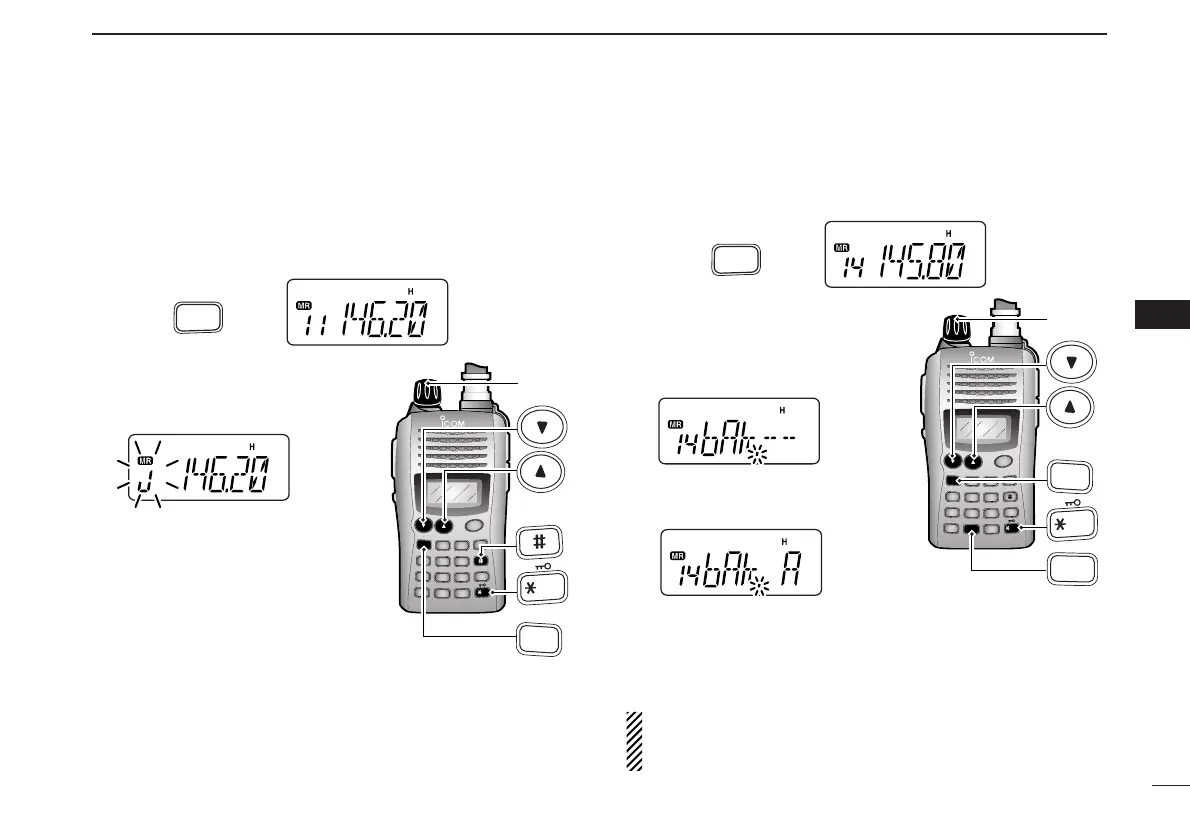
■ Memory bank selection
The IC-V85 has a total of 10 banks (A to J). Each memory
channel, 0 to 99, may be assigned to one of the banks for
easy memory management.
q Push [MR] to select memory mode.
w Push [FUNC] and [
BANK
](#) to
enter memory bank selection.
• Bank indicator blinks.
e Rotate [VOL] to select the de-
sired bank, A to J.
• Banks that have no programmed
contents are skipped.
r Push [✱
ENT
] (or [CLR]) to select
the bank.
• Indicator stops blinking.
t Push [
YY
] or [
ZZ
] to select the channel in the bank.
• No channel numbers are displayed for memory bank operation.
y To return to regular memory condition, push [FUNC] and
[
BANK
](#) to enter memory bank mode, then push [✱
ENT
]
(or [CLR]).
■ Memory bank setting
q Push [MR] to select memory mode, then select the desired
memory channel via [
YY
] or [
ZZ
].
w Push [FUNC] and [
SET
](8) to
enter
SET MODE
.
e Push [
YY
] or [
ZZ
] several times
until “bAk” appears.
r Rotate [VOL] to select the de-
sired bank.
t Push [✱
ENT
] (or [CLR]) to assign the channel to the bank
and return to regular memory condition.
y Repeat steps q to t to assign another memory channel
to the same or another bank.
NOTE: Display type setting (pgs. 20, 53) in
INITIAL SET
MODE
must be selected “FR,” otherwise the memory bank
operation cannot be performed.



 To Next Page