19
4
BASIC OPERATION
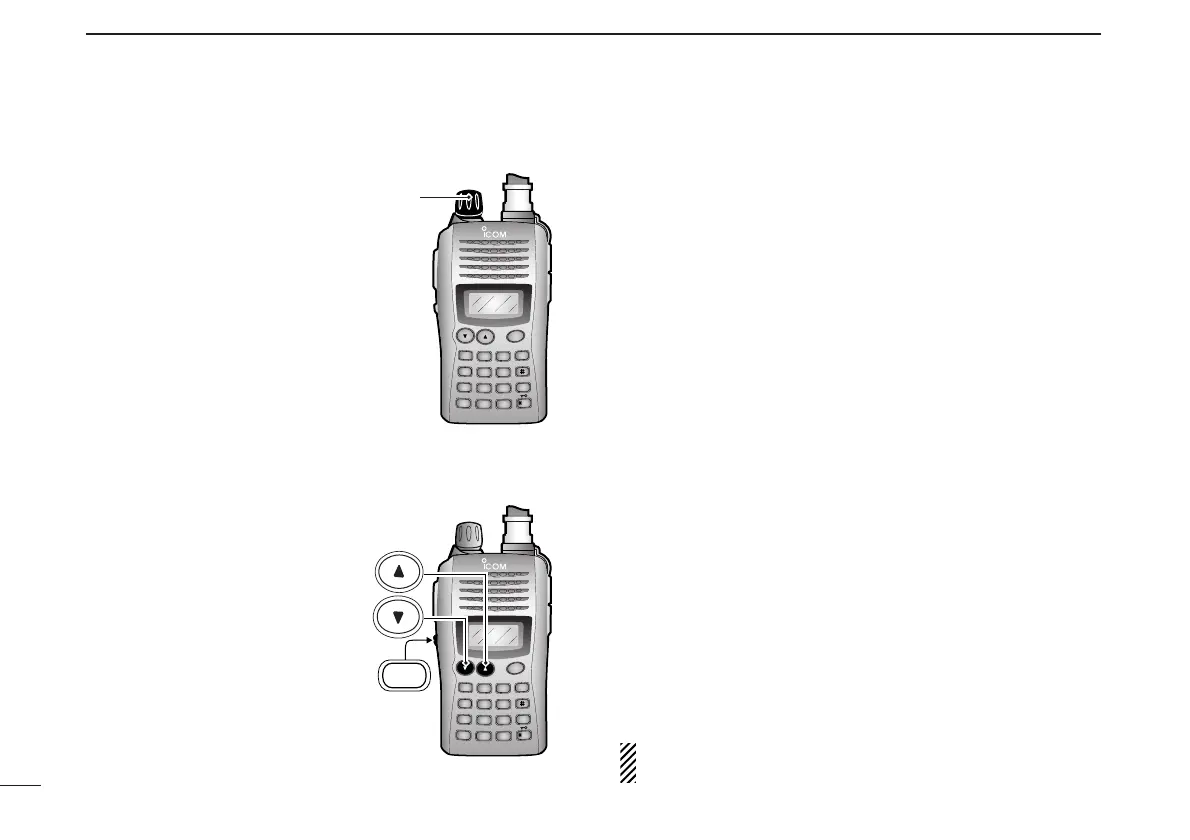
■ Setting audio/squelch level
D To set the audio level
Rotate [VOL] to set the desired
audio level while receiving a
signal.
• When no signal is received, push
and hold [MONI] while setting the
audio level.
• When [VOL] is assigned as tun-
ing dial, push [
YY
]/[
ZZ
] to adjust
the audio output level. (pgs. 18,
53)
D To set the squelch level
While pushing [MONI], push
[
YY
]/[
ZZ
] to set the squelch
level.
• The squelch level “10” is tight
squelch, “1” is loose squelch and
“0” is open squelch.
• When [VOL] is assigned as tun-
ing dial, rotate [VOL] while press-
ing [MONI]. (pgs. 18, 53)
■ Receive and transmit
qPush and hold [PWR] for 1 sec. to turn the power ON.
wAdjust audio volume to the desired level.
eSet the frequency.
When a signal is received:
• Squelch opens and audio is emitted from the speaker.
• Signal indicator shows the relative signal strength level.
rPush [FUNC], then [
H
/
M
/
L
](9) to select output power be-
tween high, middle and low.
• “H” appears when high power is selected.
• “M” appears when middle power is selected.
• “L” appears when low power is selected.
tPush and hold [PTT] to transmit, then speak into the micro-
phone.
• “
$
” appears.
• Do not hold the microphone too close to your mouth or
speak too loudly. This may distort the signal.
yRelease [PTT] to receive.
■ Monitor function
This function is used to listen to weak signals without disturb-
ing the squelch setting or to open the squelch manually even
when mute functions such as the tone squelch are in use.
➥ Push and hold [MONI] to monitor the operating frequency.
The [MONI] key can be set to ‘sticky’ operation in
INITIAL
SET MODE
. See page 55 for details.



 To Next Page