iDirect Evolution X1 Outdoor Satellite Router Installation and Safety Manual 31
Connecting the Ethernet LAN Cable
2.
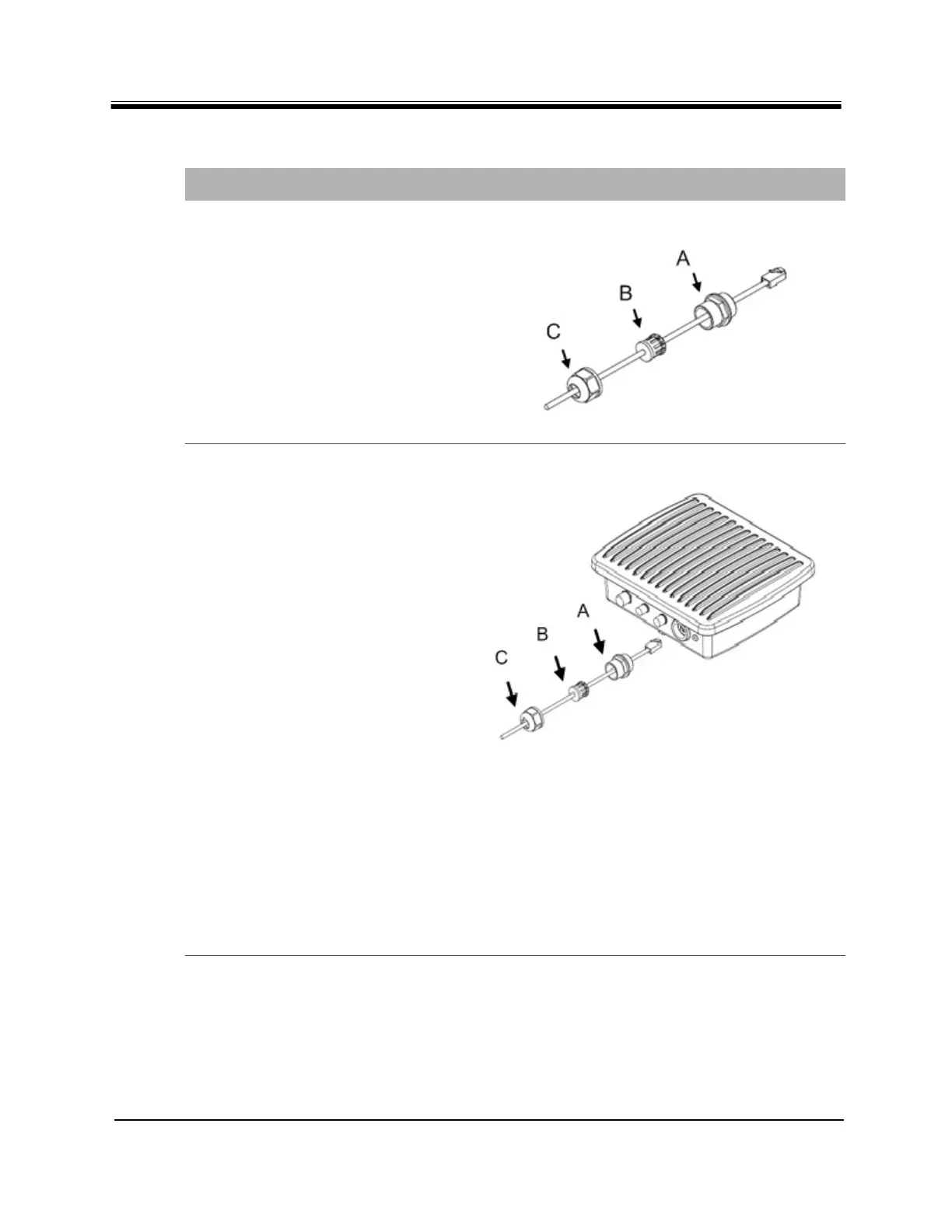
a. Place C, the lock nut
body, onto the cable.
b. Place A, the Sealing nut
onto the cable.
c. The compression nut B,
has a slit so it can be
placed, now, on the
cable.
d. Ensure that the lock nut
(A) threads are facing the
RJ45 end of the cable.
3.
a. Clip the RJ45 connector
and cable into the RJ45
receptacle.
b. Screw the sealing nut (A)
into the X1 Outdoor Unit.
c. Push the compression
ring (B) into the sealing
nut (A).
d. Pass the lock nut body (C)
over the compression ring
(B).
e. Twist the lock nut body
(C) into the sealing nut
(A) until tightly
compressing the entire
gland around the
Ethernet cable forming a
weather tight seal. It is
not necessary to fasten
too tightly, just so the
compression fits securely.
f. Wrap with
weatherproofing (self-
amalgamate tape) over
the connector and cable
junctions according to
manufacturer’s
guidelines.
Table 12. RJ 45 LAN Ethernet Cable Installation Steps (continued)
Step Instructions Diagram



 To Next Page