17
ifm Programming Manual AS-i Gateway AC14 (4.2.x) 12/2017
Getting started Create CODESYS project
>
5.1.1 Create new project with AS-i Gateway AC14
17682
To avoid errors during manual system configuration, it is explicitly recommended to use the
project template from ifm electronic when creating the AS-i Gateway AC14 project in
CODESYS.
Qualifications
> All required software components are correctly installed (→ Installation (→ p. 11)).
> CODESYS successfully started.
1 Create a new project
► Select [File] > [New Project...].
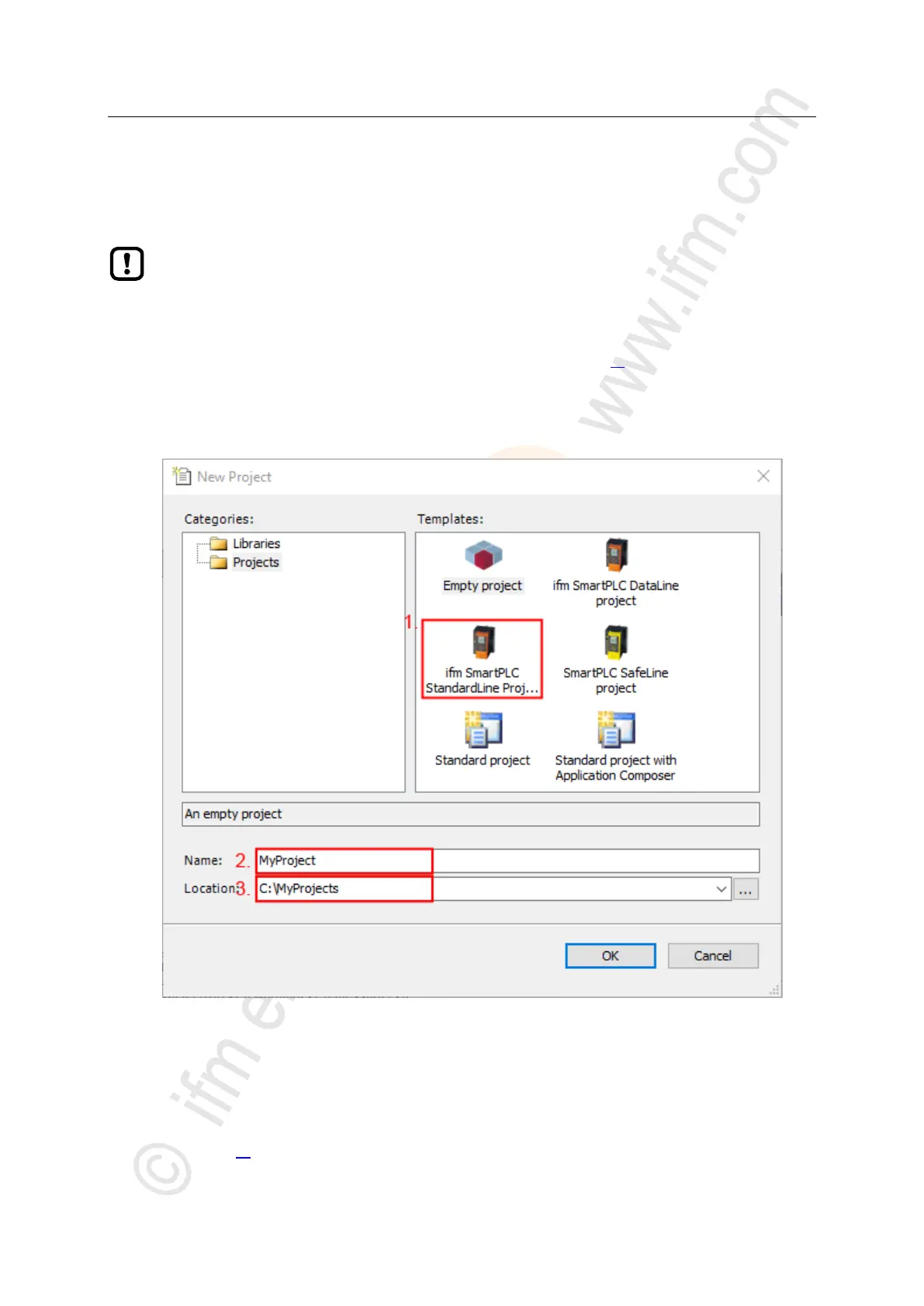
> The window to enter the project properties appears:
► Set the following values:
1. [Templates]: Select [ifm_SmartPLC_StandardLine Projekt].
2. [Name]: Enter project name
3. [Location]: Select the storage location of the project file.
► Click on [OK] to verify the entered values.
> CODESYS creates a new project with AS-i Gateway AC14.
> The window [Devices] shows the device tree of the project (→ Overview: Project structure with AS-i Gateway
AC14 (→ p. 18)).



 To Next Page