43
ifm Programming Manual AS-i Gateway AC14 (4.2.x) 12/2017
Programming Use visualisations
>
7.5.4 Configure visualisation
6953
In order to change the properties of the created visualisations, choose one of the following options:
Change properties of the web visualisation (→ p. 43)
Change the properties of the target visualisation (→ p. 44)
>
Change properties of the web visualisation
17065
To change the attributes of the web visualisation:
► In device tree: Double click on [Web-Visualisierung]
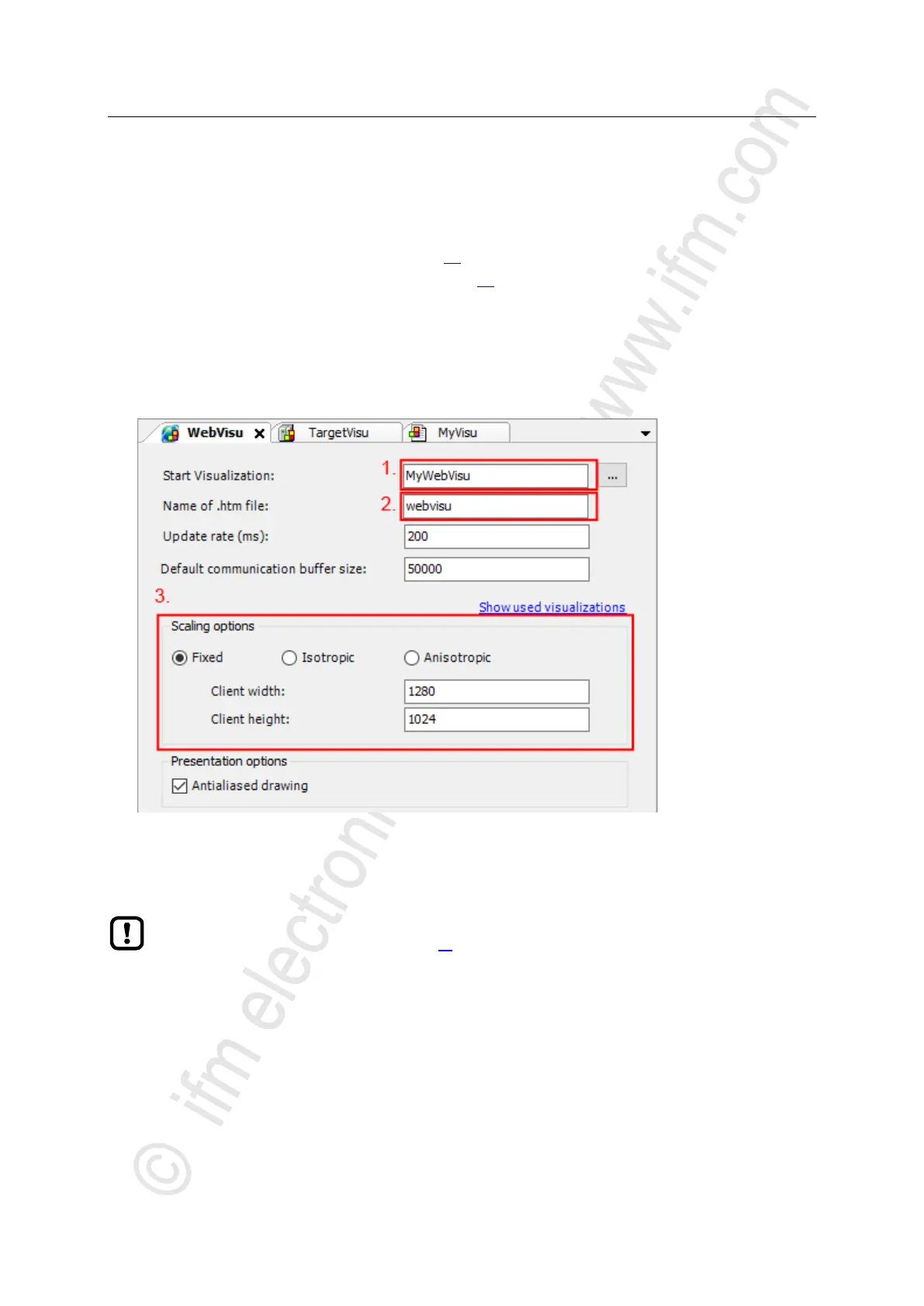
> The editor window shows attributes of the web visualisation:
► Set the following values:
1. Field [Start Visualization]: Select the created web visualisation.
2. Field [Name of .htm file]: Enter name for HTML file (→ Note).
3. Area [Scaling Options]: Enter fixed width and height as shown.
In the field [Name of .htm file] enter the name by which the web visualisation is to be accessible in the web
browser (→ Display web visualisation (→ p. 56)).
► Use only lower case when entering the name!
► Save the project to apply changes.



 To Next Page