24
ifm Programming Manual AS-i Gateway AC14 (4.2.x) 12/2017
Programming Objects of a PLC application
7 Programming
Objects of a PLC application ..................................................................................................................24
Create PLC application ...........................................................................................................................25
Access input and output data .................................................................................................................27
Use functions of the ifm package ...........................................................................................................33
Use visualisations ...................................................................................................................................40
Configure task processing ......................................................................................................................45
Testing the PLC application....................................................................................................................46
7074
This chapter provides information about the programming of the PLC of the device.
► Familiarise yourself with the programming according to the standard IEC 61131-3!
>
7.1 Objects of a PLC application
7143
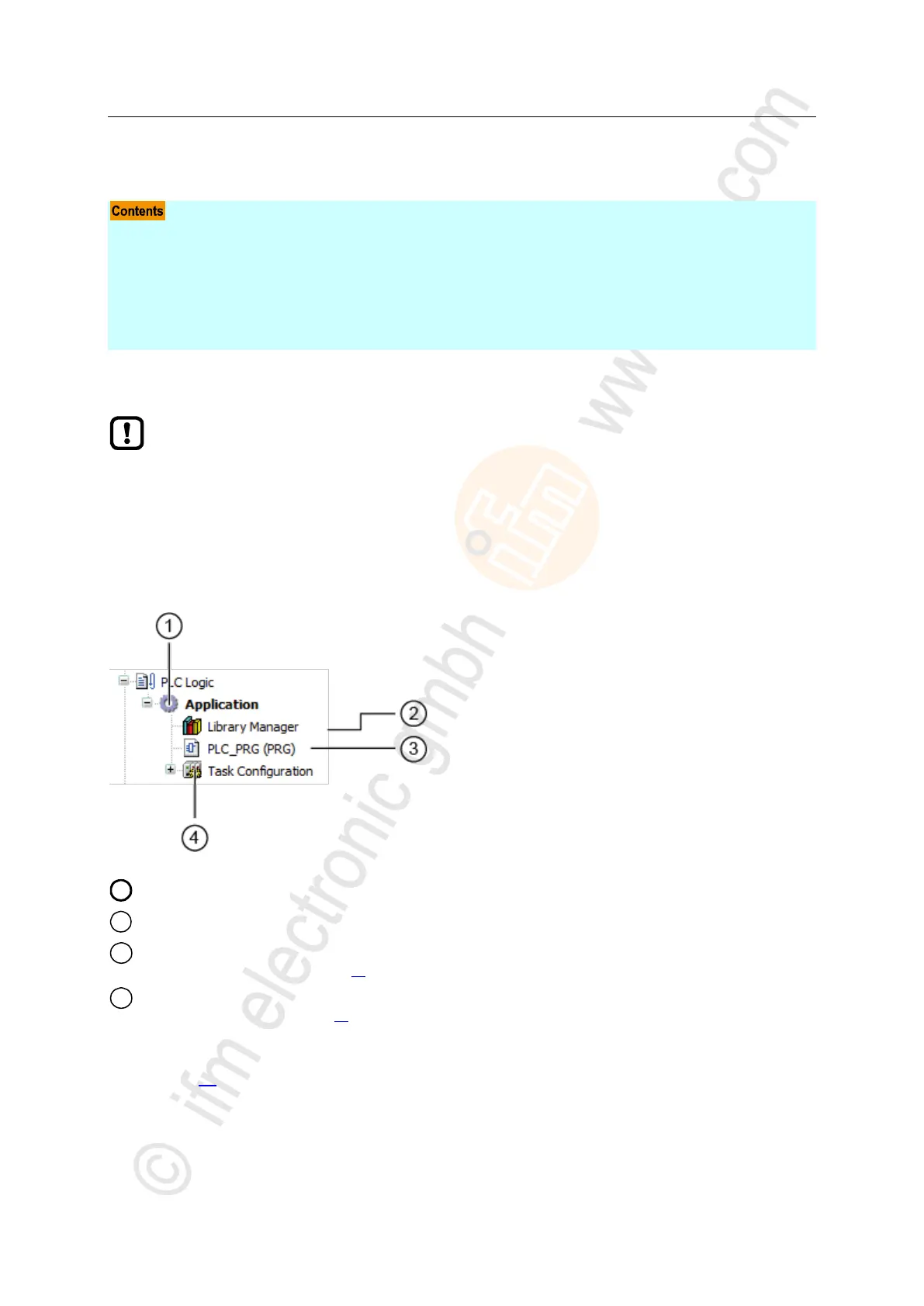
All objects of a PLC application are listed as subelements of the node [Application] in the device tree.
In the basic configuration a PLC application contains the following objects:
[Application] is the container of the PLC application
[Library manager] provides access to the standard and device-specific function libraries.
[PLC_PRG (PRG)] provides access to the program editor of the application
→ Create PLC application (→ p. 25)
[Task configuration] provides access to the settings of the task processing
→ Configure main task (→ p. 45)
If needed, the programmer can add additional objects to the PLC application (→ Add visualisation to a
project (→ p. 41)).



 To Next Page