39
BS-98 1409 VER1 (U) (E)
4.2 Power Supply
■
To Control Power ON/OFF from BS
You can control the power ON/OFF of the camera head from the BS.
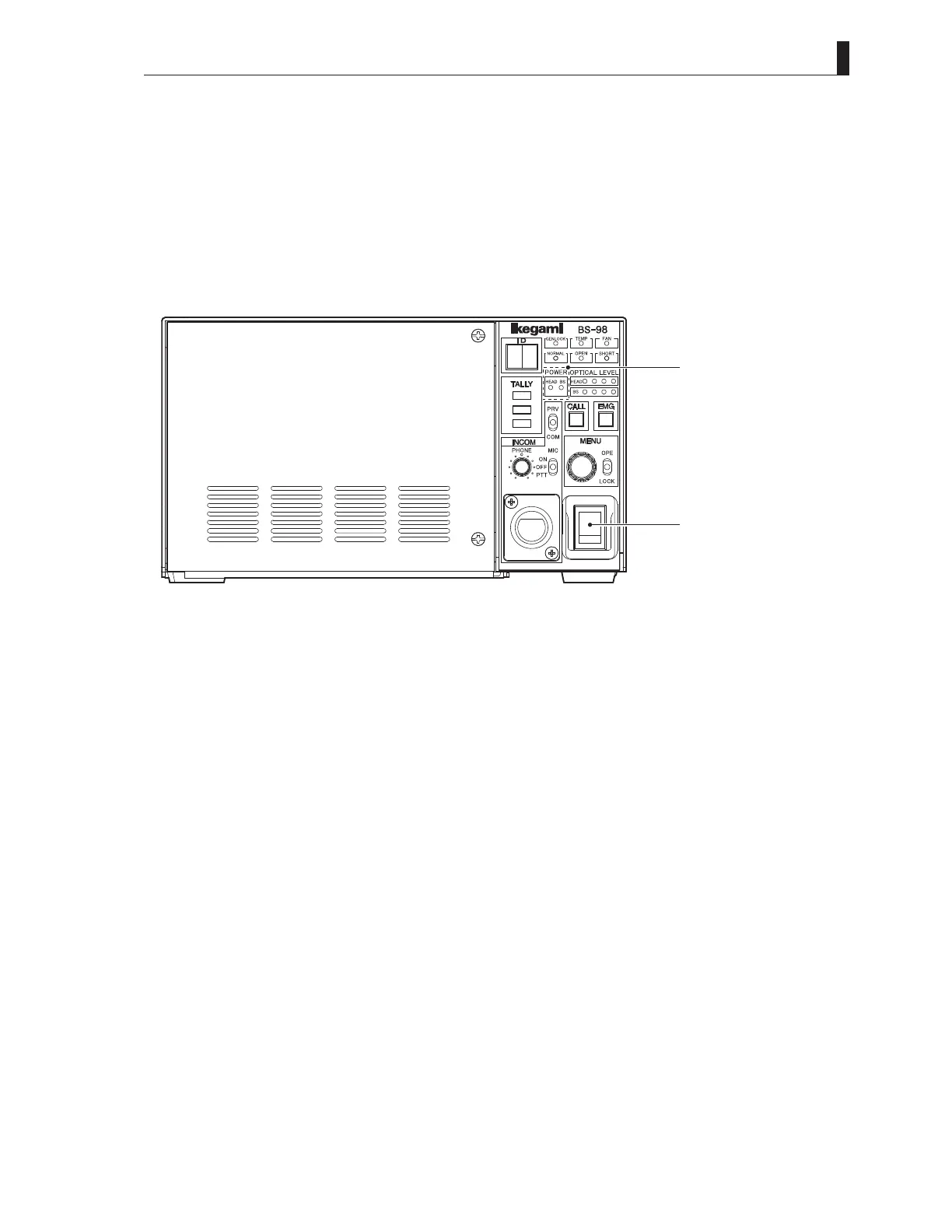
1 Set the [BS MAIN POWER switch] on the front of the BS to "ON".
This turns on the power of the BS and lights the BS MAIN POWER indicator.
In addition, the status of the camera cable connection between the camera head and the BS is automatically checked.
When the connection is judged normal, [NORMAL] green LED lights up.
When the cable is defective, or when the connection is failed, [OPEN]/[SHORT] red LED lights up.
When the power is supplied to the camera head, the HEAD POWER indicator lights up.
HEADPOWERindicator
BSMAINPOWERindicator
BS-98frontview
BSMAINPOWERswitch
CAUTION:
To turn on the BS MAIN POWER switch just after the switch is turned off, wait one or more seconds before you turn on the power.
Repeating the on/off operation within one second activates protector for equipment protection.
When the protector is activated, turn on the BS MAIN POWER switch after five or more seconds later.



 To Next Page