User Manual for the Thermographic System VarioCAM
®
high resolution
8. Operation
60 © InfraTec GmbH 2013 User Manual
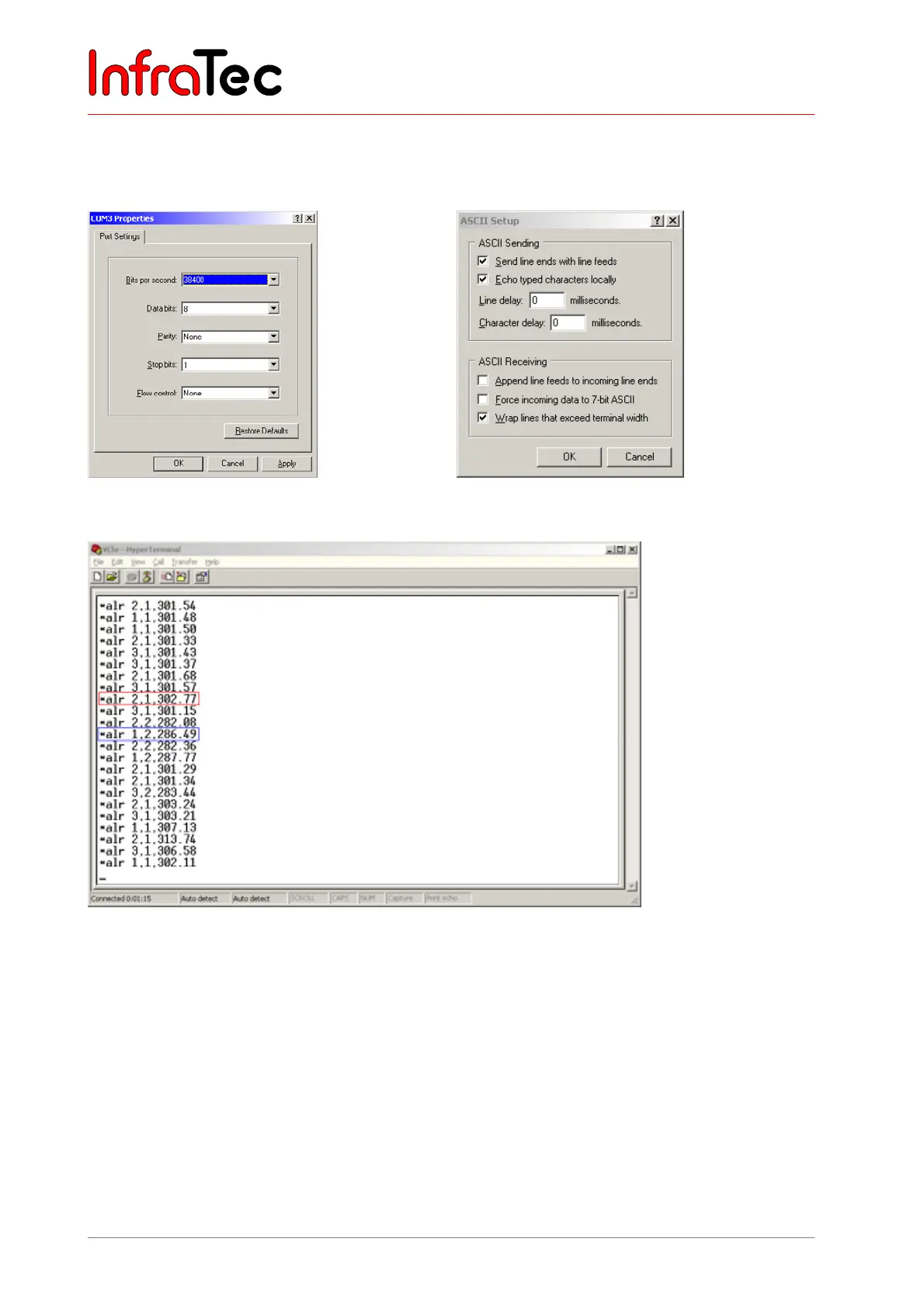
Example for displaying temperature alarm via HyperTerminal
The HyperTerminal is a programme of the operating system and can be called up as follows:
■ Start/Programs/Accessories/Communications/HyperTerminal
Fig. 127 HyperTerminal port settings
Fig. 128 recommended HyperTerminal ASCII
configuration
Fig. 129 HyperTerminal with data of the VarioCAM
®
high resolution
Temperature alarm data is output in the following way: "alr" + "ID, resp. number of the measurement
area (1 to 5)" + "alarm number (1/2)" + "current temperature in Kelvin". Two examples are
highlighted in Fig. 129 referring to the alarm definitions in Fig. 124.
■ Red frame Defined alarm condition 1 (exceeding threshold 1 with 28 °C) was met in
measurement area 2. The current maximum temperature of measurement area
2 is 302.77 K = 29.62 °C.
■ Blue frame Defined alarm condition 2 (deceeding threshold 2 with 15 °C) was met in
measurement area 1. The current minimum temperature of measurement area
1 is 286.49 K = 13.34 °C.



 To Next Page