User Manual for the Thermographic System VarioCAM
®
high resolution
8. Operation
User Manual © InfraTec GmbH 2013 65
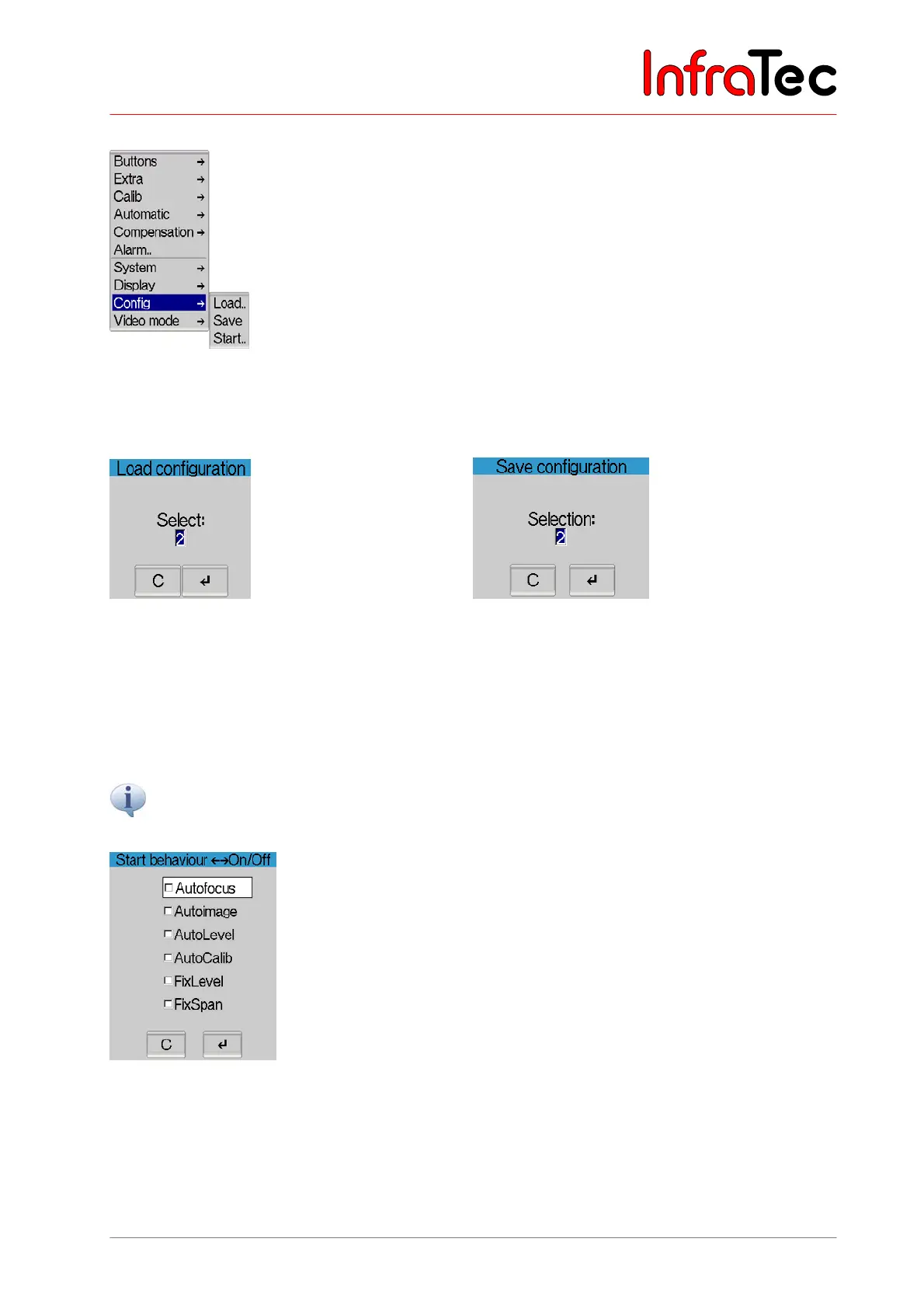
Menu item "Config"
Fig. 142 Menu "Settings" - "Config"
The menu item "Config" allows loading and saving the configuration of the thermographic camera, to
make standard settings and firmware updates.
Fig. 143 Dialogue "Load configuration"
Fig. 144 Dialogue "Save configuration"
Menu item "Load.." permits to load a configuration
(0 ... 5/9*).
Menu item "Save" serves to save the current
configuration (1 ... 5/9*).
The number of configurations that can be saved is dependent on the version of equipment. Configuration
0 contains the default setting and cannot be overwritten.
Please note that loading the default setting will reverse all previously saved individual settings. The default
settings define English to be the system language.
Fig. 145 Dialogue "Start behaviour"
By selecting the menu item "Start..", a dialogue will be shown (see Fig. 145) in which the start behaviour
of the thermographic camera can be determined:
■ "Autofocus" VarioCAM
®
hr performs autofocus.



 To Next Page