35
Connecting the DTR-8.4
—Continued
■
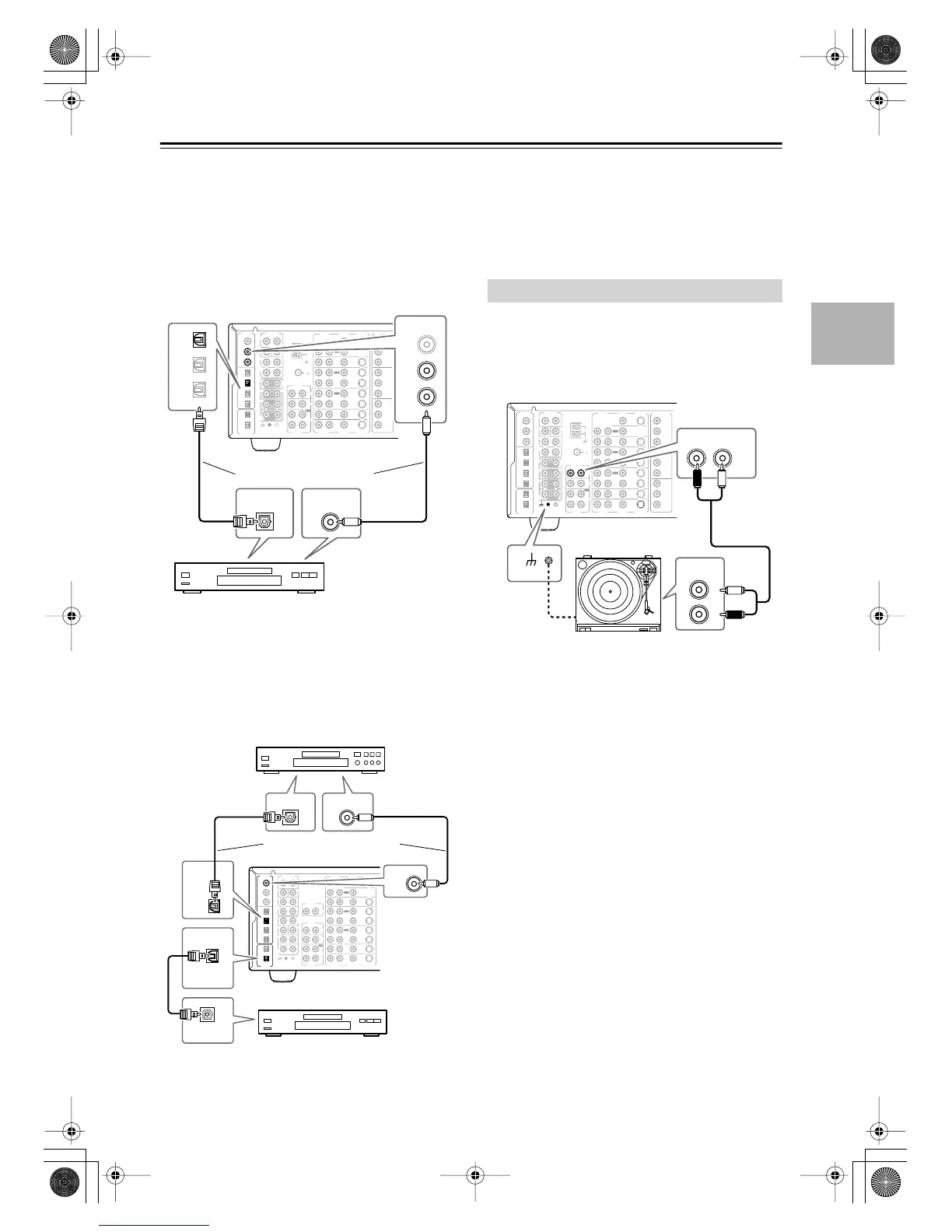
Using Coaxial or Optical Connections
(playback only)
• Use a coaxial digital audio cable to connect the
DTR-8.4’s DIGITAL IN COAX 2, or 3 to the coaxial
output on your recorder, as shown.
OR
• Use an optical digital audio cable to connect the
DTR-8.4’s DIGITAL IN OPT 2 to the optical output
on your recorder, as shown.
You might need to change the digital input-to-input
source assignments (page 45).
■
Digital Recording
If your recorder has a digital input, by connecting it to
one of the DTR-8.4’s DIGITAL OUTs you can record
digitally. Since the DTR-8.4 does not convert analog
input signals to digital and vice versa, only input signals
connected to a DIGITAL IN can be recorded digitally.
Note:
Don’t connect the recorder’s digital output to the
DTR-8.4 when the recorder’s digital input is connected
to one of the DTR-8.4’s digital outputs. Doing so may
create a signal loop and cause a malfunction.
The DTR-8.4’s phono inputs are for use with moving
magnet (MM) type cartridges.
Use an analog audio cable (RCA/phono) to connect the
DTR-8.4’s AUDIO PHONO IN L/R inputs to the audio
outputs on your turntable, as shown.
Notes:
• If your turntable has a ground wire, connect it to the
GND screw on the DTR-8.4. With some turntables,
connecting the ground wire may cause hum, in which
case it should be disconnected.
• If your turntable has a moving coil (MC) type car-
tridge, you’ll need a commercially available MC
phono preamp. Connect the phono preamp to your
turntable, and then connect the phono preamp to the
DTR-8.4’s AUDIO PHONO IN L/R inputs.
FM
75
OUT
OUT
OUT
OUT
L
PHONO
DIGITAL
IN
PRE OUT
DIGITAL
OUT
OPT
OPT
2
1
2
3
4
1
2
FRONT
SUB
SURR
R
L
AUDIO
R
L
CD
TAPE
R
L
AUDIO
VIDEO
S VIDEO
MONITOR
OUT
R
L
IN
IN
IN
IN
IN
IN
IN
ZONE 2
DVD
VIDEO 1
VIDEO 2
VIDEO 3
VIDEO 4
AUDIO
AUDIO
VIDEO
S VIDEO
1
3
GND
SURR
BACK/
ZONE 2
R
L
IN
COAX
R
CENTER
R
L
MULTI CH
INPUT
FRONT
SUB
SURR
SURR
BACK
CENTER
R
L
AM
ANTENNA
COMPONENT
VIDEO
Y
P
B
PR
OUTPUT
INPUT 1
Y
P
B
PR
INPUT 2
Y
P
B
PR
DIGITAL
IN
2
3
1
COAX
2
3
4
DIGITAL OUT
OPTICAL
DIGITAL OUT
COAXIAL
DAT, CD, or MD
recorder
Connect one or the other
OUT
OUT
OUT
OUT
L
PHONO
DIGITAL
IN
PRE OUT
DIGITAL
OUT
OPT
OPT
2
1
2
3
4
1
2
FRONT
SUB
SURR
R
L
AUDIO
R
L
AUDIO
R
L
CD
TAPE
R
L
AUDIO
VIDEO
S VIDEO
MONITOR
OUT
R
L
IN
IN
IN
IN
IN
IN
IN
IN
ZONE 2
DVD
VIDEO 1
VIDEO 2
VIDEO 3
VIDEO 4
AUDIO
AUDIO
VIDEO
S VIDEO
1
3
GND
SURR
BACK/
ZONE 2
R
L
IN
COAX
TUNER
R
L
MULTI CH
INPUT
FRONT
SUB
SURR
SURR
BACK
CENTER
R
R
L
CENTER
COAX
IN
OPT
2
DIGITAL
IN
OPT
2
DIGITAL
OUT
OPTICAL
DIGITAL OUT
COAXIAL
DIGITAL OUT
OPTICAL
DIGITAL IN
DAT, CD, or MD recorder
Digital source
(DAT, CD, MD
player)
Connect one or the other
Connecting a Turntable
FM
75
OUT
OUT
OUT
OUT
L
PHONO
DIGITAL
IN
PRE OUT
DIGITAL
OUT
OPT
OPT
2
1
2
3
4
1
2
FRONT
SUB
SURR
R
L
AUDIO
R
L
CD
TAPE
R
L
AUDIO
VIDEO
S VIDEO
MONITOR
OUT
R
L
IN
IN
IN
IN
IN
IN
IN
ZONE 2
DVD
VIDEO 1
VIDEO 2
VIDEO 3
VIDEO 4
AUDIO
AUDIO
VIDEO
S VIDEO
1
3
GND
SURR
BACK/
ZONE 2
R
L
IN
COAX
R
CENTER
R
L
MULTI CH
INPUT
FRONT
SUB
SURR
SURR
BACK
CENTER
R
L
AM
ANTENNA
COMPONENT
VIDEO
Y
P
B
PR
OUTPUT
INPUT 1
Y
P
B
PR
INPUT 2
Y
P
B
PR
L
R
AUDIO
OUTPUT
PHONO
AUDIO
R
L
IN
GND
DTR-8.4En.book Page 35 Thursday, October 16, 2003 11:09 AM



 To Next Page