54
Basic Operation
—Continued
With the built-in tuner you can enjoy AM and FM radio
stations. You can store your favorite radio stations as pre-
sets for quick selection.
Tuning into Radio Stations
Notes:
• The tuner frequency changes in 0.1 MHz steps for FM
and 10 kHz steps for AM (0.05 MHz and 9 kHz
respectively on some models).
■
Listening to Stereo FM Radio Stations
When the DTR-8.4 is properly tuned to a radio station,
the “ TUNED ” indicators appear on the display.
When the DTR-8.4 is properly tuned to a stereo FM
radio station, the “FM STEREO” indicator appears as
well.
If the signal from a stereo FM station is weak, it may be
impossible to achieve good reception. If this happens,
press the DTR-8.4’s [FM Mode] button to listen to the
station in mono (the “AUTO” and “FM STEREO” indi-
cators go off).
■
Specifying Radio Stations by Frequency
To select a radio station by entering its frequency, press
the remote controller’s [Direct Tuning] button, and then
use the number buttons to enter the frequency.
Presetting Radio Stations
You can store up to 40 AM and FM radio stations as pre-
sets.
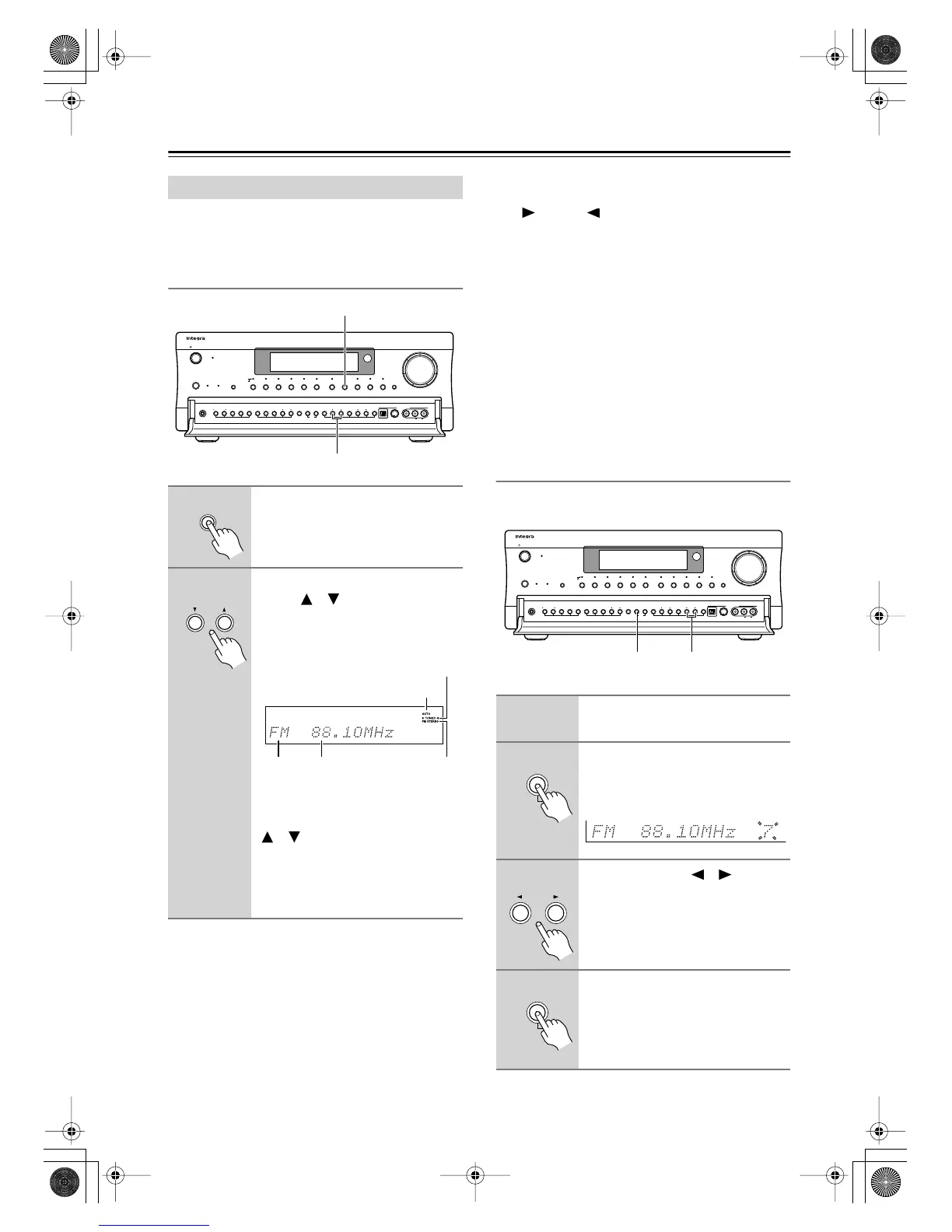
Using the Tuner
1
Use the [Tuner] input selector
button to select either AM or FM.
2
Use the DTR-8.4’s Tuning Up/
Down [ ]/[ ] buttons to tune
into a station.
The following illustration shows the
tuner-related indicators on the display.
To locate an FM station automatically,
press and hold the Tuning Up or Down
[ ]/[ ] button for more than 1/2 a
second. The DTR-8.4 scans the FM
band up or down, depending on which
button you pressed, stopping when a
stereo FM station is found.
Display
Audio
Selector
Direct/
Pure Audio
Master Volume
Standby/On
Video 1
Video 3 Tape
Tuner Phono Net AudioCD
DVD
Video 2
VCR 1 VCR 2
Video 4 Video 5
Zone 2
()
GRN
Rec
()
RED
Pure Audio psamplingU
Standby
Phones
Zone 2 Level
Stereo Surround THX DSPRec Out Zone 2 Off Dimmer Memory
Clear
FM Mode
Setup Tuning
Enter Preset Return
S Video Audio
Video L R
Digital
Video 5 Input
2
1
Tuner
Tuning
AUTO indicator
TUNED indicator
FM STEREO
indicator
FrequencyBand
1
Tune into a radio station as
explained previously.
2
Press the DTR-8.4’s [Memory]
button.
The preset number flashes.
3
Use the PRESET [ ]/[ ] buttons
to select a preset from 1 to 40.
4
Press the [Memory] button to
store the preset.
The preset number stops flashing.
You can name your presets for easy
identification (see page 73).
Display
Audio
Selector
Direct/
Pure Audio
Master Volume
Standby/On
Video 1
Video 3 Tape
Tuner Phono Net AudioCD
DVD
Video 2
VCR 1 VCR 2
Video 4 Video 5
Zone 2
()
GRN
Rec
()
RED
Pure Audio psamplingU
Standby
Phones
Zone 2 Level
Stereo Surround THX DSPRec Out Zone 2 Off Dimmer Memory
Clear
FM Mode
Setup Tuning
Enter Preset Return
S Video Audio
Video L R
Digital
Video 5 Input
32, 4
Memory
ch
Preset
Memory
DTR-8.4En.book Page 54 Thursday, October 16, 2003 11:09 AM



 To Next Page