72
Advanced Setup
—Continued
This section explains the items on the Preference menu.
Note:
• This procedure can also be performed by using the
DTR-8.4’s [Setup] button, [ ]/[ ]/[ ]/[ ] but-
tons, and [Enter] button.
4-1. Volume Setup
■
a. Volume Display
With this preference you can choose how the volume
level is displayed.
Absolute:
Display range is 0 to 100.
Relative:
Display range is –
∞
dB, –81 dB, –80 dB
through +16 dB, +17 dB, and Max.
The absolute value 82 is equal to the relative value 0 dB.
■
b. Muting Level
This setting determines the volume level while the
DTR-8.4 is muted (see page 52). It can be set to –
∞
dB
(default) or between –50 dB and –10 dB in 10 dB steps.
■
c. Maximum Volume
With this preference you can prevent the volume being
set too high by specifying a maximum volume level.
When the Volume Display preference is set to Absolute,
the range is from 50 to 99. When it’s set to Relative, the
range is –32 dB through +17 dB. To specify no maxi-
mum volume, select “Off.”
■
d. Power On Volume
With this preference you can specify the volume setting
to be used each time the DTR-8.4 is turned on.
When the Volume Display preference is set to Absolute,
the range is from 0 to 100. When it’s set to Relative, the
range is –
∞
dB, –81 dB through +18 dB. To use the same
volume level that was used when the DTR-8.4 was
turned off, select “Last.”
4-2. Headphones Level
■
a. Headphones Level
With this preference you can specify the headphone vol-
ume relative to the main volume. This is useful if there’s
a volume difference between your speakers and your
headphones. The headphone volume can be set between
–12 dB and +12 dB.
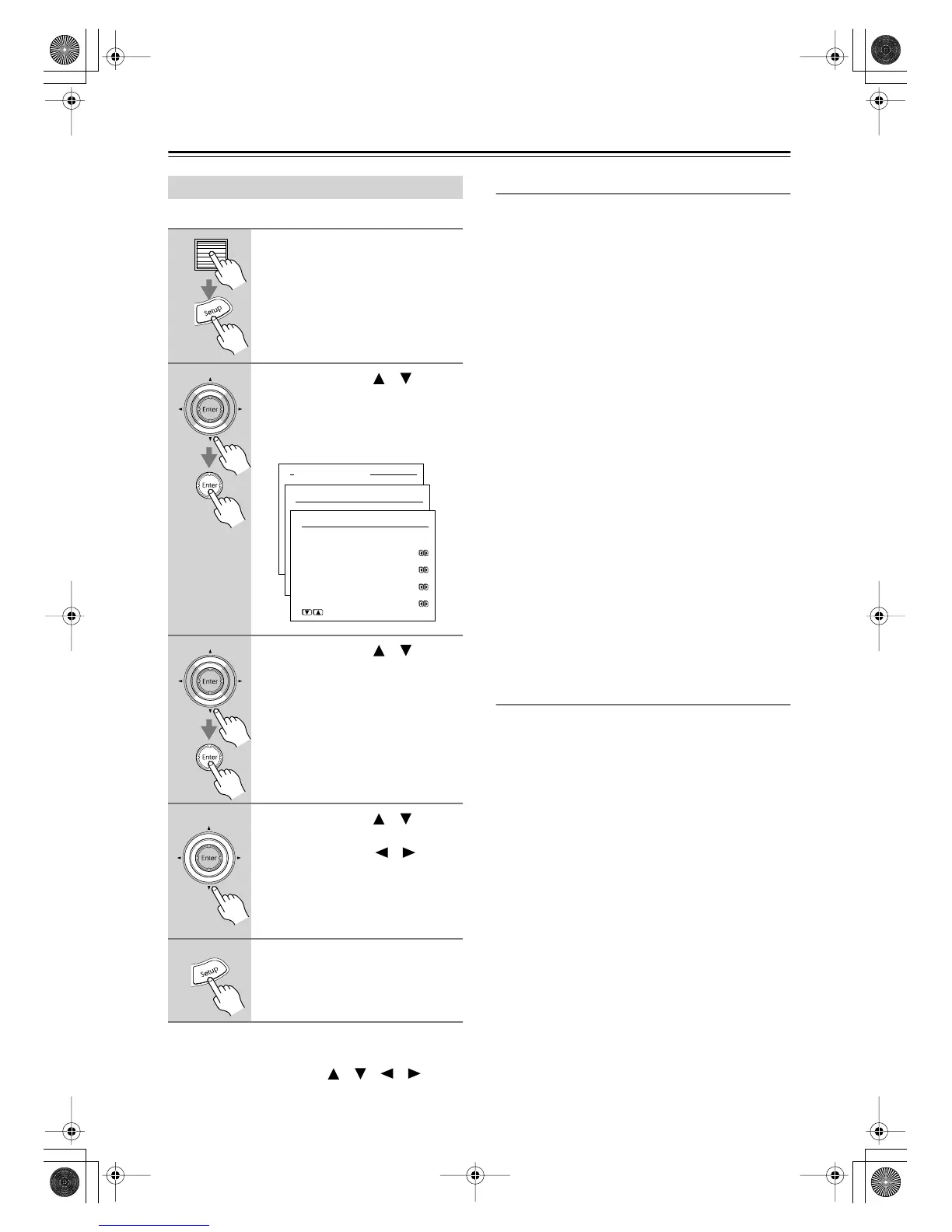
Setting Preferences
1
Press the scroll wheel, and then
press the [Setup] button.
The main menu appears onscreen.
2
Use the Up/Down [ ]/[ ] but-
tons to select “4. Preference,”
and then press the [Enter] but-
ton.
The Preference menu appears.
3
Use the Up/Down [ ]/[ ] but-
tons to select the menu items,
and then press the [Enter] but-
ton.
4
Use the Up/Down [ ]/[ ] but-
tons to select the settings, and
use the Left/Right [ ]/[ ] but-
tons to set them.
The settings are explained below.
5
Press the [Setup] button.
The setup menu closes.
Advanced Menu
4.Preference
4-1.Volume Setup
a.Volume Display
:Absolute
b.Muting Level
:-oodB
c.Maximum Volume
:Off
d.Power On Volume
:Last
Quit:|SETUP|
DTR-8.4En.book Page 72 Thursday, October 16, 2003 11:09 AM



 To Next Page