14
Remote Controller
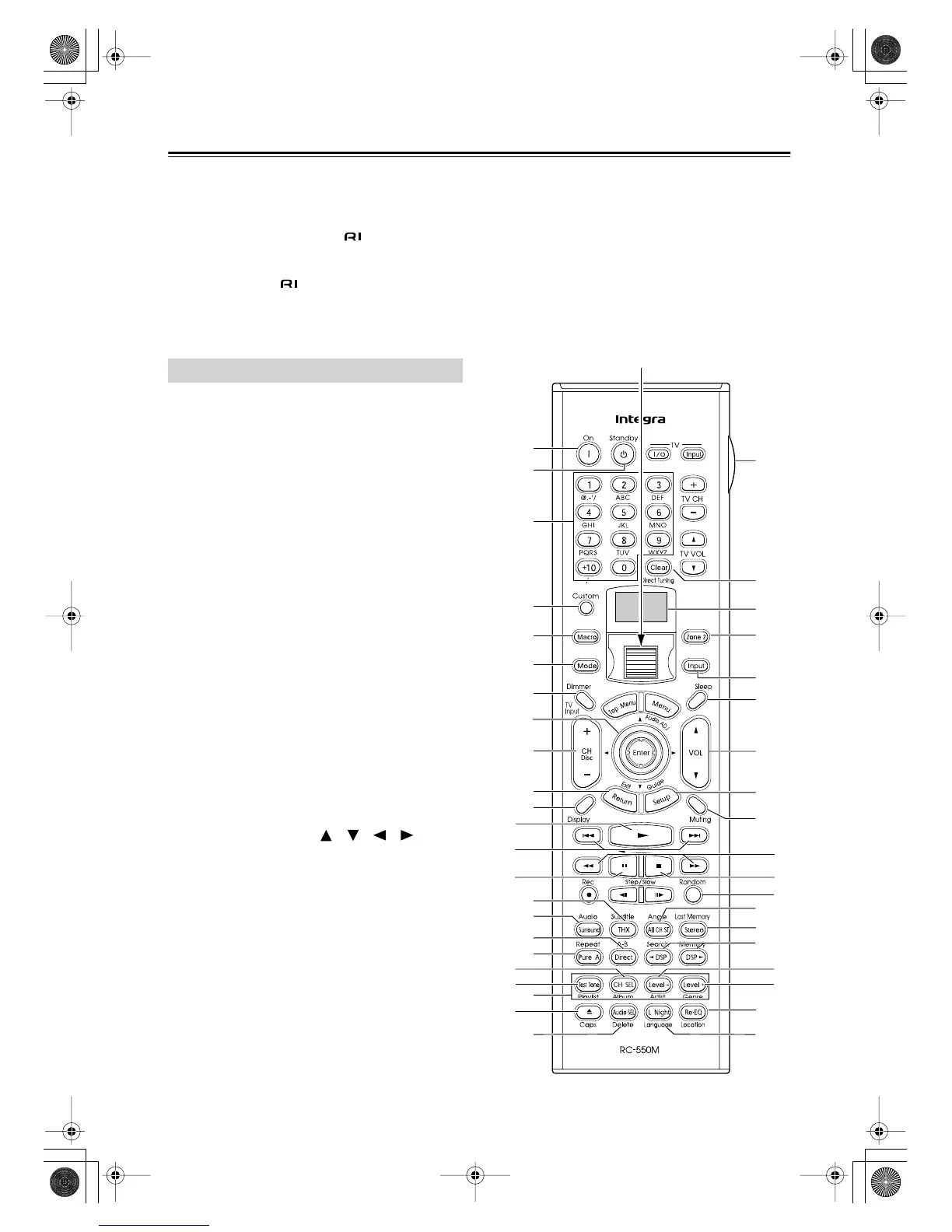
The DTR-8.4’s remote controller is a multipurpose
device that can be used to control not just the DTR-8.4
but your other AV components as well. This section
explains how it’s various operating modes can be used to
control the DTR-8.4 and various -compatible Inte-
gra/Onkyo components. See page 88 for information on
using the remote controller to control Integra/Onkyo
components without and TVs, VCRs, and AV com-
ponents made by other manufacturers.
For detailed information, refer to the pages in parenthe-
sis.
Amp mode is used to control the DTR-8.4.
To select
Amp mode, press the scroll wheel. “AMP” appears
on the display.
Note:
While neither the [Input] button nor [Mode] button is
illuminated, rolling the scroll wheel changes the input
source and remote controller mode simultaneously.
Boxed numbers are for Net-Tune mode (page 15).
A
On button (38)
This button is used to turn on the DTR-8.4.
B
Standby button (38)
This button is used to set the DTR-8.4 to Standby.
C
Number/letter buttons (54, 55, 73)
These buttons are used to enter numbers and letters.
D
Custom button (88)
This button is used to access various settings that
you can use to customize the operation of the
remote controller.
E
Macro button (96)
This button is used with the Macro function.
F
Mode button
This button is used with the scroll wheel to select
the remote controller modes.
G
Dimmer button (52)
This button is used to adjust the display brightness.
H
Up/Down/Left/Right [ ]/[ ]/[ ]/[ ] &
Enter buttons
These buttons are used to select items on the
onscreen setup menus (OSD). The Enter button is
also used to enter names and to confirm settings.
I
CH/Disc button (55)
This button is used to select radio presets.
J
Return/Exit button
This button is used to return to the previously dis-
played onscreen setup menu (OSD).
K
Display button (61)
This button is used to display various information
about the currently selected input source.
L
THX button (59)
This button is used to select the THX listening
modes.
M
Surround button (59)
This button is used to select the Dolby and DTS lis-
tening modes.
N
Direct button (59)
This button is used to select the Direct listening
mode.
O
Pure A button (59)
This button is used to select the Pure Audio listen-
ing mode.
Amp Mode
A
C
D
E
F
G
I
J
L
O
N
P
B
R
T
U
S
W
Y
Z
a
c
e
b
d
X
V
2
3
4
5
1
9
8
0
A
B
C
G
I
J
H
F
E
K
H
6
7
M
Q
D
Scroll wheel
DTR-8.4En.book Page 14 Thursday, October 16, 2003 11:09 AM



 To Next Page