77
Net-Tune
—Continued
This section explains how to use Internet radio. You can
select stations by genre, location, or language.
To use Internet radio, you must connect the DTR-8.4 to
a network with Internet access (see page 75).
Note:
• If you’re using a narrowband Internet connection (e.g.,
56K modem, ISDN), depending on the station, Inter-
net radio may not work satisfactorily. Use a broadband
connection for best results (e.g., cable modem, xDSL
modem, etc).
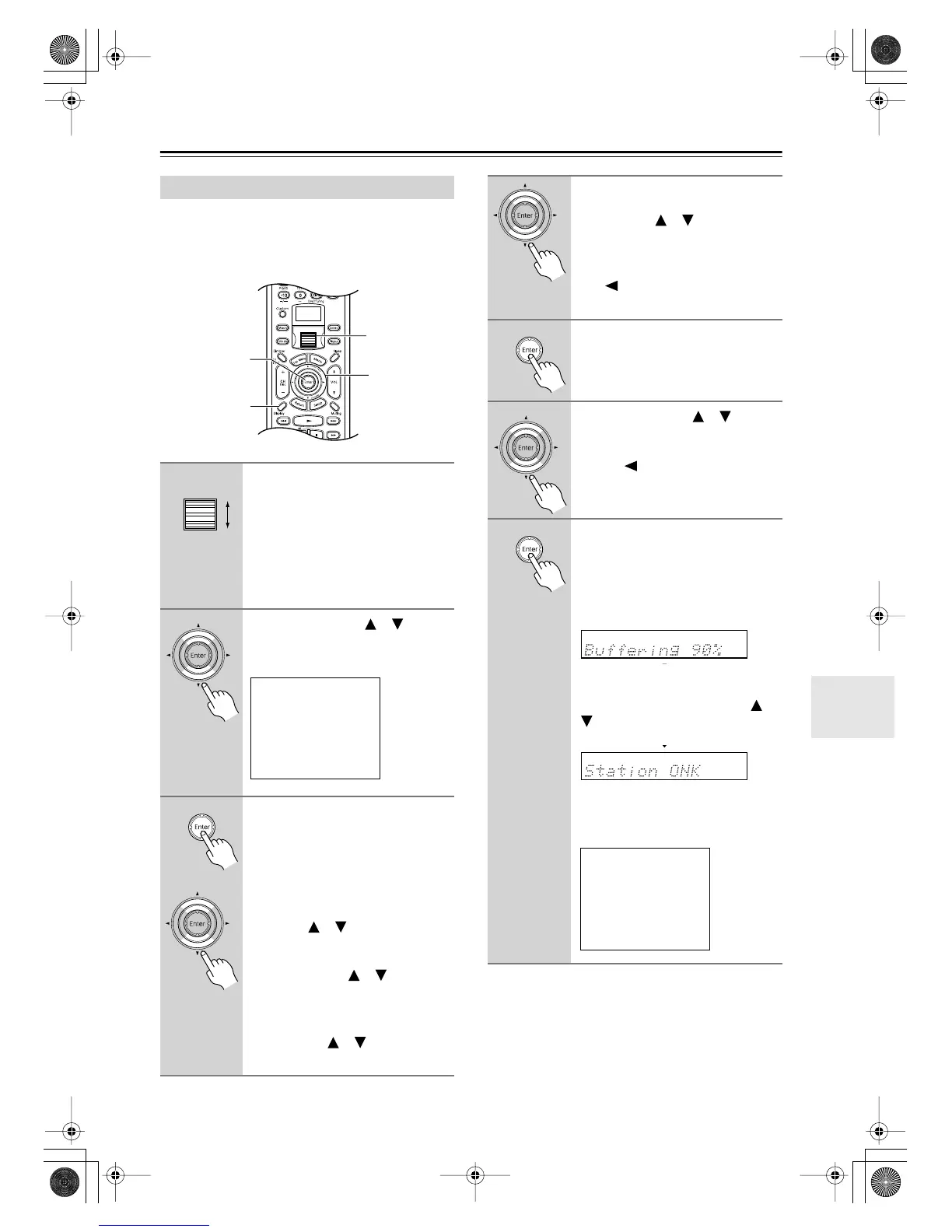
Using Internet Radio
1
While either the [Input] button
nor [Mode] button is illuminated,
rolling the scroll wheel to select
IRD (Internet Radio).
“NET-T” appears on the bottom line.
If the Internet Radio menu doesn’t
appear onscreen, press the remote con-
troller’s [Display] button.
2
Use the Up/Down [ ]/[ ] but-
tons to select Genres, Location,
or Language.
3
Press the [Enter] button.
The DTR-8.4 accesses the XiVA-Net
online database to see what radio sta-
tions are available. This may take
awhile.
If you select Genres:
When the Genre menu appears, use the
Up/Down [ ]/[ ] buttons to select a
genre, and then press the [Enter] but-
ton. When the subgenre menu appears,
use the Up/Down [ ]/[ ] buttons to
select a subgenre.
If you select Location:
When the Location menu appears, use
the Up/Down [ ]/[ ] buttons to
select a location.
2, 3, 5
3, 4, 6
1
1
i Net Radio(Menu)
1.Genres
2.Location
3.Language
If you select Language:
When the Language menu appears, use
the Up/Down [ ]/[ ] buttons to
select a language.
If no information is found, “No List”
appears onscreen. In this case, press the
Left [ ] button to return to the previ-
ous menu.
4
Press the [Enter] button.
A list of available radio stations appears
onscreen.
5
Use the Up/Down [ ]/[ ] but-
tons to select a radio station.
To return to the previous menu, press
the Left [ ] button.
6
Press the [Enter] button.
The DTR-8.4 connects to the selected
radio station and begins buffering audio
data, the progress of which is displayed
in percent. When buffering reaches
100%, playback starts.
To display information about the cur-
rent radio station on the DTR-8.4, as
shown below, use the Up/Down [ ]/
[] buttons. If no information is avail-
able, “No Info” appears.
If you’re using the onscreen display
(OSD), the available information
appears as shown below.
iNet Radio Station ONK
7ch
Track:
Station ONK Live
Program:
Station ONK Live
Artist:
RealOnkyoNet.com
Data:
WMA 20kbps
Tuned
DTR-8.4En.book Page 77 Thursday, October 16, 2003 11:09 AM



 To Next Page