28
Connecting the DTR-8.4
—Continued
Video Connections
You only need to use one of the following connection
methods.
■
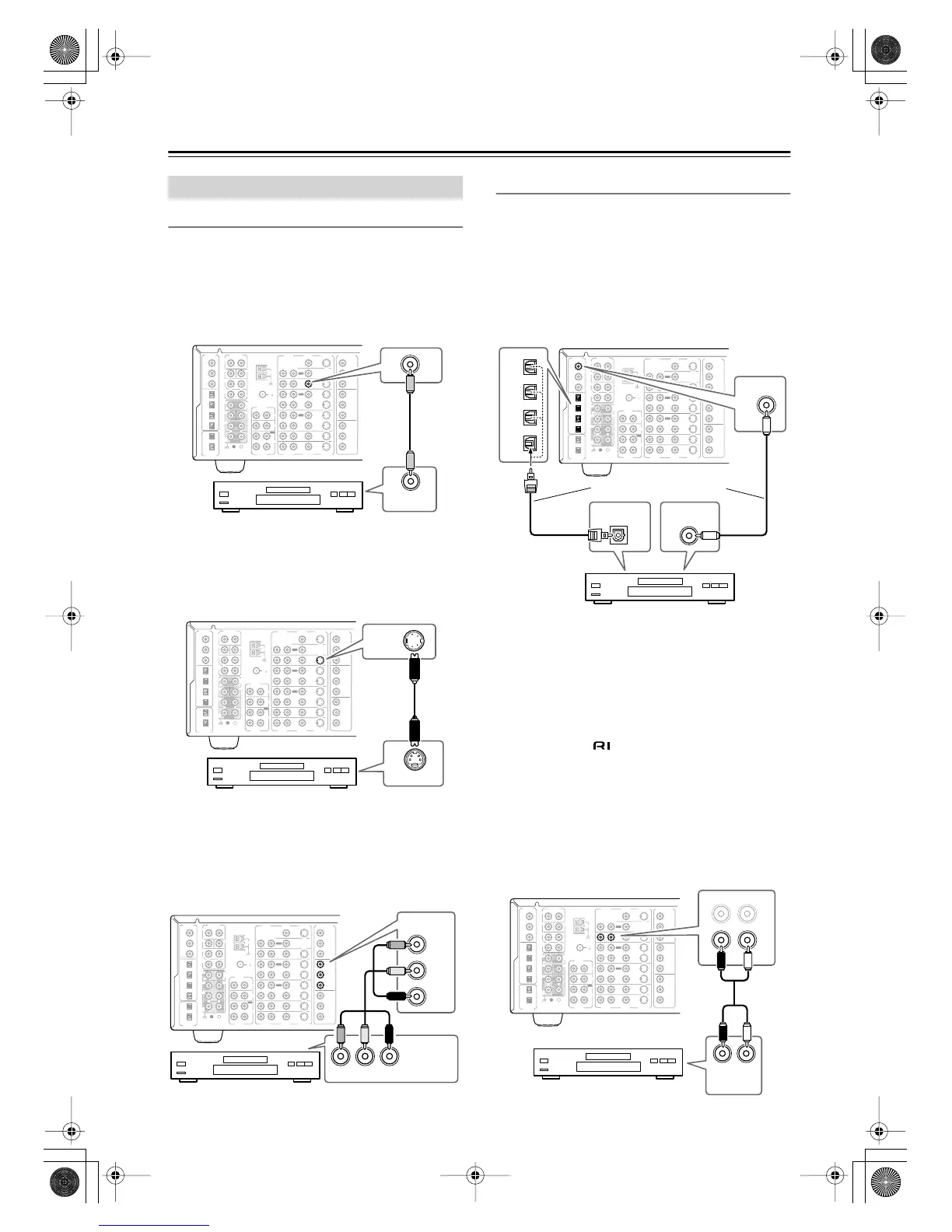
Using Composite Video
Use a composite video cable to connect the DTR-8.4’s
VIDEO DVD IN to the composite video output on your
DVD player, as shown.
■
Using S-Video
Use an S-Video cable to connect the DTR-8.4’s
S VIDEO DVD IN to the S-Video output on your DVD
player, as shown.
■
Using Component Video
Use a component video cable to connect the DTR-8.4’s
COMPONENT VIDEO INPUT 1 to the component
video output on your DVD player, as shown.
•Your TV must also be connected via component video.
Audio Connections
■
Using Coaxial or Optical Connections
• Use a coaxial digital audio cable to connect the
DTR-8.4’s DIGITAL IN COAX 1 to the coaxial out-
put on your DVD player, as shown.
OR
• Use an optical digital audio cable to connect the
DTR-8.4’s DIGITAL IN OPT 1, 2, 3, or 4 to the opti-
cal output on your DVD player, as shown.
Initially, the COAX 1 digital input is assigned to the
DVD input source. If you connect your DVD player to a
different digital input, you’ll need to reassign the DVD
input source (see page 45).
■
Using Analog Connections
Even if your DVD player is connected digitally (coaxial
or optical), to use , or to record audio from your
DVD player, you’ll need to make analog connections as
well.
Use an analog audio cable (RCA/phono) to connect the
DTR-8.4’s AUDIO DVD IN L/R inputs to the analog
audio outputs on your DVD player, as shown.
If your DVD player has left, right, and multichannel out-
puts, be sure to use the left and right outputs.
Connecting a DVD Player
FM
75
OUT
OUT
OUT
OUT
L
PHONO
DIGITAL
IN
PRE OUT
DIGITAL
OUT
OPT
OPT
2
1
2
3
4
1
2
FRONT
SUB
SURR
R
L
AUDIO
R
L
CD
TAPE
R
L
AUDIO
VIDEO
S VIDEO
MONITOR
OUT
R
L
IN
IN
IN
IN
IN
IN
IN
ZONE 2
DVD
VIDEO 1
VIDEO 2
VIDEO 3
VIDEO 4
AUDIO
AUDIO
VIDEO
S VIDEO
1
3
GND
SURR
BACK/
ZONE 2
R
L
IN
COAX
R
CENTER
R
L
MULTI CH
INPUT
FRONT
SUB
SURR
SURR
BACK
CENTER
R
L
AM
ANTENNA
COMPONENT
VIDEO
Y
P
B
PR
OUTPUT
INPUT 1
Y
P
B
PR
INPUT 2
Y
P
B
PR
VIDEO OUT
IN
DVD
DVD player
FM
75
OUT
OUT
OUT
OUT
L
PHONO
DIGITAL
IN
PRE OUT
DIGITAL
OUT
OPT
OPT
2
1
2
3
4
1
2
FRONT
SUB
SURR
R
L
AUDIO
R
L
CD
TAPE
R
L
AUDIO
VIDEO
S VIDEO
MONITOR
OUT
R
L
IN
IN
IN
IN
IN
IN
ZONE 2
DVD
VIDEO 1
VIDEO 2
VIDEO 3
VIDEO 4
AUDIO
AUDIO
VIDEO
S VIDEO
1
3
GND
SURR
BACK/
ZONE 2
R
L
IN
COAX
R
CENTER
R
L
MULTI CH
INPUT
FRONT
SUB
SURR
SURR
BACK
CENTER
R
L
AM
ANTENNA
COMPONENT
VIDEO
Y
P
B
PR
OUTPUT
INPUT 1
Y
P
B
PR
INPUT 2
Y
P
B
PR
S VIDEO OUT
DVD
IN
DVD player
FM
75
OUT
OUT
OUT
OUT
L
PHONO
DIGITAL
IN
PRE OUT
DIGITAL
OUT
OPT
OPT
2
1
2
3
4
1
2
FRONT
SUB
SURR
R
L
AUDIO
R
L
CD
TAPE
R
L
AUDIO
VIDEO
S VIDEO
MONITOR
OUT
R
L
IN
IN
IN
IN
IN
IN
ZONE 2
DVD
VIDEO 1
VIDEO 2
VIDEO 3
VIDEO 4
AUDIO
AUDIO
VIDEO
S VIDEO
1
3
GND
SURR
BACK/
ZONE 2
R
L
IN
COAX
R
CENTER
R
L
MULTI CH
INPUT
FRONT
SUB
SURR
SURR
BACK
CENTER
R
L
AM
ANTENNA
COMPONENT
VIDEO
Y
P
B
PR
OUTPUT
INPUT 1
Y
P
B
PR
INPUT 2
Y
P
B
PR
COMPONENT
VIDEO OUT
INPUT 1
Y
P
B
PR
YPB PR
DVD player
FM
75
OUT
OUT
OUT
OUT
L
PHONO
DIGITAL
IN
PRE OUT
DIGITAL
OUT
OPT
OPT
2
1
2
3
4
1
2
FRONT
SUB
SURR
R
L
AUDIO
R
L
CD
TAPE
R
L
AUDIO
VIDEO
S VIDEO
MONITOR
OUT
R
L
IN
IN
IN
IN
IN
IN
IN
ZONE 2
DVD
VIDEO 1
VIDEO 2
VIDEO 3
VIDEO 4
AUDIO
AUDIO
VIDEO
S VIDEO
1
3
GND
SURR
BACK/
ZONE 2
R
L
IN
COAX
R
CENTER
R
L
MULTI CH
INPUT
FRONT
SUB
SURR
SURR
BACK
CENTER
R
L
AM
ANTENNA
COMPONENT
VIDEO
Y
P
B
PR
OUTPUT
INPUT 1
Y
P
B
PR
INPUT 2
Y
P
B
PR
DIGITAL
IN
1
COAX
DIGITAL OUT
OPTICAL
DIGITAL OUT
COAXIAL
OPT
1
2
3
4
Connect one or the other
FM
75
OUT
OUT
OUT
OUT
L
PHONO
DIGITAL
IN
PRE OUT
DIGITAL
OUT
OPT
OPT
2
1
2
3
4
1
2
FRONT
SUB
SURR
R
L
AUDIO
R
L
CD
TAPE
R
L
AUDIO
VIDEO
S VIDEO
MONITOR
OUT
R
L
IN
IN
IN
IN
IN
IN
IN
ZONE 2
DVD
VIDEO 1
VIDEO 2
VIDEO 3
VIDEO 4
AUDIO
AUDIO
VIDEO
S VIDEO
1
3
GND
SURR
BACK/
ZONE 2
R
L
IN
COAX
R
CENTER
R
L
MULTI CH
INPUT
FRONT
SUB
SURR
SURR
BACK
CENTER
R
L
AM
ANTENNA
COMPONENT
VIDEO
Y
P
B
PR
OUTPUT
INPUT 1
Y
P
B
PR
INPUT 2
Y
P
B
PR
LR
AUDIO
OUTPUT
IN
R
L
DVD player
DVD player
DTR-8.4En.book Page 28 Thursday, October 16, 2003 11:09 AM



 To Next Page