76
Net-Tune
—Continued
Notes:
•To use Internet radio with the DTR-8.4, your broad-
band Internet connection needs to be up and running
and able to access the Web. Please consult your ISP if
you have any problems with your Internet connection.
• The DTR-8.4 uses DHCP and AutoIP to configure its
network settings automatically. If you want to config-
ure these settings manually, see page 82.
• The DTR-8.4 does not support PPPoE settings, so if
you have a PPPoE-type Internet connection, you must
use a PPPoE-compatible router.
• Depending on your ISP, you may need to specify a
proxy server to use Internet radio. If your PC is con-
figured to use a proxy server, use the same settings
(see page 82).
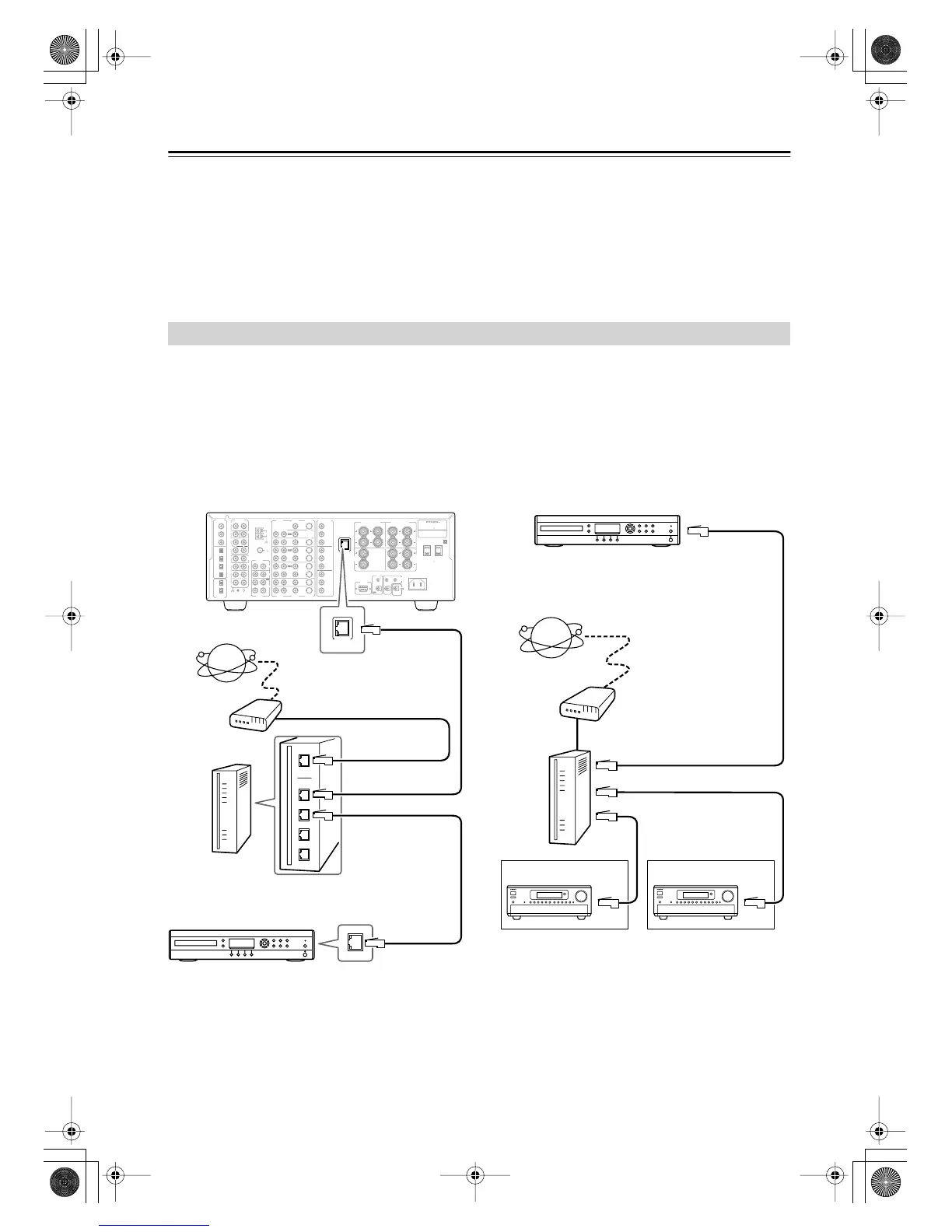
To connect the DTR-8.4 to your Ethernet network, plug one end of a CAT5 Ethernet cable into the ETHERNET (Net-
Tune) port, and plug the other end into a LAN port on your router or switch.
The following diagram shows how you can connect the DTR-8.4 to your Ethernet network. Here it’s connected to a LAN
port on the router, which has a 4-port 100Base-TX switch built-in.
You can connect any number of DTR-8.4s to the network, and the network audio server can serve up to three clients
simultaneously, so you can enjoy Net-Tune in three separate rooms simultaneously. The following diagram shows a Net-
Tune network with two DTR-8.4s.
Networking Your DTR-8.4
FM
75
OUT
OUT
OUT
OUT
L
PHONO
PRE OUT
FRONT
SUB
SURR
R
L
AUDIO
R
L
CD
TAPE
R
L
AUDIO
VIDEO
S VIDEO
MONITOR
OUT
R
L
IN
IN
IN
IN
IN
IN
IN
ZONE 2
DVD
VIDEO 1
VIDEO 2
VIDEO 3
VIDEO 4
AUDIO
AUDIO
VIDEO
S VIDEO
GND
SURR
BACK/
ZONE 2
R
L
IN
AC
INLET
R
CENTER
ETHERNET
(Net -Tune)
R
L
MULTI CH
INPUT
FRONT
SUB
SURR
SURR
BACK
CENTER
RL
AM
ANTENNA
COMPONENT
VIDEO
Y
P
B
PR
OUTPUT
INPUT 1
Y
P
B
PR
INPUT 2
Y
P
B
PR
SURR
BACK/
ZONE 2
SPEAKERS
FRONT SPEAKERS
LRL R
SURR SPEAKERS
CENTER
SPEAKER
R
L
AC OUTLETS
AV RECEIVER
MODEL NO. DTR
-
8.4
RATING
:
AC
120
V 60
Hz 9.0
A
AC
120
V 60
Hz
SWITCHED
TOTAL 120W 1A MAX.
I
R
IN
ZONE 2
REMOTE
CONTROL
A
B
RS232
OUT
12
V
TRIGGER OUT
DIGITAL
IN
DIGITAL
OUT
OPT
OPT
2
1
2
3
4
1
2
1
3
COAX
ETHERNET
(Net -Tune)
DTR-8.4
Internet radio
Modem
Router
LAN/
Ethernet
port
WAN port
LAN port
LAN port
Network audio server
LAN port
LAN port
LAN port
Modem
Router
Network audio server
Internet radio
Room 1 Room 2
WAN port
LAN/
Ethernet
port
DTR-8.4En.book Page 76 Thursday, October 16, 2003 11:09 AM



 To Next Page