45
Basic Setup
—Continued
Digital Setup
This section explains how to assign digital inputs to
input sources. You only need to change these assign-
ments if you connect a component to a digital input other
than the default assignment listed in the following table.
For example, if you connect a DVD player to the DIGI-
TAL IN OPT 2 input, since the default DVD assignment
is COAX1, you would need to assign OPT2 to DVD.
Note:
If you connect a cassette recorder to the TAPE IN/OUT
sockets, you should change the TAPE assignment to
“----.”
Note:
• This procedure can also be performed by using the
input selector buttons, [Setup] button, [ ]/[ ]/[ ]/
[] buttons, and [Enter] button.
Input Setup
Input source Default digital input
DVDCOAX1 (coaxial 1)
VIDEO 1 COAX2 (coaxial 2)
VIDEO 2 COAX3 (coaxial 3)
VIDEO 3 OPT3 (optical 3)
VIDEO 4 OPT4 (optical 4)
TAPE OPT2 (optical 2)
PHONO ---- (No assignment)
CD OPT1 (optical 1)
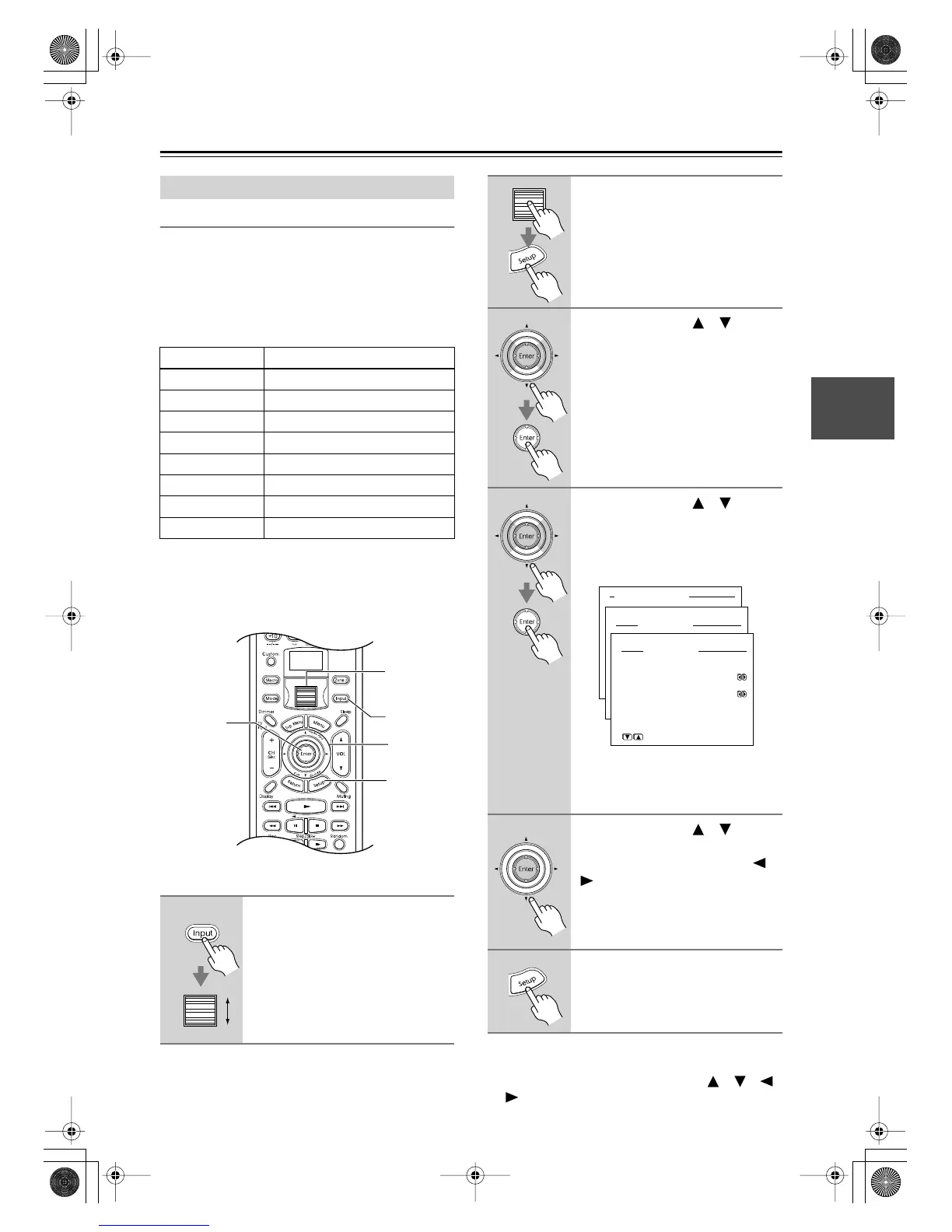
1
Press the [Input] button, and then
roll the scroll wheel to select the
input source you want to assign.
Note:
There are no assignments for the
TUNER, VIDEO 5, and NET AUDIO
input sources.
1
3–5
3, 4
2, 6
1, 2
2
Press the scroll wheel, and then
press the [Setup] button.
The main menu appears onscreen.
3
Use the Up/Down [ ]/[ ] but-
tons to select “2. Input Setup,”
and then press the [Enter] but-
ton.
The Input Setup menu appears.
4
Use the Up/Down [ ]/[ ] but-
tons to select “1. Digital Setup,”
and then press the [Enter] but-
ton.
The Digital Setup menu appears.
The name of the currently selected
input source appears next to “Input,”
“DVD” in this case.
5
Use the Up/Down [ ]/[ ] but-
tons to select “a. Digital Input,”
and then use the Left/Right [ ]/
[] buttons to select a digital
input.
6
Press the [Setup] button.
The setup menu closes.
Advanced Menu
2.Input Setup
2-1.Digital Setup
a.Digital Input
:COAX1
b.Digital Format
:All
Quit:|SETUP|
Input:DVD
Input:DVD
DTR-8.4En.book Page 45 Thursday, October 16, 2003 11:09 AM



 To Next Page