44
Basic Setup
—Continued
Speaker Level Calibration
This section explains how to adjust the level of each
speaker individually using the built-in test tone so that
the volume of each speaker is the same at the listening
position.
Notes:
• The speakers cannot be calibrated while the output of
the DTR-8.4 is muted, while a pair of headphones is
connected, or when using the multichannel inputs.
• Since the DTR-8.4 supports THX, the test tone is
output at the standard level of 0 dB (absolute vol-
ume setting 82). If you normally listen at volume
settings below this, be careful because the test tone
will be much louder.
Notes:
• This procedure can also be performed by using the
remote controller’s [Test Tone] button. First press the
[Test Tone] button to output the test tone. Use the
[Level–] and [Level+] buttons to adjust the speaker
volume, and use the [CH SEL] button to select the
other speakers.
•To calibrate the speaker more accurately, use a com-
mercially available sound pressure level (SPL) meter.
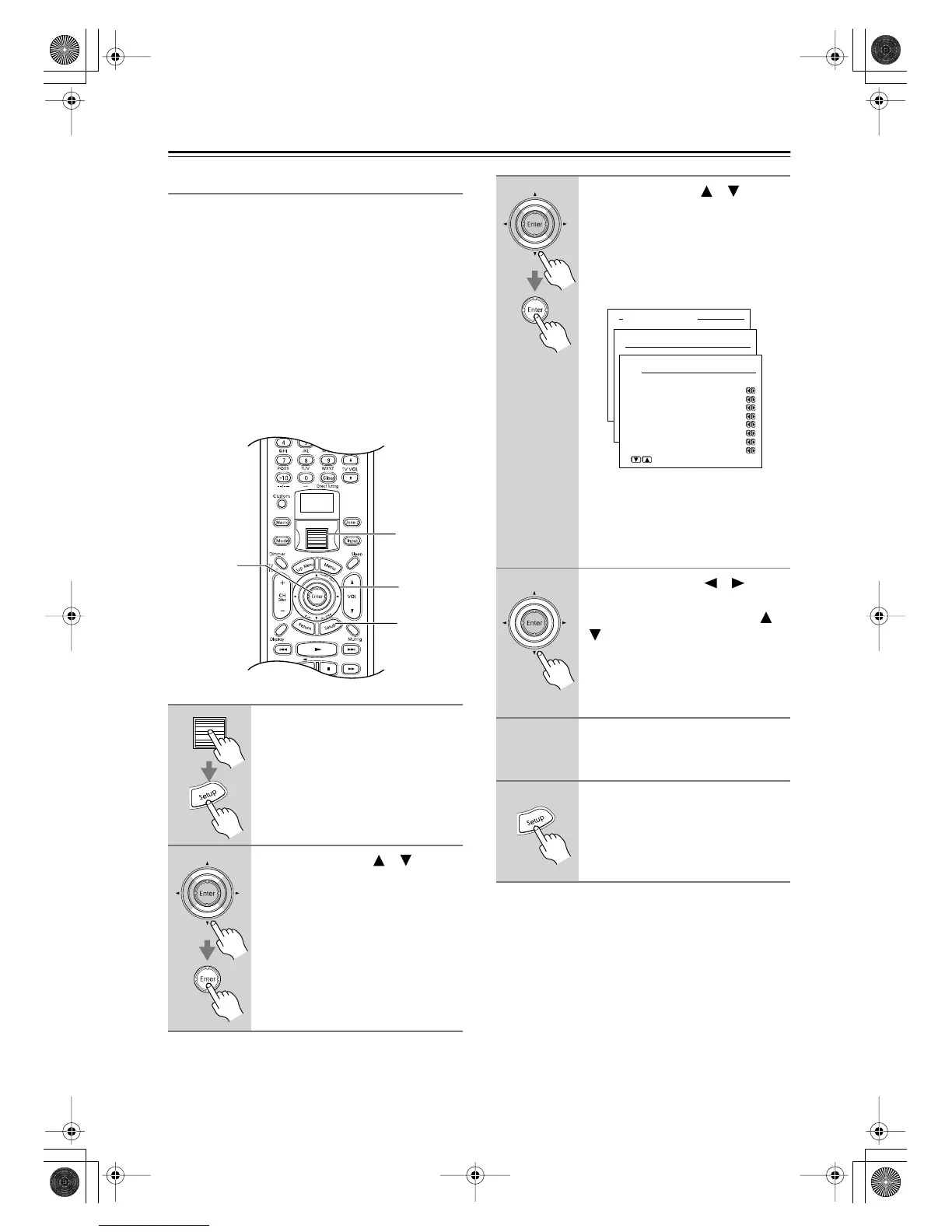
1
Press the scroll wheel, and then
press the [Setup] button.
The main menu appears onscreen.
2
Use the Up/Down [ ]/[ ] but-
tons to select “1. Speaker Setup,”
and then press the [Enter] but-
ton.
The Speaker Setup menu appears.
1
1, 6
2–4
2, 3
3
Use the Up/Down [ ]/[ ] but-
tons to select “3. Level Calibra-
tion,” and then press the [Enter]
button.
The Level Calibration menu appears
and the pink noise test tone is output by
the front left speaker.
Note:
Speakers that you set to No or None on
the Speaker Configuration page
(page 41) cannot be selected on this
page.
4
Use the Left/Right [ ]/[ ] but-
tons to adjust the speaker vol-
ume, and use the Up/Down [ ]/
[] buttons to select the other
speakers.
The volume can be adjusted from –12
to +12 dB in 1 dB steps (–15 to +12 dB
for the subwoofer).
5
Repeat step 4 until the volume of
the test tone coming from each
speaker is the same.
6
Press the [Setup] button.
The setup menu closes.
Advanced Menu
1.Speaker Setup
1-3.Level Calibration
a.Left : 0dB
b.Center : 0dB
c.Right : 0dB
d.Surr Right : 0dB
e.Surr Back R : 0dB
f.Surr Back L : 0dB
g.Surr Left : 0dB
h.Subwoofer : 0dB
Quit:|SETUP|
DTR-8.4En.book Page 44 Thursday, October 16, 2003 11:09 AM



 To Next Page