87
Zone 2—Continued
The section explains how to turn on, select an input
source, and adjust the volume for Zone 2.
Notes:
• If the Sleep function has been set, any Zone 2 compo-
nent will turn off along with the DTR-8.4 when the
specified sleep time expires. To use the Sleep function
with Zone 2 only, set the Sleep function and then set
the DTR-8.4 to Standby.
• Only analog input sources are output by the PRE OUT
SURR BACK/ZONE 2 outputs and the SURR BACK/
ZONE 2 SPEAKERS terminals. Digital input sources
are not output. If no sound is heard when an input
source is selected, check if it’s connected to analog
inputs.
• Since the Zone 2 function and the REC OUT outputs
use the same circuitry, if the [Rec Out] button is
pressed, Zone 2 will be turned off.
• When the SURR BACK/ZONE 2 outputs (SPEAK-
ERS/PRE OUT) are set to Zone 2 (page 86), listening
modes that need surround back speakers (i.e., Dolby
Digital EX, DTS-ES, and THX Surround EX) are not
available.
• While Zone 2 is active, functions will not work.
• While Zone 2 is active, the Pure Audio listening mode
cannot be selected for the main room.
•You can’t select different radio bands for Zone 2 and
the main room. For example, if you select FM for the
main room, then FM will also be selected for Zone 2.
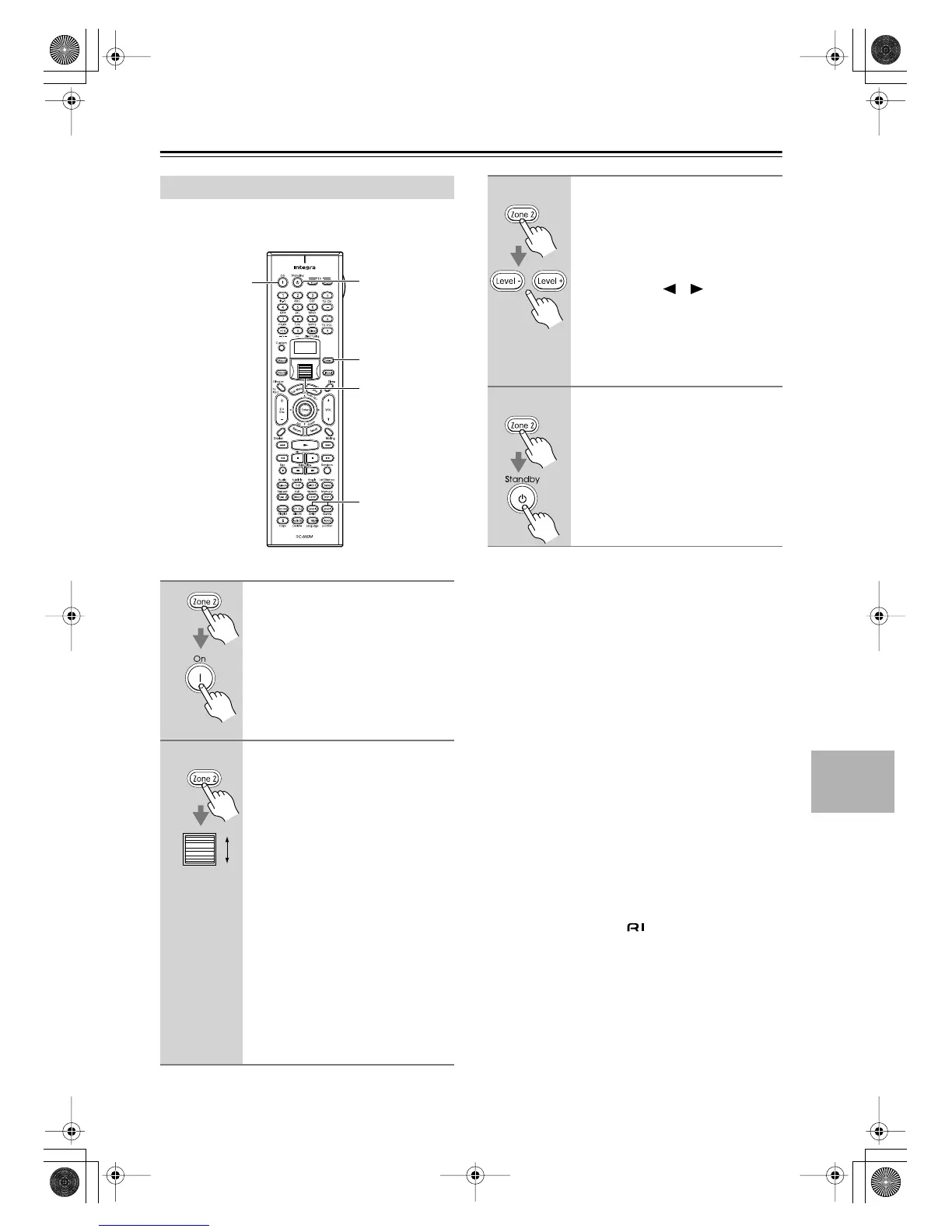
Controlling Zone 2
1
Point the remote controller at the
DTR-8.4 and press the [Zone 2]
button, make sure the [Zone 2]
button is illuminated, then fol-
lowed by the [On] button.
This activates Zone 2 and, if connected
to the DTR-8.4’s 12V TRIGGER OUT,
turns on the Zone 2 amp.
2
To select the Zone 2 input source
with the remote controller, press
the [Zone 2] button and then roll
the scroll wheel.
The name of the selected Zone 2 source
appears on the display.
To do this on the DTR-8.4, press
the [Zone 2] button, and then
press an input selector button
within eight seconds.
If you select AM or FM, you can use
the remote controller’s [CH/Disc] but-
ton to select the presets.
To set the main room and Zone 2
sources simultaneously, press the
[Zone 2] button repeatedly until “Z2
Sel: SOURCE” appears on the display.
Now use the scroll wheel or input selec-
tor buttons to select the source.
1
2
1, 2, 3, 4
4
3
3
To adjust the Zone 2 volume with
the remote controller, press the
[Zone 2] button, and then use the
Level [+]/[–] buttons.
To do this on the DTR-8.4, use the
Zone 2 Level [ ] [ ] buttons.
If your Zone 2 receiver/integrated amp
is connected to the DTR-8.4’s AUDIO
ZONE 2 OUT L/R outputs, use the vol-
ume control on the receiver/integrated
amp.
4
To turn off Zone 2 with the
remote controller, press the
[Zone 2] button followed by the
[Standby] button.
To do this from the DTR-8.4,
press the [Zone 2] button, and
then press the [Off] button within
eight seconds.
6AdvncedEn Page 87 Thursday, October 16, 2003 11:42 AM



 To Next Page