Note: To ensure operating stability, keep the USB cable connected and the board powered on
when running the demonstration application. You must attach the USB cable and
power on the board for BTS to run correctly.
Navigate to the <packagedir>\examples\board_test_system directory to run
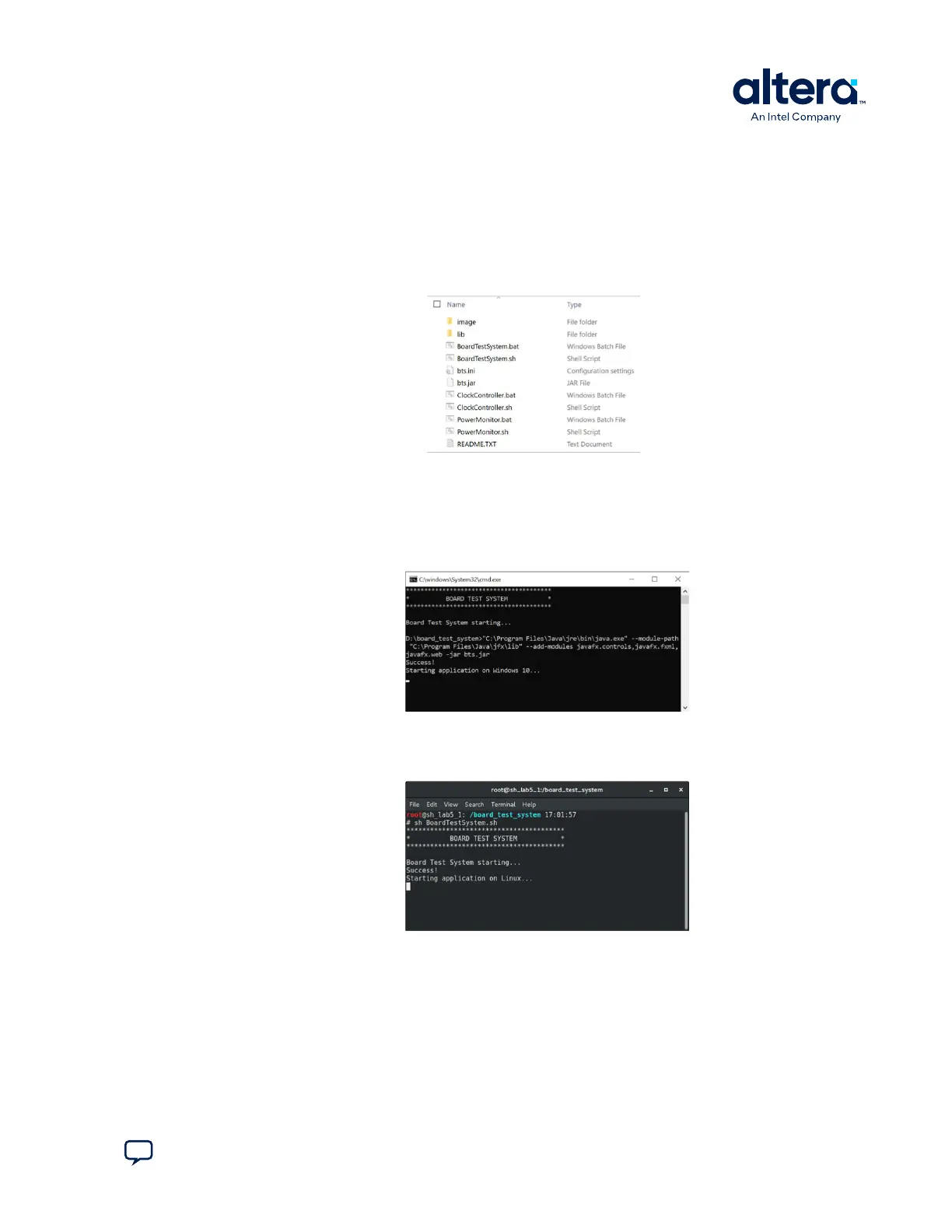
BTS. The BTS release folder always includes the following files.
Figure 5. BTS Folder
You can run BTS GUI easily with the following scripts.
1.
On Windows system, double click the .bat files to run BTS, Clock Controller, or
Power Monitor GUI.
Figure 6. Windows Console
2. On Linux system, you need to run the shell script with root privilege.
Figure 7. Linux Console
Note:
The .bat or shell script checks the Java environment settings, copies necessary files,
and gives some prompts if the environment is not set up correctly.
The GUI displays the application tab corresponding to the design running in the FPGA.
If the design loaded in the FPGA is not supported, it prompts a message to configure
your board with a valid BTS design. Refer to The Configure Menu.
4. Board Test System
776646 | 2024.11.21
Send Feedback
Agilex
™
7 FPGA I-Series Transceiver (6 × F-Tile) Development Kit User Guide
17








 To Next Page