4.2. BTS Functionalities
This section describes each control in the BTS.
4.2.1. The Bottom Info Bar
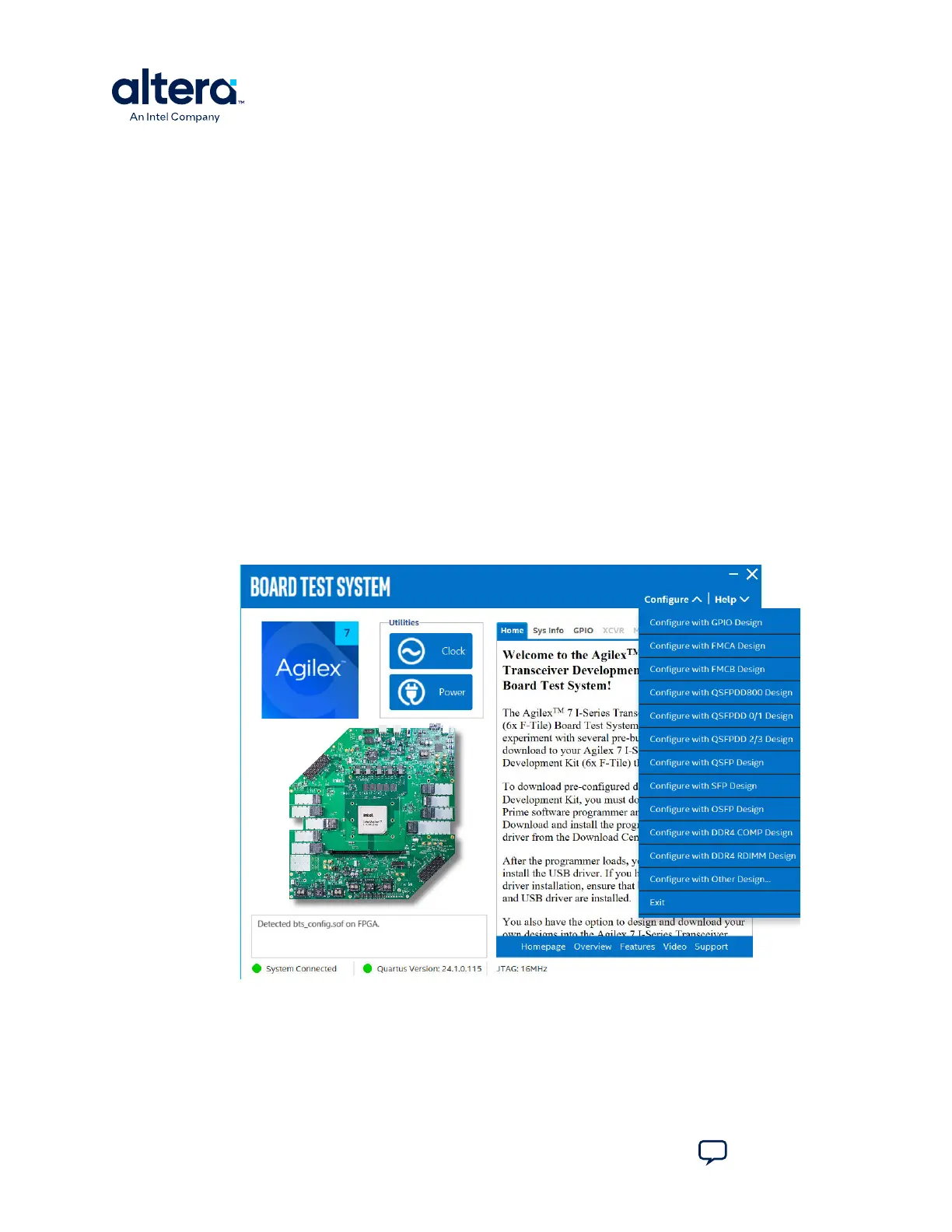
The bottom information bar shows the status of the system connection, the Quartus
Prime version and the JTAG clock.
• System Connected/Disconnected: Shows if the board is connected to the
system. The green sign turns gray if the board becomes disconnected.
• Quartus Prime Version: Displays the current Quartus Prime version installed
and active on your system. The text turns red if your version is older than the
required version. Change the QUARTUS_ROOTDIR environment variable to the
required version.
• JTAG: Displays the JTAG clock frequency.
4.2.2. The Configure Menu
Use the Configure menu to select the design you want to use. Each design example
tests different functionality that corresponds to one or more application tabs.
Figure 8. The Configure Menu
4. Board Test System
776646 | 2024.11.21
Agilex
™
7 FPGA I-Series Transceiver (6 × F-Tile) Development Kit User Guide
Send Feedback
18








 To Next Page